

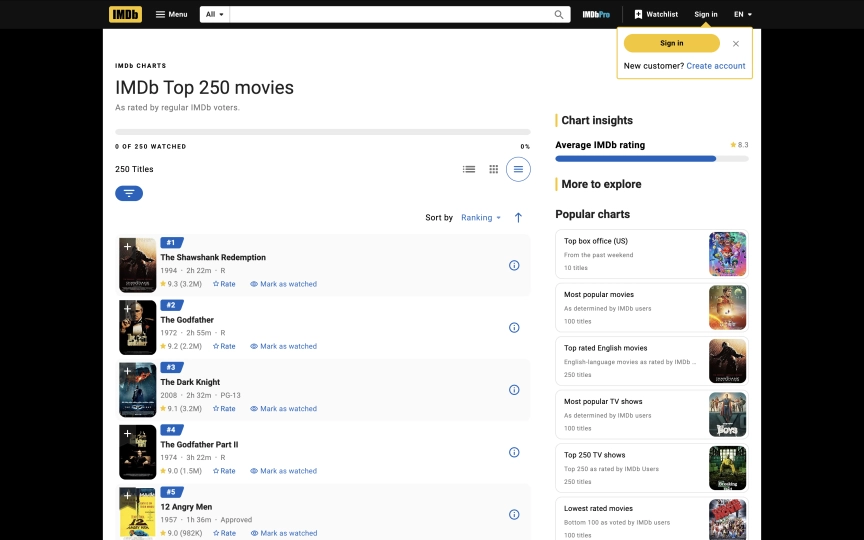
You're building a movie recommendation engine. You need ratings, cast lists, and box office numbers for thousands of titles. IMDb has the data, but its React-based frontend generates class names like ipc-title-link-wrapper and sc-1185cb28-0 that change between deploys. Traditional CSS selectors break without warning. And unlike most sites, IMDb's React hydration destroys the browser context mid-load, so you can't pass extraction steps inline with the session creation.
The fix requires two calls instead of one. Create the session first, let IMDb's React app finish hydrating, then call observe or execute_js as a separate action. Browserbeam's observe endpoint reads the rendered page as structured markdown, ignoring the underlying class names entirely. For detail pages, every IMDb title embeds a ld+json script tag with clean structured data that execute_js can parse. Residential proxies for reliable access. Block all resources for maximum speed.
This guide covers everything you need to extract data from IMDb at scale:
- A scraper that returns the full Top 250 as structured markdown (rank, title, year, runtime, rating)
- Structured JSON extraction from any movie detail page using LD+JSON parsing
- Why IMDb requires the interactive pattern (create, then act) instead of one-shot steps
- The
observevsexecute_jsdecision for IMDb's React DOM - Maximum resource blocking that works safely on IMDb
- CSV and JSON export for building a local movie database
- Six common mistakes and how to avoid them
TL;DR: Use residential proxies for IMDb. Datacenter IPs get intermittently blocked by CloudFront. Use the interactive pattern: create a session first, then call observe or execute_js separately. One-shot steps fail because React hydration destroys the execution context. Block all resources (images, fonts, media, stylesheets) for maximum speed.
Don't have an API key yet? Create a free Browserbeam account - you get 5,000 credits, no credit card required.
Quick Start: Scrape IMDb's Top 250
Create a session on the Top 250 page, then call observe to read the full movie list as markdown. Two API calls. All 250 movies with rank, title, year, runtime, and rating.
# Step 1: Create session (let React hydrate)
SESSION_ID=$(curl -s -X POST https://api.browserbeam.com/v1/sessions \
  -H "Authorization: Bearer YOUR_API_KEY" \
  -H "Content-Type: application/json" \
  -d '{
    "url": "https://www.imdb.com/chart/top/",
    "proxy": { "kind": "residential", "country": "us" },
    "block_resources": ["image", "font", "media", "stylesheet"]
  }' | jq -r '.session_id')

# Step 2: Observe + close
curl -s -X POST "https://api.browserbeam.com/v1/sessions/$SESSION_ID/act" \
  -H "Authorization: Bearer YOUR_API_KEY" \
  -H "Content-Type: application/json" \
  -d '{"steps": [{"observe": {}}, {"close": {}}]}' \
  | jq '.page.markdown.content'
from browserbeam import Browserbeam
client = Browserbeam(api_key="YOUR_API_KEY")
session = client.sessions.create(
url="https://www.imdb.com/chart/top/",
proxy={"kind": "residential", "country": "us"},
block_resources=["image", "font", "media", "stylesheet"],
)
session.observe()
for line in session.page.markdown.content.split("\n"):
if line.strip():
print(line)
session.close()import Browserbeam from "@browserbeam/sdk";
const client = new Browserbeam({ apiKey: "YOUR_API_KEY" });
const session = await client.sessions.create({
url: "https://www.imdb.com/chart/top/",
proxy: { kind: "residential", country: "us" },
block_resources: ["image", "font", "media", "stylesheet"],
});
await session.observe();
console.log(session.page?.markdown?.content?.slice(0, 500));
await session.close();require "browserbeam"
client = Browserbeam::Client.new(api_key: "YOUR_API_KEY")
session = client.sessions.create(
url: "https://www.imdb.com/chart/top/",
proxy: { kind: "residential", country: "us" },
block_resources: ["image", "font", "media", "stylesheet"]
)
session.observe
puts session.page.markdown.content[0..500]
session.closeThe observe endpoint returns structured markdown. Each movie in the Top 250 looks like this:
#1

The Shawshank Redemption

-   1994
-   2h 22m
-   R

9.3 (3.2M)

#2

The Godfather

-   1972
-   2h 55m
-   R

9.2 (2.2M)
Every entry includes rank, title, year, runtime, content rating, IMDb rating, and vote count. All 250 movies come back in a single response. No pagination needed.
Notice the two-step pattern: create then observe. On most sites, you can pass steps directly in the create call. On IMDb, React hydration destroys the execution context mid-load, so steps passed in create fail with "Execution context was destroyed." The interactive pattern waits for React to finish before running any extraction.
What Data Can You Extract from IMDb?
IMDb pages follow consistent patterns across millions of titles. Here's what each page type contains:
| Page Type | URL Pattern | Available Fields |
|---|---|---|
| Top 250 | /chart/top/ |
Rank, title, year, runtime, content rating, IMDb rating, vote count |
| Movie detail | /title/tt0111161/ |
Title, year, rating, votes, genre, director, cast, plot, duration, content rating, reviews, awards |
| Search results | /find/?q=inception |
Title, year, type (movie/TV/person), link to detail page |
| Genre lists | /search/title/?genres=sci-fi |
Title, year, rating, runtime, genre tags |
| TV series | /title/tt0903747/ |
Same as movie + seasons, episodes, episode ratings |
The richest data comes from movie detail pages. Each title page includes a ld+json script tag with structured metadata that follows Schema.org's Movie type. We'll use that in the detail page section below.
Navigating IMDb's React-Based DOM
IMDb migrated to a React single-page application over the past two years. This created two problems for scrapers. First, CSS class names are generated at build time: sc-1185cb28-0, gzxElL, da-dCJp. They change between deployments. Second, React hydration performs a client-side navigation after the initial page load, which destroys any in-flight JavaScript execution.
This second issue is why one-shot steps fail on IMDb. When you pass steps in the create call, those steps start executing before React finishes hydrating. React then destroys the execution context, and the step fails with "Execution context was destroyed, most likely because of a navigation." The fix is the interactive pattern: create the session (which waits for the page to stabilize), then call act with your steps separately.
Two extraction methods work reliably on IMDb once the page is stable:
| Method | How It Works | Stability on IMDb | Output Format | Best For |
|---|---|---|---|---|
observe |
Reads rendered content as markdown | High (ignores classes) | Markdown string | Full page data, quick exploration |
execute_js |
Runs custom JS on the stabilized DOM | High (queries live DOM) | Structured JSON | Top 250 lists, any page |
execute_js with LD+JSON |
Parses embedded structured data | High (Schema.org standard) | Structured JSON | Complete movie metadata from detail pages |
extract with CSS classes |
Targets webpack-generated classes | Low (fails in steps, classes change) | Structured JSON | Avoid on IMDb |
Which data-testid Selectors Work?
IMDb's React team added data-testid attributes for their own testing. Some of these work for extraction in the interactive pattern:
| Selector | Returns | Reliability |
|---|---|---|
[data-testid=hero__pageTitle] |
Movie title | Stable |
[data-testid=hero-rating-bar__aggregate-rating__score] |
Rating (e.g., "9.3/10") | Stable |
[data-testid=plot] |
Plot summary | Stable |
[data-testid=chart-layout-main-column] |
Top 250 list container | Stable |
These are more reliable than CSS classes, but they're still internal testing attributes. IMDb could rename them during a refactor. The observe and LD+JSON approaches don't depend on any specific attribute names.
The LD+JSON Advantage
Every IMDb title page includes a <script type="application/ld+json"> tag with structured data following the Schema.org Movie specification. It contains the title, rating, genre, director, actors, description, duration, and release date in a clean JSON format.
One catch: React injects the LD+JSON script during rendering. It's not present immediately after session creation. You need to call observe first (which forces a full page read and ensures React has finished), then execute_js to parse the LD+JSON. Both steps can run in the same act call.
Since this data exists for SEO purposes (Google reads it for rich search results), IMDb is unlikely to remove it. That makes it the most stable extraction method for movie detail pages.
Scraping IMDb's Top 250 (Index Pages)
The Quick Start used observe for the full markdown. When you need structured JSON from the Top 250 instead, call observe first (which triggers a full page render including all 250 lazy-loaded items), then execute_js to query the live DOM:
# Step 1: Create session
SESSION_ID=$(curl -s -X POST https://api.browserbeam.com/v1/sessions \
  -H "Authorization: Bearer YOUR_API_KEY" \
  -H "Content-Type: application/json" \
  -d '{
    "url": "https://www.imdb.com/chart/top/",
    "proxy": { "kind": "residential", "country": "us" },
    "block_resources": ["image", "font", "media", "stylesheet"]
  }' | jq -r '.session_id')

# Step 2: Observe (triggers full render of all 250 items)
curl -s -X POST "https://api.browserbeam.com/v1/sessions/$SESSION_ID/act" \
  -H "Authorization: Bearer YOUR_API_KEY" \
  -H "Content-Type: application/json" \
  -d '{"steps": [{"observe": {}}]}' > /dev/null

# Step 3: Execute JS + close
curl -s -X POST "https://api.browserbeam.com/v1/sessions/$SESSION_ID/act" \
  -H "Authorization: Bearer YOUR_API_KEY" \
  -H "Content-Type: application/json" \
  -d '{"steps": [{"execute_js": {"code": "const items = document.querySelectorAll(\"li.ipc-metadata-list-summary-item\"); const movies = []; items.forEach((el) => { const t = el.querySelector(\"h3.ipc-title__text\"); const a = el.querySelector(\"a.ipc-title-link-wrapper\"); const r = el.querySelector(\".ipc-rating-star--imdb\"); movies.push({ title: t?.textContent?.trim() || \"\", link: a?.href || \"\", rating: r?.textContent?.trim()?.split(\"\\n\")[0] || \"\" }); }); return movies;", "result_key": "movies"}}, {"close": {}}]}' \
  | jq '.extraction.movies'
from browserbeam import Browserbeam
client = Browserbeam(api_key="YOUR_API_KEY")
session = client.sessions.create(
url="https://www.imdb.com/chart/top/",
proxy={"kind": "residential", "country": "us"},
block_resources=["image", "font", "media", "stylesheet"],
)
session.observe()
session.execute_js(
code="""
const items = document.querySelectorAll('li.ipc-metadata-list-summary-item');
const movies = [];
items.forEach((el) => {
const t = el.querySelector('h3.ipc-title__text');
const a = el.querySelector('a.ipc-title-link-wrapper');
const r = el.querySelector('.ipc-rating-star--imdb');
movies.push({
title: t?.textContent?.trim() || '',
link: a?.href || '',
rating: r?.textContent?.trim()?.split('\\n')[0] || '',
});
});
return movies;
""",
result_key="movies",
)
for movie in session.extraction["movies"]:
print(f"{movie['title']} ({movie['rating']}) -> {movie['link']}")
session.close()import Browserbeam from "@browserbeam/sdk";
const client = new Browserbeam({ apiKey: "YOUR_API_KEY" });
const session = await client.sessions.create({
url: "https://www.imdb.com/chart/top/",
proxy: { kind: "residential", country: "us" },
block_resources: ["image", "font", "media", "stylesheet"],
});
await session.observe();
await session.executeJs({
code: `
const items = document.querySelectorAll('li.ipc-metadata-list-summary-item');
const movies = [];
items.forEach((el) => {
const t = el.querySelector('h3.ipc-title__text');
const a = el.querySelector('a.ipc-title-link-wrapper');
const r = el.querySelector('.ipc-rating-star--imdb');
movies.push({
title: t?.textContent?.trim() || '',
link: a?.href || '',
rating: r?.textContent?.trim()?.split('\\n')[0] || '',
});
});
return movies;`,
result_key: "movies",
});
const movies = session.extraction?.movies as any[];
movies?.forEach((m) => console.log(`${m.title} (${m.rating}) -> ${m.link}`));
await session.close();require "browserbeam"
client = Browserbeam::Client.new(api_key: "YOUR_API_KEY")
session = client.sessions.create(
url: "https://www.imdb.com/chart/top/",
proxy: { kind: "residential", country: "us" },
block_resources: ["image", "font", "media", "stylesheet"]
)
session.observe
session.execute_js(
"const items = document.querySelectorAll('li.ipc-metadata-list-summary-item'); const movies = []; items.forEach((el) => { const t = el.querySelector('h3.ipc-title__text'); const a = el.querySelector('a.ipc-title-link-wrapper'); const r = el.querySelector('.ipc-rating-star--imdb'); movies.push({ title: t?.textContent?.trim() || '', link: a?.href || '', rating: r?.textContent?.trim()?.split('\\n')[0] || '' }); }); return movies;",
result_key: "movies"
)
session.extraction["movies"].each do |movie|
puts "#{movie['title']} (#{movie['rating']}) -> #{movie['link']}"
end
session.closeThis returns structured JSON with title, link, and rating for each movie:
[
  { "title": "The Shawshank Redemption", "link": "https://www.imdb.com/title/tt0111161/?ref_=chttp_t_1", "rating": "9.3 (3.2M)" },
  { "title": "The Godfather", "link": "https://www.imdb.com/title/tt0068646/?ref_=chttp_t_2", "rating": "9.2 (2.2M)" },
  { "title": "The Dark Knight", "link": "https://www.imdb.com/title/tt0468569/?ref_=chttp_t_3", "rating": "9.1 (3.2M)" }
]
The observe call before execute_js is important: it triggers a full page render that loads all 250 lazy-loaded items. Without it, you'd only get around 25 movies from the initial viewport. The links give you the title ID (like tt0111161) that you need for detail page scraping.
Parsing the Observe Markdown
If you prefer to work with the markdown output from observe, you can parse it in Python to extract structured data:
import re

content = session.page.markdown.content
movies = []
blocks = re.split(r'\n#(\d+)\n', content)

for i in range(1, len(blocks) - 1, 2):
    rank = int(blocks[i])
    text = blocks[i + 1].strip()
    lines = [l.strip() for l in text.split('\n') if l.strip() and not l.strip().startswith('[image')]
    if len(lines) >= 2:
        title = lines[0]
        rating_line = [l for l in lines if re.match(r'\d+\.\d+', l)]
        movies.append({
            "rank": rank,
            "title": title,
            "rating": rating_line[0] if rating_line else None,
        })

for m in movies[:5]:
    print(f"#{m['rank']} {m['title']} ({m['rating']})")
Both approaches return the same data. The execute_js approach gives you cleaner JSON directly. The observe approach gives you richer content (year, runtime, content rating) that requires parsing.
Scraping Movie Detail Pages
Movie detail pages have the densest data on IMDb. Each page includes the title, rating, plot, full cast, crew, genres, runtime, reviews, and awards. Let's look at two approaches for extracting this data.
Using Observe for Rich Markdown
The simplest way to get movie data is observe. Create the session, then call observe:
SESSION_ID=$(curl -s -X POST https://api.browserbeam.com/v1/sessions \
  -H "Authorization: Bearer YOUR_API_KEY" \
  -H "Content-Type: application/json" \
  -d '{
    "url": "https://www.imdb.com/title/tt0111161/",
    "proxy": { "kind": "residential", "country": "us" },
    "block_resources": ["image", "font", "media", "stylesheet"]
  }' | jq -r '.session_id')

curl -s -X POST "https://api.browserbeam.com/v1/sessions/$SESSION_ID/act" \
  -H "Authorization: Bearer YOUR_API_KEY" \
  -H "Content-Type: application/json" \
  -d '{"steps": [{"observe": {}}, {"close": {}}]}' \
  | jq '.page.markdown.content' | head -30
from browserbeam import Browserbeam
client = Browserbeam(api_key="YOUR_API_KEY")
session = client.sessions.create(
url="https://www.imdb.com/title/tt0111161/",
proxy={"kind": "residential", "country": "us"},
block_resources=["image", "font", "media", "stylesheet"],
)
session.observe()
print(session.page.markdown.content[:1000])
session.close()import Browserbeam from "@browserbeam/sdk";
const client = new Browserbeam({ apiKey: "YOUR_API_KEY" });
const session = await client.sessions.create({
url: "https://www.imdb.com/title/tt0111161/",
proxy: { kind: "residential", country: "us" },
block_resources: ["image", "font", "media", "stylesheet"],
});
await session.observe();
console.log(session.page?.markdown?.content?.slice(0, 1000));
await session.close();require "browserbeam"
client = Browserbeam::Client.new(api_key: "YOUR_API_KEY")
session = client.sessions.create(
url: "https://www.imdb.com/title/tt0111161/",
proxy: { kind: "residential", country: "us" },
block_resources: ["image", "font", "media", "stylesheet"]
)
session.observe
puts session.page.markdown.content[0..1000]
session.closeThe markdown output includes the title, metadata, rating, plot, director, writers, stars, and full cast list:
# The Shawshank Redemption

-   1994
-   R
-   2h 22m

IMDb RATING
9.3/10 3.2M

Period Drama  Prison Drama  Drama

A wrongfully convicted banker forms a close friendship with a
hardened convict over a quarter century while retaining his
humanity through simple acts of compassion.

-   Director
    -   Frank Darabont
-   Writers
    -   Stephen King
    -   Frank Darabont
-   Stars
    -   Tim Robbins
    -   Morgan Freeman
    -   Bob Gunton
This is useful for building text-based pipelines, feeding data to LLMs, or getting a quick overview of any movie.
Using Execute JS for Structured JSON
When you need clean JSON output, execute_js with LD+JSON parsing is the most reliable method. React injects the LD+JSON script during rendering, so you need to call observe first to ensure it's present, then execute_js to parse it. Both steps can go in the same act call:
SESSION_ID=$(curl -s -X POST https://api.browserbeam.com/v1/sessions \
  -H "Authorization: Bearer YOUR_API_KEY" \
  -H "Content-Type: application/json" \
  -d '{
    "url": "https://www.imdb.com/title/tt0111161/",
    "proxy": { "kind": "residential", "country": "us" },
    "block_resources": ["image", "font", "media", "stylesheet"]
  }' | jq -r '.session_id')

curl -s -X POST "https://api.browserbeam.com/v1/sessions/$SESSION_ID/act" \
  -H "Authorization: Bearer YOUR_API_KEY" \
  -H "Content-Type: application/json" \
  -d '{"steps": [{"observe": {}}, {"execute_js": {"code": "const ld = document.querySelector(\"script[type=\\\"application/ld+json\\\"]\"); if (ld) { const d = JSON.parse(ld.textContent); return { title: d.name, year: d.datePublished, rating: d.aggregateRating?.ratingValue, votes: d.aggregateRating?.ratingCount, genre: d.genre, director: d.director?.map(p => p.name), actors: d.actor?.map(p => p.name)?.slice(0, 5), description: d.description, duration: d.duration, contentRating: d.contentRating }; } return null;", "result_key": "movie"}}, {"close": {}}]}' \
  | jq '.extraction.movie'
from browserbeam import Browserbeam
client = Browserbeam(api_key="YOUR_API_KEY")
session = client.sessions.create(
url="https://www.imdb.com/title/tt0111161/",
proxy={"kind": "residential", "country": "us"},
block_resources=["image", "font", "media", "stylesheet"],
)
session.observe()
session.execute_js(
code="""
const ld = document.querySelector('script[type="application/ld+json"]');
if (ld) {
const d = JSON.parse(ld.textContent);
return {
title: d.name,
year: d.datePublished,
rating: d.aggregateRating?.ratingValue,
votes: d.aggregateRating?.ratingCount,
genre: d.genre,
director: d.director?.map(p => p.name),
actors: d.actor?.map(p => p.name)?.slice(0, 5),
description: d.description,
duration: d.duration,
contentRating: d.contentRating,
};
}
return null;
""",
result_key="movie",
)
movie = session.extraction["movie"]
print(f"{movie['title']} ({movie['year'][:4]})")
print(f"Rating: {movie['rating']}/10 ({movie['votes']:,} votes)")
print(f"Genre: {', '.join(movie['genre'])}")
print(f"Director: {', '.join(movie['director'])}")
print(f"Cast: {', '.join(movie['actors'])}")
session.close()import Browserbeam from "@browserbeam/sdk";
const client = new Browserbeam({ apiKey: "YOUR_API_KEY" });
const session = await client.sessions.create({
url: "https://www.imdb.com/title/tt0111161/",
proxy: { kind: "residential", country: "us" },
block_resources: ["image", "font", "media", "stylesheet"],
});
await session.observe();
await session.executeJs({
code: `
const ld = document.querySelector('script[type="application/ld+json"]');
if (ld) {
const d = JSON.parse(ld.textContent);
return {
title: d.name,
year: d.datePublished,
rating: d.aggregateRating?.ratingValue,
votes: d.aggregateRating?.ratingCount,
genre: d.genre,
director: d.director?.map(p => p.name),
actors: d.actor?.map(p => p.name)?.slice(0, 5),
description: d.description,
duration: d.duration,
contentRating: d.contentRating,
};
}
return null;`,
result_key: "movie",
});
const movie = session.extraction?.movie as any;
console.log(`${movie.title} (${movie.year.slice(0, 4)})`);
console.log(`Rating: ${movie.rating}/10`);
await session.close();require "browserbeam"
client = Browserbeam::Client.new(api_key: "YOUR_API_KEY")
session = client.sessions.create(
url: "https://www.imdb.com/title/tt0111161/",
proxy: { kind: "residential", country: "us" },
block_resources: ["image", "font", "media", "stylesheet"]
)
session.observe
session.execute_js(
'const ld = document.querySelector(\'script[type="application/ld+json"]\'); if (ld) { const d = JSON.parse(ld.textContent); return { title: d.name, year: d.datePublished, rating: d.aggregateRating?.ratingValue, votes: d.aggregateRating?.ratingCount, genre: d.genre, director: d.director?.map(p => p.name), actors: d.actor?.map(p => p.name)?.slice(0, 5), description: d.description, duration: d.duration, contentRating: d.contentRating }; } return null;',
result_key: "movie"
)
movie = session.extraction["movie"]
puts "#{movie['title']} (#{movie['year'][0..3]})"
puts "Rating: #{movie['rating']}/10 (#{movie['votes']} votes)"
puts "Genre: #{movie['genre'].join(', ')}"
session.closeThe output is clean, structured JSON:
{
  "title": "The Shawshank Redemption",
  "year": "1994-10-14",
  "rating": 9.3,
  "votes": 3180690,
  "genre": ["Drama"],
  "director": ["Frank Darabont"],
  "actors": ["Tim Robbins", "Morgan Freeman", "Bob Gunton"],
  "description": "A wrongfully convicted banker forms a close friendship with a hardened convict over a quarter century while retaining his humanity through simple acts of compassion.",
  "duration": "PT2H22M",
  "contentRating": "R"
}
The year field returns the full release date (1994-10-14). Slice the first four characters for just the year. The duration uses ISO 8601 format (PT2H22M means 2 hours 22 minutes). The votes field is an exact count, not the abbreviated format you see on the page.
Combining Top 250 with Detail Pages
Here's a Python script that scrapes the Top 250 for movie links, then fetches structured data from each detail page. Both use the interactive pattern:
from browserbeam import Browserbeam
import json
import time

client = Browserbeam(api_key="YOUR_API_KEY")

top_session = client.sessions.create(
    url="https://www.imdb.com/chart/top/",
    proxy={"kind": "residential", "country": "us"},
    block_resources=["image", "font", "media", "stylesheet"],
)

top_session.observe()
top_session.execute_js(
    code="""
const items = document.querySelectorAll('li.ipc-metadata-list-summary-item');
const movies = [];
items.forEach((el) => {
  const t = el.querySelector('h3.ipc-title__text');
  const a = el.querySelector('a.ipc-title-link-wrapper');
  movies.push({ title: t?.textContent?.trim() || '', link: a?.href || '' });
});
return movies;
""",
    result_key="movies",
)
movie_links = top_session.extraction["movies"]
top_session.close()

JS_CODE = """
const ld = document.querySelector('script[type="application/ld+json"]');
if (ld) {
  const d = JSON.parse(ld.textContent);
  return {
    title: d.name,
    year: d.datePublished?.slice(0, 4),
    rating: d.aggregateRating?.ratingValue,
    votes: d.aggregateRating?.ratingCount,
    genre: d.genre,
    director: d.director?.map(p => p.name),
    actors: d.actor?.map(p => p.name)?.slice(0, 5),
    description: d.description,
    duration: d.duration,
    contentRating: d.contentRating,
  };
}
return null;
"""

movies_with_details = []
for movie in movie_links[:10]:
    detail = client.sessions.create(
        url=movie["link"],
        proxy={"kind": "residential", "country": "us"},
        block_resources=["image", "font", "media", "stylesheet"],
    )
    detail.observe()
    detail.execute_js(code=JS_CODE, result_key="movie")
    movies_with_details.append(detail.extraction["movie"])
    print(f"Scraped: {detail.extraction['movie']['title']}")
    detail.close()
    time.sleep(1)

with open("imdb_top_10.json", "w") as f:
    json.dump(movies_with_details, f, indent=2)

print(f"Saved {len(movies_with_details)} movies to imdb_top_10.json")
This script creates a fresh session for each detail page. The observe() call before execute_js() ensures the LD+JSON script has been injected. We add a one-second delay between requests to be polite. Change [:10] to [:250] for the full list.
What Changed in 2026
IMDb's frontend has been through a significant rewrite. If you used IMDb scrapers before 2025, here's what broke and what replaced it.
The old IMDb DOM (pre-2024):
- Stable CSS class names: .titleColumn, .ratingColumn, .lister-list
- Server-rendered HTML that loaded without JavaScript
- Simple BeautifulSoup scripts could extract all data
- One-shot scraping worked because the HTML was static
The current IMDb DOM:
- React single-page application with client-side rendering
- Webpack-generated class names that change between builds
- React hydration performs a client-side navigation that destroys in-flight execution contexts
- data-testid attributes added for React testing (partially usable for scraping)
- LD+JSON structured data injected after React renders (not present in initial HTML)
- JavaScript required for any page content to render
The biggest change for scrapers is that plain HTTP requests no longer work. Since IMDb renders content with JavaScript, tools like requests + BeautifulSoup in Python will get an empty page. You need a headless browser (Playwright, Selenium, Puppeteer) or a browser API like Browserbeam.
The observe endpoint handles this transparently. It renders the JavaScript, waits for the page to stabilize, and returns the content as markdown. You don't need to know whether a site uses React, Vue, or server-rendered HTML. The interactive pattern (create, then act) handles React's hydration quirks automatically.
Saving and Processing Your Data
Export to JSON
import json

with open("imdb_movies.json", "w") as f:
    json.dump(movies_with_details, f, indent=2, ensure_ascii=False)

print(f"Saved {len(movies_with_details)} movies")
Export to CSV
import csv

with open("imdb_movies.csv", "w", newline="", encoding="utf-8") as f:
    writer = csv.DictWriter(f, fieldnames=[
        "title", "year", "rating", "votes", "genre",
        "director", "actors", "description", "duration", "contentRating",
    ])
    writer.writeheader()
    for movie in movies_with_details:
        row = movie.copy()
        row["genre"] = ", ".join(row.get("genre", []))
        row["director"] = ", ".join(row.get("director", []))
        row["actors"] = ", ".join(row.get("actors", []))
        writer.writerow(row)

print(f"Exported {len(movies_with_details)} movies to CSV")
The CSV format works well for importing into spreadsheets, pandas DataFrames, or database tables. For nested data (arrays of genres, directors), join them with commas or use JSON format instead.
DIY Scraping vs Browserbeam API
If you're considering building your own IMDb scraper, here's what each approach requires:
| Aspect | DIY (Playwright/Selenium) | Browserbeam API |
|---|---|---|
| JavaScript rendering | You manage the browser (install, launch, memory) | API handles it |
| Proxy management | Buy proxies, configure rotation, handle bans | One parameter: proxy: { kind: "residential" } |
| Resource blocking | Custom request interception code | One parameter: block_resources: [...] |
| Page stability | Write custom wait logic or arbitrary sleeps | Automatic stability detection |
| Output format | Parse raw HTML yourself | Structured markdown or JSON |
| Scaling | Manage browser pools, memory limits, crashes | API handles concurrency |
| LD+JSON extraction | page.evaluate() with custom JS |
Same JS via execute_js |
| Cost | Server costs + proxy costs + maintenance time | API credits |
The raw Playwright approach requires more code but gives you full control. Here's what a minimal Playwright version looks like for comparison:
from playwright.sync_api import sync_playwright
import json

with sync_playwright() as p:
    browser = p.chromium.launch(headless=True)
    page = browser.new_page()
    page.goto("https://www.imdb.com/title/tt0111161/")
    page.wait_for_load_state("networkidle")

    movie = page.evaluate("""
      const ld = document.querySelector('script[type="application/ld+json"]');
      return ld ? JSON.parse(ld.textContent) : null;
    """)

    print(json.dumps({
        "title": movie["name"],
        "rating": movie["aggregateRating"]["ratingValue"],
    }, indent=2))

    browser.close()
This works for a single page. When you need to scrape hundreds of pages with proxy rotation, resource blocking, and error handling, the complexity adds up fast. The Browserbeam API wraps all of that into HTTP requests.
For a deeper comparison of browser automation tools, see the Puppeteer vs Playwright vs Browserbeam guide.
Use Cases
Building a Movie Database
Scrape the Top 250 (or any IMDb chart) and enrich each entry with detail page data. Store the results in a database for your recommendation engine, portfolio project, or data analysis pipeline.
import sqlite3

conn = sqlite3.connect("movies.db")
conn.execute("""
    CREATE TABLE IF NOT EXISTS movies (
        imdb_id TEXT PRIMARY KEY,
        title TEXT, year TEXT, rating REAL, votes INTEGER,
        genre TEXT, director TEXT, description TEXT
    )
""")

for movie in movies_with_details:
    conn.execute(
        "INSERT OR REPLACE INTO movies VALUES (?, ?, ?, ?, ?, ?, ?, ?)",
        ("", movie["title"], movie.get("year", "")[:4],
         movie.get("rating"), movie.get("votes"),
         ", ".join(movie.get("genre", [])),
         ", ".join(movie.get("director", [])),
         movie.get("description", "")),
    )

conn.commit()
print(f"Stored {len(movies_with_details)} movies in SQLite")
Rating Trend Analysis
Track how movie ratings change over time by scraping the same titles periodically. Compare ratings across different chart pages (Top 250, genre-specific charts, most popular this week).
Watchlist Automation
Build a script that monitors IMDb charts and alerts you when a movie matching your criteria appears. Filter by rating threshold, genre, year range, or runtime.
Common Mistakes When Scraping IMDb
1. Using One-Shot Steps on React Pages
Passing steps in the create call fails on IMDb with "Execution context was destroyed." React hydration performs a client-side navigation that kills any in-flight JavaScript. Always use the interactive pattern: create the session first, then call observe or execute_js as separate actions.
2. Skipping Observe Before Execute JS
The observe call does two things: it ensures React has fully rendered the page, and it triggers loading of lazy-loaded content (like the full Top 250 list). Without it, execute_js on the Top 250 returns only ~25 movies instead of 250, and on detail pages the LD+JSON script tag won't exist yet. Always call observe before execute_js.
3. Using Datacenter Proxies
IMDb's CloudFront CDN intermittently blocks datacenter proxy IPs, returning "ERROR: The request could not be satisfied" instead of the actual page. Use residential proxies for reliable access. This is the main difference from sites like Amazon or eBay where datacenter proxies work fine.
4. Not Blocking Resources
IMDb pages load heavy images, video thumbnails, and ad scripts. Without block_resources: ["image", "font", "media", "stylesheet"], each page load takes 3-5x longer and costs more credits. Since we're extracting text data, blocking visual resources is safe.
5. Scraping Without JavaScript Rendering
IMDb is a React application. Plain HTTP requests with requests or urllib return an empty shell. You need a headless browser or browser API to render the page before extracting data. If your scraper returns empty results, this is almost certainly the issue.
6. Ignoring TV Series vs Movie Differences
TV series pages on IMDb have a different structure than movie pages. They include season selectors, episode lists, and per-episode ratings. The LD+JSON data uses TVSeries instead of Movie as the @type. Check the @type field before assuming the data shape.
Frequently Asked Questions
Is it legal to scrape IMDb?
IMDb's Terms of Service restrict automated access. However, the data displayed on IMDb (titles, ratings, cast) is factual information. IMDb also provides a Non-Commercial Datasets page with official TSV files for research use. For commercial projects, evaluate your use case and consider the official datasets first.
Does IMDb block scrapers?
IMDb has no CAPTCHAs or JavaScript challenges, but its CloudFront CDN intermittently blocks datacenter proxy IPs. Use residential proxies for reliable access. There are no login walls or rate-limit headers. With residential proxies and the interactive pattern, IMDb is straightforward to scrape.
IMDb API vs scraping?
IMDb does not offer a free public API. The official IMDb Non-Commercial Datasets provide bulk data in TSV format, but they don't include plot summaries, images, or real-time data. For current ratings, reviews, and cast information, scraping the website is the practical approach.
How do I scrape IMDb ratings?
Use the interactive pattern: create a session, call observe, then execute_js to parse the LD+JSON. The rating is at aggregateRating.ratingValue in the structured data. For the Top 250, observe returns ratings inline with each movie entry. See the data extraction guide for more on extraction schemas.
Can I scrape IMDb with Python?
Yes. Install the Browserbeam Python SDK with pip install browserbeam. The examples in this guide use Python throughout. The execute_js approach for LD+JSON parsing works identically across Python, TypeScript, and Ruby.
How do I handle IMDb's React-based pages?
Use the interactive pattern: create the session first, then call observe or execute_js as separate actions. Do not pass steps in the create call. React hydration destroys the execution context, so one-shot steps always fail. See the "Navigating IMDb's React-Based DOM" section above for the full explanation.
What data does the LD+JSON tag contain?
The application/ld+json script tag on each IMDb title page includes: movie name, release date, aggregate rating (value and count), genre array, director array, actor array, description, duration (ISO 8601), content rating, and thumbnail image URL. This is the Schema.org Movie type that Google uses for rich search results. Note: the tag is injected by React during rendering, so call observe first to ensure it exists.
How do I scrape multiple IMDb pages?
Create a fresh session for each page. Scrape the Top 250 first to collect title URLs, then iterate through each URL to fetch detail data. Add a one-second delay between requests. See the "Combining Top 250 with Detail Pages" section for a working Python script.
Start Building Your IMDb Scraper
We covered two approaches to IMDb extraction: observe for rich markdown output and execute_js for structured JSON. IMDb requires the interactive pattern (create, then act) because React hydration breaks one-shot steps. On the Top 250, execute_js queries the live DOM for titles, links, and ratings. On detail pages, observe first (to ensure React has rendered the LD+JSON), then execute_js parses Schema.org structured data into clean JSON.
Try swapping the Shawshank Redemption URL with any other movie. The same observe + execute_js sequence returns structured data from any title page. For bulk scraping, start with the Top 250 to collect URLs, then loop through detail pages with a delay between requests.
For the complete API reference, check the Browserbeam documentation. The web scraping agent tutorial shows how to chain multiple sites into a single workflow. If you're extracting data from other sites too, the Amazon scraping guide and eBay scraping guide cover different anti-bot challenges and extraction strategies.