

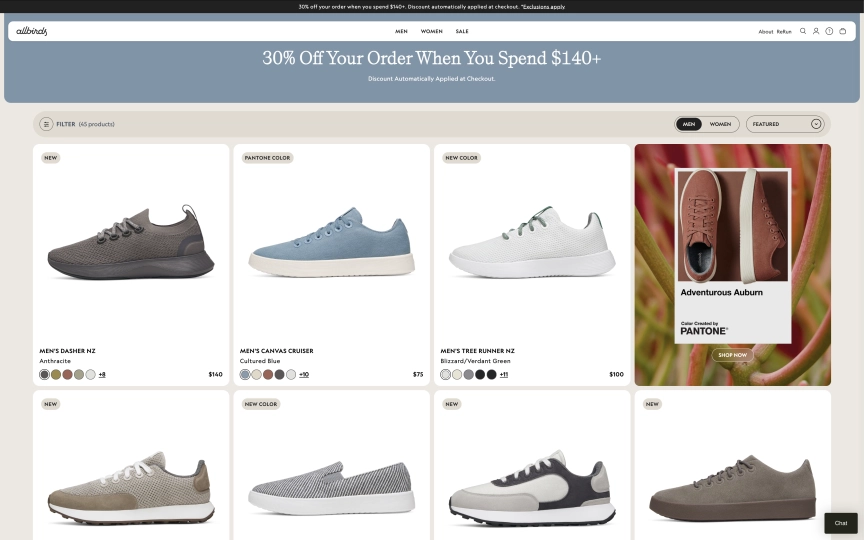
How do you scrape a platform that powers over 4 million online stores? Every Shopify site uses the same underlying engine, which means the same extraction patterns work across all of them. Better yet, Shopify exposes a built-in JSON endpoint at /products.json that returns structured product data without rendering a single pixel of HTML. When that endpoint isn't enough (some stores disable it, and it skips search filters, reviews, and collection metadata), the browser API fills the gaps.
This guide covers both approaches and helps you decide which one fits your project:
- Two extraction paths: browser API (
observe) and the/products.jsonshortcut - How to scrape collection pages for product names, prices, and variants
- How to extract full product detail data using LD+JSON (Schema.org ProductGroup)
- Pagination with the JSON API (up to 250 products per request)
- Why datacenter proxies work on every Shopify store (no anti-bot protection)
- Export to JSON and CSV for price monitoring or product research
- Five common mistakes and how to avoid them
TL;DR: Shopify has no anti-bot protection. Datacenter proxies work on every store. Check /products.json first for structured data without a browser. When you need rendered content (filtered collections, reviews, or stores that disabled the JSON endpoint), use observe with one-shot steps. Block images, fonts, and media for faster sessions. Keep stylesheets loaded so prices render correctly.
Don't have an API key yet? Create a free Browserbeam account - you get 5,000 credits, no credit card required.
Quick Start: Two Ways to Scrape Any Shopify Store
Option A: Browser API with Observe
Create a session, call observe, get the full collection page as structured markdown. One request with steps, all products with names and prices.
curl -s -X POST https://api.browserbeam.com/v1/sessions \
  -H "Authorization: Bearer YOUR_API_KEY" \
  -H "Content-Type: application/json" \
  -d '{
    "url": "https://www.allbirds.com/collections/mens",
    "proxy": { "kind": "datacenter", "country": "us" },
    "block_resources": ["image", "font", "media"],
    "steps": [
      {"observe": {}},
      {"close": {}}
    ]
  }' | jq '.page.markdown.content'
from browserbeam import Browserbeam
client = Browserbeam(api_key="YOUR_API_KEY")
session = client.sessions.create(
url="https://www.allbirds.com/collections/mens",
proxy={"kind": "datacenter", "country": "us"},
block_resources=["image", "font", "media"],
steps=[{"observe": {}}, {"close": {}}],
)
for line in session.page.markdown.content.split("\n"):
if line.strip():
print(line)import Browserbeam from "@browserbeam/sdk";
const client = new Browserbeam({ apiKey: "YOUR_API_KEY" });
const session = await client.sessions.create({
url: "https://www.allbirds.com/collections/mens",
proxy: { kind: "datacenter", country: "us" },
block_resources: ["image", "font", "media"],
steps: [{ observe: {} }, { close: {} }],
});
console.log(session.page?.markdown?.content?.slice(0, 1000));require "browserbeam"
client = Browserbeam::Client.new(api_key: "YOUR_API_KEY")
session = client.sessions.create(
url: "https://www.allbirds.com/collections/mens",
proxy: { kind: "datacenter", country: "us" },
block_resources: ["image", "font", "media"],
steps: [{ observe: {} }, { close: {} }]
)
puts session.page.markdown.content[0..1000]The observe endpoint returns structured markdown with product names, color variants, and prices:
Men's Dasher NZAnthracite$140
+8
Men's Canvas CruiserCultured Blue$75
+10
Men's Tree Runner NZBlizzard/Verdant Green$100
+11
Men's Varsity AiryMushroom$120
Notice the one-shot pattern: steps go directly in the create call. Shopify stores are server-rendered, so one-shot steps work reliably (unlike React apps like IMDb where you need the interactive pattern).
Option B: The /products.json Shortcut
Every Shopify store exposes a JSON API at /products.json. No browser session needed. A simple HTTP GET returns structured product data:
curl -s "https://www.allbirds.com/collections/mens/products.json?limit=3" \
  | jq '.products[] | {title: .title, handle: .handle, price: .variants[0].price}'
Output:
{
  "title": "Men's Dasher NZ - Ochre (Weathered White Sole)",
  "handle": "mens-dasher-nz-ochre",
  "price": "140.00"
}
{
  "title": "Men's Dasher NZ - Anthracite (Dark Anthracite Sole)",
  "handle": "mens-dasher-nz-anthracite",
  "price": "140.00"
}
{
  "title": "Men's Dasher NZ - Auburn (Auburn Sole)",
  "handle": "mens-dasher-nz-auburn",
  "price": "140.00"
}
No API key. No browser. No proxy. Just a URL. We'll cover when this works and when you need the browser API in the comparison section below.
What Data Can You Extract from Shopify Stores?
Shopify stores follow a predictable structure. Every store uses the same URL patterns and data formats, regardless of the theme.
| Page Type | URL Pattern | Available Fields |
|---|---|---|
| Collection page | /collections/{handle} |
Product names, prices, color/size variants, product URLs, collection metadata |
| Product detail | /products/{handle} |
Full description, all variants (size, color, material), pricing, LD+JSON structured data, images |
| Products JSON | /products.json?limit=250 |
Title, body HTML, vendor, product type, variants (price, SKU, inventory), images, tags |
| Collection JSON | /collections/{handle}/products.json |
Same as products JSON, filtered by collection |
| Product JSON | /products/{handle}.json |
Single product with all variants, images, and metadata |
The JSON endpoints return the most structured data. The browser API captures what the JSON misses: rendered content from custom theme sections, customer reviews, and dynamic pricing based on location or logged-in status.
The /products.json Shortcut
Every Shopify store has a built-in JSON API. It's not documented for public use, but it's been available since Shopify's early days and remains active on the vast majority of stores.
How It Works
Append /products.json to any Shopify store's domain:
# All products (default 30 per page)
curl -s "https://www.allbirds.com/products.json"

# First 250 products (maximum per page)
curl -s "https://www.allbirds.com/products.json?limit=250"

# Products in a specific collection
curl -s "https://www.allbirds.com/collections/mens/products.json?limit=250"

# Page 2 of results
curl -s "https://www.allbirds.com/products.json?limit=250&page=2"

# Single product detail
curl -s "https://www.allbirds.com/products/mens-tree-runners.json"
JSON Structure
Each product in the response contains:
{
"title": "Men's Tree Runner - Jet Black (White Sole)",
"handle": "mens-tree-runners",
"vendor": "Allbirds",
"product_type": "Shoes",
"body_html": "The Allbirds Tree Runner is a breathable...
",
"variants": [
{
"title": "8",
"price": "100.00",
"sku": "TR3MJBW080",
"available": true
},
{
"title": "9",
"price": "100.00",
"sku": "TR3MJBW090",
"available": true
}
],
"images": [
{ "src": "https://www.allbirds.com/cdn/shop/files/shoe-left.png" }
],
"tags": ["allbirds::gender => mens", "allbirds::material => Tree"]
}You get the product title, vendor, type, HTML description, every size/color variant with price and SKU, images, and custom tags. The handle field is the URL slug you can use to build direct product links (/products/{handle}).
Pagination
The JSON endpoint supports page and limit parameters:
limit: 1-250 products per page (default 30)page: Page number starting at 1
To scrape all products from a store, loop through pages until you get an empty response:
import requests

store = "https://www.allbirds.com"
all_products = []
page = 1

while True:
    url = f"{store}/products.json?limit=250&page={page}"
    data = requests.get(url).json()
    products = data.get("products", [])
    if not products:
        break
    all_products.extend(products)
    page += 1

print(f"Found {len(all_products)} products across {page - 1} pages")
Limitations
The JSON endpoint has a few gaps:
| Limitation | Impact | Workaround |
|---|---|---|
| Some stores disable it | Returns 404 or redirects to homepage | Use the browser API with observe |
| No search or filtering | Can't query by price range, rating, etc. | Filter client-side or use browser API on filtered collection URLs |
| Max 250 per page | Large catalogs require pagination | Loop through pages as shown above |
| No reviews or ratings | Only core product data | Use browser API to extract review sections |
| No dynamic pricing | Shows base price, not geo/discount pricing | Use browser API with locale/proxy for geo-specific prices |
| Tags are store-specific | Format varies between stores (e.g., allbirds::gender => mens) |
Parse based on the specific store's tag format |
When you hit these limits, switch to the browser API. The next section covers browser-based extraction for collection and detail pages.
Scraping Collection Pages (Browser API)
Collection pages list products with names, prices, and variant selectors. The observe endpoint captures all of this as markdown.
curl -s -X POST https://api.browserbeam.com/v1/sessions \
  -H "Authorization: Bearer YOUR_API_KEY" \
  -H "Content-Type: application/json" \
  -d '{
    "url": "https://www.allbirds.com/collections/mens",
    "proxy": { "kind": "datacenter", "country": "us" },
    "block_resources": ["image", "font", "media"],
    "steps": [
      {"observe": {}},
      {"close": {}}
    ]
  }' | jq '{title: .page.title, markdown_length: (.page.markdown.content | length)}'
from browserbeam import Browserbeam
client = Browserbeam(api_key="YOUR_API_KEY")
session = client.sessions.create(
url="https://www.allbirds.com/collections/mens",
proxy={"kind": "datacenter", "country": "us"},
block_resources=["image", "font", "media"],
steps=[{"observe": {}}, {"close": {}}],
)
lines = session.page.markdown.content.split("\n")
for line in lines:
if "$" in line:
print(line.strip())import Browserbeam from "@browserbeam/sdk";
const client = new Browserbeam({ apiKey: "YOUR_API_KEY" });
const session = await client.sessions.create({
url: "https://www.allbirds.com/collections/mens",
proxy: { kind: "datacenter", country: "us" },
block_resources: ["image", "font", "media"],
steps: [{ observe: {} }, { close: {} }],
});
const lines = session.page?.markdown?.content?.split("\n") || [];
for (const line of lines) {
if (line.includes("$")) console.log(line.trim());
}require "browserbeam"
client = Browserbeam::Client.new(api_key: "YOUR_API_KEY")
session = client.sessions.create(
url: "https://www.allbirds.com/collections/mens",
proxy: { kind: "datacenter", country: "us" },
block_resources: ["image", "font", "media"],
steps: [{ observe: {} }, { close: {} }]
)
session.page.markdown.content.each_line do |line|
puts line.strip if line.include?("$")
endWhy Keep Stylesheets Loaded?
On most sites, blocking stylesheets speeds up the session. On Shopify, prices are rendered inside styled components. Blocking stylesheets can cause price elements to not render properly. Block ["image", "font", "media"] but leave stylesheets out of the list. This keeps sessions fast while ensuring prices appear in the markdown output.
Handling Different Shopify Themes
Shopify stores use thousands of different themes. CSS class names differ between themes, so hardcoded selectors like .product-card or .price break across stores. The observe endpoint avoids this problem entirely. It reads the rendered page content regardless of theme, returning product names and prices as markdown text.
If you need structured JSON from a collection page (not markdown), use the /products.json endpoint instead. It returns the same data in a consistent format across all stores. Want to know exactly which theme a competitor's store runs before you start scraping? The Shopify theme detector identifies the theme name, developer, and 40+ installed apps from any store URL.
Scraping Product Detail Pages
Product detail pages contain the full description, all size/color variants, pricing, and LD+JSON structured data. You have two options: observe for markdown or execute_js for structured JSON.
Option A: Observe for Markdown
curl -s -X POST https://api.browserbeam.com/v1/sessions \
  -H "Authorization: Bearer YOUR_API_KEY" \
  -H "Content-Type: application/json" \
  -d '{
    "url": "https://www.allbirds.com/products/mens-tree-runners",
    "proxy": { "kind": "datacenter", "country": "us" },
    "block_resources": ["image", "font", "media"],
    "steps": [
      {"observe": {}},
      {"close": {}}
    ]
  }' | jq '.page.markdown.content' | head -30
from browserbeam import Browserbeam
client = Browserbeam(api_key="YOUR_API_KEY")
session = client.sessions.create(
url="https://www.allbirds.com/products/mens-tree-runners",
proxy={"kind": "datacenter", "country": "us"},
block_resources=["image", "font", "media"],
steps=[{"observe": {}}, {"close": {}}],
)
print(session.page.markdown.content[:1000])import Browserbeam from "@browserbeam/sdk";
const client = new Browserbeam({ apiKey: "YOUR_API_KEY" });
const session = await client.sessions.create({
url: "https://www.allbirds.com/products/mens-tree-runners",
proxy: { kind: "datacenter", country: "us" },
block_resources: ["image", "font", "media"],
steps: [{ observe: {} }, { close: {} }],
});
console.log(session.page?.markdown?.content?.slice(0, 1000));require "browserbeam"
client = Browserbeam::Client.new(api_key: "YOUR_API_KEY")
session = client.sessions.create(
url: "https://www.allbirds.com/products/mens-tree-runners",
proxy: { kind: "datacenter", country: "us" },
block_resources: ["image", "font", "media"],
steps: [{ observe: {} }, { close: {} }]
)
puts session.page.markdown.content[0..1000]Option B: Execute JS for LD+JSON
Shopify product pages include a <script type="application/ld+json"> tag with Schema.org ProductGroup data. Use execute_js to parse it into clean JSON:
curl -s -X POST https://api.browserbeam.com/v1/sessions \
  -H "Authorization: Bearer YOUR_API_KEY" \
  -H "Content-Type: application/json" \
  -d '{
    "url": "https://www.allbirds.com/products/mens-tree-runners",
    "proxy": { "kind": "datacenter", "country": "us" },
    "block_resources": ["image", "font", "media"],
    "steps": [
      {"execute_js": {"code": "const scripts = document.querySelectorAll(\"script[type=\\\"application/ld+json\\\"]\"); for (const s of scripts) { try { const d = JSON.parse(s.textContent); if (d[\"@type\"] === \"ProductGroup\") return { name: d.name, brand: d.brand?.name, price: d.offers?.price, currency: d.offers?.priceCurrency, sku: d.sku, description: d.description, variants: d.hasVariant?.length || 0 }; } catch(e) {} } return null;", "result_key": "product"}},
      {"close": {}}
    ]
  }' | jq '.extraction.product'
from browserbeam import Browserbeam
client = Browserbeam(api_key="YOUR_API_KEY")
session = client.sessions.create(
url="https://www.allbirds.com/products/mens-tree-runners",
proxy={"kind": "datacenter", "country": "us"},
block_resources=["image", "font", "media"],
steps=[
{"execute_js": {
"code": """
const scripts = document.querySelectorAll('script[type="application/ld+json"]');
for (const s of scripts) {
try {
const d = JSON.parse(s.textContent);
if (d['@type'] === 'ProductGroup') {
return {
name: d.name,
brand: d.brand?.name,
price: d.offers?.price,
currency: d.offers?.priceCurrency,
sku: d.sku,
description: d.description,
variants: d.hasVariant?.length || 0,
};
}
} catch(e) {}
}
return null;
""",
"result_key": "product",
}},
{"close": {}},
],
)
product = session.extraction["product"]
print(f"{product['name']} - ${product['price']} {product['currency']}")
print(f"Brand: {product['brand']}")
print(f"Variants: {product['variants']}")import Browserbeam from "@browserbeam/sdk";
const client = new Browserbeam({ apiKey: "YOUR_API_KEY" });
const session = await client.sessions.create({
url: "https://www.allbirds.com/products/mens-tree-runners",
proxy: { kind: "datacenter", country: "us" },
block_resources: ["image", "font", "media"],
steps: [
{
execute_js: {
code: `
const scripts = document.querySelectorAll('script[type="application/ld+json"]');
for (const s of scripts) {
try {
const d = JSON.parse(s.textContent);
if (d['@type'] === 'ProductGroup') {
return {
name: d.name,
brand: d.brand?.name,
price: d.offers?.price,
currency: d.offers?.priceCurrency,
sku: d.sku,
description: d.description,
variants: d.hasVariant?.length || 0,
};
}
} catch(e) {}
}
return null;`,
result_key: "product",
},
},
{ close: {} },
],
});
const product = session.extraction?.product as any;
console.log(`${product.name} - $${product.price} ${product.currency}`);require "browserbeam"
client = Browserbeam::Client.new(api_key: "YOUR_API_KEY")
session = client.sessions.create(
url: "https://www.allbirds.com/products/mens-tree-runners",
proxy: { kind: "datacenter", country: "us" },
block_resources: ["image", "font", "media"],
steps: [
{ execute_js: {
code: 'const scripts = document.querySelectorAll(\'script[type="application/ld+json"]\'); for (const s of scripts) { try { const d = JSON.parse(s.textContent); if (d["@type"] === "ProductGroup") return { name: d.name, brand: d.brand?.name, price: d.offers?.price, currency: d.offers?.priceCurrency, sku: d.sku, description: d.description, variants: d.hasVariant?.length || 0 }; } catch(e) {} } return null;',
result_key: "product"
} },
{ close: {} }
]
)
product = session.extraction["product"]
puts "#{product['name']} - $#{product['price']}"
puts "Brand: #{product['brand']}"The LD+JSON output:
{
  "name": "Men's Tree Runner",
  "brand": "Allbirds",
  "price": 100,
  "currency": "USD",
  "sku": "MENS_TREE_RUNNERS",
  "description": "The Allbirds Tree Runner is a breathable and lightweight sneaker...",
  "variants": 28
}
The LD+JSON uses the ProductGroup type (not Product), which includes an offers object with the base price and a hasVariant array listing every size/color combination. Since this data exists for Google's rich search results, Shopify stores are unlikely to remove it.
Two Approaches: Browser vs JSON API
Both extraction paths have tradeoffs. Here's when to use each:
| Factor | /products.json | Browser API (observe) |
|---|---|---|
| Speed | 200-500ms per request | 6-10s per session |
| Cost | Free (plain HTTP) | API credits per session |
| Structured data | Full JSON (variants, SKU, tags, images) | Markdown text (needs parsing) |
| Works on all stores | Most stores, but some disable it | All stores |
| Reviews and ratings | Not included | Captured in markdown |
| Geo-specific pricing | Shows base price only | Renders local pricing with proxy + locale |
| Collection filters | No filtering (all products or by collection) | Renders filtered results from any URL |
| Pagination | Built-in (?page=2&limit=250) |
Navigate to next page via goto |
| Authentication | None needed | None needed |
| Rate limits | Shopify's standard rate limiting | Browserbeam handles it |
Decision Framework
Start with /products.json when:
- You need product titles, prices, variants, and SKUs
- The store hasn't disabled the endpoint
- You're scraping the full catalog, not filtered views
- Speed and cost matter more than rendered content
Switch to the browser API when:
- The /products.json endpoint returns 404 or redirects
- You need reviews, ratings, or custom theme content
- You need geo-specific pricing (use proxies from different countries)
- You're scraping a filtered collection URL with sort/filter parameters
- You need the page as the customer sees it, not raw data
For most product monitoring use cases, start with the JSON API and fall back to the browser API for stores that don't support it.
Building a Multi-Store Product Scraper
Here's a Python script that scrapes products from any Shopify store. It tries the JSON endpoint first and falls back to the browser API:
from browserbeam import Browserbeam
import requests
import json

client = Browserbeam(api_key="YOUR_API_KEY")

def scrape_shopify_json(store_url, collection=None, max_pages=5):
    """Try the /products.json endpoint first."""
    all_products = []
    for page in range(1, max_pages + 1):
        if collection:
            url = f"{store_url}/collections/{collection}/products.json?limit=250&page={page}"
        else:
            url = f"{store_url}/products.json?limit=250&page={page}"
        try:
            resp = requests.get(url, timeout=10)
            if resp.status_code != 200:
                return None
            products = resp.json().get("products", [])
            if not products:
                break
            for p in products:
                all_products.append({
                    "title": p["title"],
                    "handle": p["handle"],
                    "vendor": p["vendor"],
                    "product_type": p.get("product_type", ""),
                    "price": p["variants"][0]["price"] if p["variants"] else None,
                    "variants_count": len(p["variants"]),
                    "available": any(v.get("available") for v in p["variants"]),
                    "url": f"{store_url}/products/{p['handle']}",
                })
        except Exception:
            return None
    return all_products

def scrape_shopify_browser(store_url, collection_path="/collections/all"):
    """Fall back to browser API if JSON endpoint fails."""
    session = client.sessions.create(
        url=f"{store_url}{collection_path}",
        proxy={"kind": "datacenter", "country": "us"},
        block_resources=["image", "font", "media"],
        steps=[{"observe": {}}, {"close": {}}],
    )
    return session.page.markdown.content

stores = [
    "https://www.allbirds.com",
    "https://www.gymshark.com",
]

for store in stores:
    products = scrape_shopify_json(store, collection="mens")
    if products:
        print(f"{store}: {len(products)} products via JSON API")
    else:
        markdown = scrape_shopify_browser(store)
        print(f"{store}: {len(markdown)} chars via browser API")

with open("shopify_products.json", "w") as f:
    json.dump(products, f, indent=2)

print(f"Saved {len(products)} products")
The JSON endpoint is the fast path. When it fails (returns 404, redirects, or has incomplete data), the browser API picks up where it left off.
Saving and Processing Your Data
Export to JSON
import json

with open("shopify_products.json", "w") as f:
    json.dump(all_products, f, indent=2, ensure_ascii=False)

print(f"Saved {len(all_products)} products")
Export to CSV
import csv

with open("shopify_products.csv", "w", newline="", encoding="utf-8") as f:
    writer = csv.DictWriter(f, fieldnames=[
        "title", "handle", "vendor", "product_type",
        "price", "variants_count", "available", "url",
    ])
    writer.writeheader()
    for product in all_products:
        writer.writerow(product)

print(f"Exported {len(all_products)} products to CSV")
The CSV format works well for importing into spreadsheets, pandas DataFrames, or databases. For variant-level data (every size/color combination), expand each product into multiple rows before writing.
DIY Scraping vs Browserbeam API
If you're considering building your own Shopify scraper from scratch:
| Aspect | DIY (Requests + Playwright) | Browserbeam API |
|---|---|---|
| JSON API scraping | requests.get() works fine |
Not needed (use requests directly) |
| JavaScript rendering | You manage Playwright/Selenium | API handles it |
| Proxy management | Buy and rotate proxies yourself | One parameter: proxy: { kind: "datacenter" } |
| Resource blocking | Custom request interception code | One parameter: block_resources: [...] |
| Page stability | Write custom wait logic | Automatic stability detection |
| Output format | Parse raw HTML yourself | Structured markdown or JSON |
| Scaling | Manage browser pools and memory | API handles concurrency |
| Cost | Server + proxy + maintenance time | API credits |
For the /products.json endpoint, plain requests is all you need. When you need rendered content, here's what a Playwright version looks like:
from playwright.sync_api import sync_playwright
import json

with sync_playwright() as p:
    browser = p.chromium.launch(headless=True)
    page = browser.new_page()
    page.goto("https://www.allbirds.com/products/mens-tree-runners")
    page.wait_for_load_state("networkidle")

    ld_json = page.evaluate("""
      const scripts = document.querySelectorAll('script[type="application/ld+json"]');
      for (const s of scripts) {
        try {
          const d = JSON.parse(s.textContent);
          if (d['@type'] === 'ProductGroup') return d;
        } catch(e) {}
      }
      return null;
    """)

    print(json.dumps({
        "name": ld_json["name"],
        "price": ld_json["offers"]["price"],
    }, indent=2))

    browser.close()
This works for one-off scraping. For multi-store monitoring with proxy rotation and resource blocking, the Browserbeam API saves you from managing browser infrastructure. For more on the tradeoffs, see the Puppeteer vs Playwright vs Browserbeam comparison.
Use Cases
Competitor Product Monitoring
Track your competitors' product catalogs and pricing changes. Scrape their Shopify stores daily with the JSON API and diff the results:
import json
import os
from datetime import date

def track_prices(store_url, output_dir="price_history"):
    os.makedirs(output_dir, exist_ok=True)
    today = date.today().isoformat()
    products = scrape_shopify_json(store_url)
    if not products:
        return

    filepath = os.path.join(output_dir, f"{today}.json")
    with open(filepath, "w") as f:
        json.dump(products, f, indent=2)

    yesterday = os.path.join(output_dir, f"{date.today().isoformat()}.json")
    if os.path.exists(yesterday):
        old = {p["handle"]: p["price"] for p in json.load(open(yesterday))}
        for p in products:
            old_price = old.get(p["handle"])
            if old_price and old_price != p["price"]:
                print(f"Price change: {p['title']} {old_price} -> {p['price']}")

track_prices("https://www.allbirds.com")
Cross-Store Price Comparison
Compare the same product type across multiple Shopify stores:
stores = {
    "Allbirds": "https://www.allbirds.com",
    "Gymshark": "https://www.gymshark.com",
}

for name, url in stores.items():
    products = scrape_shopify_json(url)
    if products:
        avg_price = sum(float(p["price"]) for p in products if p["price"]) / len(products)
        print(f"{name}: {len(products)} products, avg ${avg_price:.2f}")
Product Catalog Aggregation
Build a product database that aggregates data from many Shopify stores into a single searchable index:
import sqlite3

conn = sqlite3.connect("shopify_catalog.db")
conn.execute("""
    CREATE TABLE IF NOT EXISTS products (
        store TEXT, handle TEXT, title TEXT, vendor TEXT,
        product_type TEXT, price REAL, available INTEGER,
        url TEXT, PRIMARY KEY (store, handle)
    )
""")

for store_name, store_url in stores.items():
    products = scrape_shopify_json(store_url) or []
    for p in products:
        conn.execute(
            "INSERT OR REPLACE INTO products VALUES (?, ?, ?, ?, ?, ?, ?, ?)",
            (store_name, p["handle"], p["title"], p["vendor"],
             p["product_type"], float(p["price"] or 0),
             1 if p["available"] else 0, p["url"]),
        )

conn.commit()
print(f"Catalog updated")
Common Mistakes When Scraping Shopify
1. Not Checking /products.json First
The most common mistake is reaching for a browser when a simple HTTP GET would do. Before building a browser-based scraper, test {store_url}/products.json. If it returns data, you can skip browser sessions entirely and save time and credits.
2. Blocking Stylesheets on Collection Pages
Unlike Wikipedia or IMDb where blocking stylesheets is safe, Shopify themes use CSS to render price elements. Blocking stylesheets can cause prices to disappear from the observe output. Block ["image", "font", "media"] but keep stylesheets loaded.
3. Assuming All Themes Use the Same Selectors
Shopify has thousands of themes. A selector like .product-card .price that works on one store breaks on another. The observe endpoint handles this by reading rendered text, not DOM structure. For CSS-based extraction, use the /products.json endpoint instead.
4. Not Paginating the JSON API
The JSON endpoint defaults to 30 products per page with a maximum of 250. If a store has 500 products and you only fetch the first page, you're missing most of the catalog. Always loop through pages until you get an empty response.
5. Ignoring Variant Data
Shopify products have variants (size, color, material). Each variant can have a different price, SKU, and availability status. If you only grab the product title and first variant price, you miss the size that's on sale or the color that's sold out. The JSON API returns all variants per product.
Frequently Asked Questions
Is it legal to scrape Shopify stores?
Shopify store data (product names, prices, descriptions) is publicly available information displayed to all visitors. Scraping publicly available data is generally permitted under the hiQ v. LinkedIn precedent. Each store has its own Terms of Service, so check the specific store's terms if you're planning large-scale commercial scraping.
Does Shopify block scrapers?
Shopify stores have no CAPTCHAs, JavaScript challenges, or bot detection. Datacenter proxies work on every Shopify store we've tested, which keeps costs low (see residential vs datacenter proxies for why datacenter is the right call here). Shopify does apply standard rate limiting, so avoid sending hundreds of requests per second. A one-second delay between requests is polite and sufficient.
Shopify API vs scraping?
Shopify's official Storefront API requires store owner authentication. You can only access stores where you have API credentials. Scraping the public /products.json endpoint or using the browser API works on any Shopify store without authentication.
Can I scrape any Shopify store?
Yes. The browser API works on every Shopify store because it renders the page like a real browser. The /products.json endpoint works on most stores, but some store owners disable it. Try the JSON endpoint first. If it returns 404 or redirects, use the browser API.
How do I know if a site runs on Shopify?
Check the page source for cdn.shopify.com in script or stylesheet URLs. You can also look for Shopify.theme in the page's JavaScript or check the X-ShopId response header. A quick test: append /products.json to the domain. If it returns a JSON array of products, it's Shopify. For a one-click check that also reveals the store's theme, developer, and installed apps, try the free Shopify theme detector.
How to scrape Shopify product prices?
Two options: (1) Use /products.json which includes variants[].price for every size/color combination. (2) Use the browser API with observe to capture rendered prices. The JSON endpoint gives you exact numeric prices; the browser captures what the customer sees, including sale prices and formatted currency.
How do I scrape Shopify product variants?
The /products.json endpoint returns a variants array for each product. Each variant includes title (size label), price, sku, available (in stock or not), and option1/option2/option3 fields for size, color, and material. Loop through the variants array to build a complete size/color matrix.
How many products can I scrape from a Shopify store?
The /products.json endpoint returns up to 250 products per page. Paginate with ?page=2&limit=250 to get the next batch. Most stores have a few hundred to a few thousand products. There's no hard limit on total pages, so you can scrape the entire catalog by looping until you get an empty response.
Start Building Your Shopify Scraper
We covered two paths to Shopify product data. The /products.json endpoint gives you structured JSON with titles, prices, variants, and SKUs. No browser needed, no API key, sub-second response times. When you need rendered content, reviews, or the store has disabled the JSON endpoint, the browser API with observe captures the page as customers see it.
Try swapping allbirds.com with any Shopify store URL. The same patterns work across all 4 million+ stores on the platform. For price monitoring, start with the JSON API and schedule daily scrapes. For one-time research, observe gives you everything on the page in a single call.
For the complete API reference, check the Browserbeam documentation. The structured web scraping guide covers extraction schemas in depth. If you're scraping other sites too, the IMDb scraping guide shows how to handle React-based sites, and the Amazon scraping guide covers anti-bot challenges.