

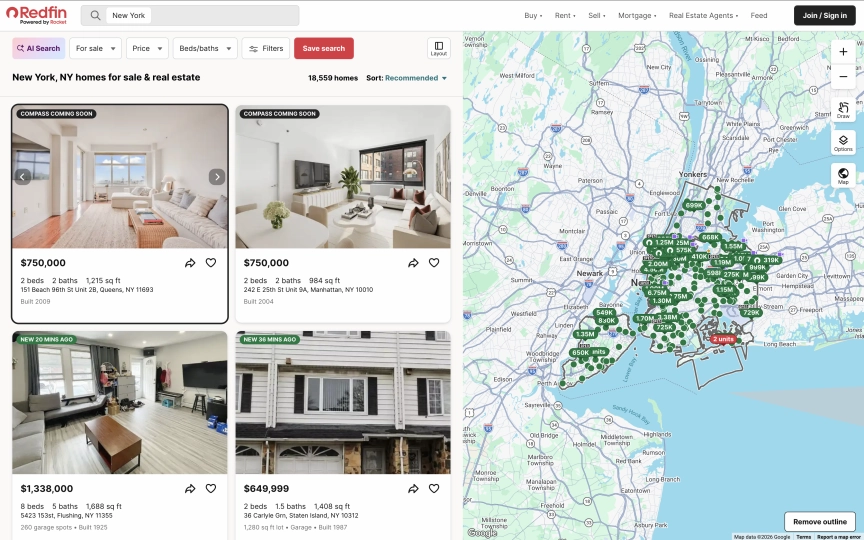
Zillow blocks every scraper you throw at it. PerimeterX fingerprints your browser, flags headless Chrome, and returns a CAPTCHA wall before you see a single listing. Redfin doesn't. Residential proxies, a browser session, and you're in. No CAPTCHAs, no JavaScript challenges, no IP bans.
Redfin covers the same markets as Zillow: property prices, beds/baths/sqft, price history, tax records, neighborhood stats, and market trends. The data is comparable, but the access is not. Redfin's pages are JavaScript-rendered (individual listings load dynamically after the initial page), so you need a browser to render them. But once rendered, the data is structured and consistent across every market.
This guide covers three types of Redfin data and how to extract each one:
- Property listings from search results with prices, beds/baths, sqft, and direct links
- Full property detail pages with descriptions, price history, tax info, and Schema.org LD+JSON
- Market trend data: median sale prices, YoY growth, days on market, and migration patterns
- Why residential proxies are required (datacenter IPs hit a human verification page)
- How to use URL filters for price range, beds, and property type
- The Redfin vs Zillow comparison for scraping real estate data
- Five common mistakes and how to avoid them
TL;DR: Redfin requires residential proxies. Datacenter IPs get blocked by a human verification page. Search results load listings dynamically via JavaScript, so use observe first (to let the page render), then execute_js to extract structured data from the DOM. Detail pages have rich LD+JSON with Schema.org RealEstateListing data. Market trend pages at /housing-market return median prices, YoY changes, and demand metrics. Block images, fonts, and media but keep stylesheets loaded.
Don't have an API key yet? Create a free Browserbeam account - you get 5,000 credits, no credit card required.
Quick Start: Scrape Redfin Property Listings
Redfin search results render property cards with JavaScript after the initial page load. The observe step lets the page finish rendering, then execute_js queries the DOM for structured listing data. Two steps, one session.
curl -s -X POST https://api.browserbeam.com/v1/sessions \
  -H "Authorization: Bearer YOUR_API_KEY" \
  -H "Content-Type: application/json" \
  -d '{
    "url": "https://www.redfin.com/city/30749/NY/New-York",
    "proxy": { "kind": "residential", "country": "us" },
    "block_resources": ["image", "font", "media"],
    "auto_dismiss_blockers": true,
    "steps": [
      {"observe": {}},
      {"execute_js": {"code": "const cards = document.querySelectorAll(\".MapHomeCardReact\"); const listings = []; cards.forEach((c) => { const price = c.querySelector(\"[class*=Price]\")?.textContent?.trim(); const addr = c.querySelector(\"[class*=Address]\")?.textContent?.trim(); const stats = c.querySelector(\"[class*=Stats]\")?.textContent?.trim(); const link = c.querySelector(\"a\")?.href; if (price && addr) listings.push({price, address: addr, stats, link}); }); return listings;", "result_key": "listings"}},
      {"close": {}}
    ]
  }' | jq '.extraction.listings[:5]'
from browserbeam import Browserbeam
client = Browserbeam(api_key="YOUR_API_KEY")
session = client.sessions.create(
url="https://www.redfin.com/city/30749/NY/New-York",
proxy={"kind": "residential", "country": "us"},
block_resources=["image", "font", "media"],
auto_dismiss_blockers=True,
steps=[{"observe": {}}, {"execute_js": {
"code": """
const cards = document.querySelectorAll('.MapHomeCardReact');
const listings = [];
cards.forEach((c) => {
const price = c.querySelector('[class*=Price]')?.textContent?.trim();
const addr = c.querySelector('[class*=Address]')?.textContent?.trim();
const stats = c.querySelector('[class*=Stats]')?.textContent?.trim();
const link = c.querySelector('a')?.href;
if (price && addr) listings.push({price, address: addr, stats, link});
});
return listings;
""",
"result_key": "listings",
}}, {"close": {}}],
)
for listing in session.extraction["listings"][:5]:
print(f"{listing['price']} - {listing['address']} ({listing['stats']})")import Browserbeam from "@browserbeam/sdk";
const client = new Browserbeam({ apiKey: "YOUR_API_KEY" });
const session = await client.sessions.create({
url: "https://www.redfin.com/city/30749/NY/New-York",
proxy: { kind: "residential", country: "us" },
block_resources: ["image", "font", "media"],
auto_dismiss_blockers: true,
steps: [
{ observe: {} },
{
execute_js: {
code: `
const cards = document.querySelectorAll('.MapHomeCardReact');
const listings = [];
cards.forEach((c) => {
const price = c.querySelector('[class*=Price]')?.textContent?.trim();
const addr = c.querySelector('[class*=Address]')?.textContent?.trim();
const stats = c.querySelector('[class*=Stats]')?.textContent?.trim();
const link = c.querySelector('a')?.href;
if (price && addr) listings.push({price, address: addr, stats, link});
});
return listings;`,
result_key: "listings",
},
},
{ close: {} },
],
});
const listings = session.extraction?.listings as any[];
listings?.slice(0, 5).forEach((l) => {
console.log(`${l.price} - ${l.address} (${l.stats})`);
});require "browserbeam"
client = Browserbeam::Client.new(api_key: "YOUR_API_KEY")
session = client.sessions.create(
url: "https://www.redfin.com/city/30749/NY/New-York",
proxy: { kind: "residential", country: "us" },
block_resources: ["image", "font", "media"],
auto_dismiss_blockers: true,
steps: [
{ observe: {} },
{ execute_js: {
code: 'const cards = document.querySelectorAll(".MapHomeCardReact"); const listings = []; cards.forEach((c) => { const price = c.querySelector("[class*=Price]")?.textContent?.trim(); const addr = c.querySelector("[class*=Address]")?.textContent?.trim(); const stats = c.querySelector("[class*=Stats]")?.textContent?.trim(); const link = c.querySelector("a")?.href; if (price && addr) listings.push({price, address: addr, stats, link}); }); return listings;',
result_key: "listings"
} },
{ close: {} }
]
)
session.extraction["listings"].first(5).each do |l|
puts "#{l['price']} - #{l['address']} (#{l['stats']})"
endThe output is structured JSON with prices, addresses, stats, and direct links to each property:
[
  {
    "price": "$750,000",
    "address": "151 Beach 96th St Unit 2B, Queens, NY 11693",
    "stats": "2 beds2 baths1,215 sq ft",
    "link": "https://www.redfin.com/NY/Far-Rockaway/151-Beach-96th-St-11693/unit-2B/home/178600628"
  },
  {
    "price": "$750,000",
    "address": "242 E 25th St Unit 9A, Manhattan, NY 10010",
    "stats": "2 beds2 baths984 sq ft",
    "link": "https://www.redfin.com/NY/New-York/242-E-25th-St-10010/unit-9A/home/45147816"
  },
  {
    "price": "$345,000",
    "address": "161 W 133rd St Unit 1A, New York, NY 10030",
    "stats": "1 bed1.5 baths708 sq ft",
    "link": "https://www.redfin.com/NY/New-York/161-W-133rd-St-10030/unit-1A/home/45321392"
  }
]
The observe step is required before execute_js because Redfin loads property cards dynamically. Without it, the cards appear as "Loading..." placeholders. The auto_dismiss_blockers parameter handles cookie consent and notification popups automatically.
What Data Can You Extract from Redfin?
Redfin organizes real estate data across three page types. Each has a different URL structure and different data available.
| Page Type | URL Pattern | Available Fields |
|---|---|---|
| Search results | /city/{id}/{state}/{city} |
Price, address, beds, baths, sqft, property link, listing status |
| Property detail | /{state}/{city}/{address}/home/{id} |
Full description, price, beds/baths/sqft, year built, price per sqft, property type, listing agent, LD+JSON structured data |
| Market trends | /city/{id}/{state}/{city}/housing-market |
Median sale price, YoY growth %, days on market, homes sold, sale-to-list ratio, migration data |
Search results give you the overview. Detail pages give you everything about a single property. Market trend pages give you aggregate statistics for cities, neighborhoods, and zip codes.
Redfin URL Filters
Redfin search URLs support filters directly in the path. You can narrow results before scraping:
# Price range: $500k to $1M
https://www.redfin.com/city/30749/NY/New-York/filter/min-price=500k,max-price=1M

# Minimum beds and baths
https://www.redfin.com/city/30749/NY/New-York/filter/min-beds=2,min-baths=2

# Property type: condos only
https://www.redfin.com/city/30749/NY/New-York/filter/property-type=condo

# Combine filters
https://www.redfin.com/city/30749/NY/New-York/filter/min-price=500k,max-price=1M,min-beds=2,property-type=condo
Using filters reduces the number of results and speeds up scraping. A search for "New York" returns 6,000+ listings. Adding a price range and bed count narrows it to a few hundred.
Scraping Property Detail Pages
Detail pages contain the full property listing: description, price breakdown, year built, property type, listing agent, and more. You have two options for extraction.
Option A: Observe for Markdown
curl -s -X POST https://api.browserbeam.com/v1/sessions \
  -H "Authorization: Bearer YOUR_API_KEY" \
  -H "Content-Type: application/json" \
  -d '{
    "url": "https://www.redfin.com/NY/New-York/242-E-25th-St-10010/unit-9A/home/45147816",
    "proxy": { "kind": "residential", "country": "us" },
    "block_resources": ["image", "font", "media"],
    "auto_dismiss_blockers": true,
    "steps": [
      {"observe": {}},
      {"close": {}}
    ]
  }' | jq '.page.markdown.content'
from browserbeam import Browserbeam
client = Browserbeam(api_key="YOUR_API_KEY")
session = client.sessions.create(
url="https://www.redfin.com/NY/New-York/242-E-25th-St-10010/unit-9A/home/45147816",
proxy={"kind": "residential", "country": "us"},
block_resources=["image", "font", "media"],
auto_dismiss_blockers=True,
steps=[{"observe": {}}, {"close": {}}],
)
print(session.page.markdown.content[:1000])import Browserbeam from "@browserbeam/sdk";
const client = new Browserbeam({ apiKey: "YOUR_API_KEY" });
const session = await client.sessions.create({
url: "https://www.redfin.com/NY/New-York/242-E-25th-St-10010/unit-9A/home/45147816",
proxy: { kind: "residential", country: "us" },
block_resources: ["image", "font", "media"],
auto_dismiss_blockers: true,
steps: [{ observe: {} }, { close: {} }],
});
console.log(session.page?.markdown?.content?.slice(0, 1000));require "browserbeam"
client = Browserbeam::Client.new(api_key: "YOUR_API_KEY")
session = client.sessions.create(
url: "https://www.redfin.com/NY/New-York/242-E-25th-St-10010/unit-9A/home/45147816",
proxy: { kind: "residential", country: "us" },
block_resources: ["image", "font", "media"],
auto_dismiss_blockers: true,
steps: [{ observe: {} }, { close: {} }]
)
puts session.page.markdown.content[0..1000]The markdown includes structured fields like price, beds/baths, square footage, year built, property type, price per square foot, listing agent, and payment calculator details. Sample output:
$750,000
Est. $4,754/mo
2 bd • 2 ba • 984 sq ft

## About this home
Presented by Caroline Parker

CondoProperty Type
2004Year Built
$762Price/Sq.Ft.

## Payment calculator
$4,754 per month
Principal and interest$3,842
Property taxes
HOA dues
Option B: Execute JS for LD+JSON
Redfin property pages include a <script type="application/ld+json"> tag with Schema.org RealEstateListing data. Use execute_js to parse it into clean JSON:
curl -s -X POST https://api.browserbeam.com/v1/sessions \
  -H "Authorization: Bearer YOUR_API_KEY" \
  -H "Content-Type: application/json" \
  -d '{
    "url": "https://www.redfin.com/NY/New-York/242-E-25th-St-10010/unit-9A/home/45147816",
    "proxy": { "kind": "residential", "country": "us" },
    "block_resources": ["image", "font", "media"],
    "auto_dismiss_blockers": true,
    "steps": [
      {"execute_js": {"code": "const scripts = document.querySelectorAll(\"script[type=\\\"application/ld+json\\\"]\"); for (const s of scripts) { try { const d = JSON.parse(s.textContent); if (d.mainEntity) return { name: d.name, price: d.offers?.price, currency: d.offers?.priceCurrency, address: d.mainEntity?.address?.streetAddress, city: d.mainEntity?.address?.addressLocality, state: d.mainEntity?.address?.addressRegion, zip: d.mainEntity?.address?.postalCode, beds: d.mainEntity?.numberOfBedrooms, baths: d.mainEntity?.numberOfBathroomsTotal, sqft: d.mainEntity?.floorSize?.value, yearBuilt: d.mainEntity?.yearBuilt, type: d.mainEntity?.accommodationCategory, description: d.description?.slice(0, 200) }; } catch(e) {} } return null;", "result_key": "property"}},
      {"close": {}}
    ]
  }' | jq '.extraction.property'
from browserbeam import Browserbeam
client = Browserbeam(api_key="YOUR_API_KEY")
session = client.sessions.create(
url="https://www.redfin.com/NY/New-York/242-E-25th-St-10010/unit-9A/home/45147816",
proxy={"kind": "residential", "country": "us"},
block_resources=["image", "font", "media"],
auto_dismiss_blockers=True,
steps=[
{"execute_js": {
"code": """
const scripts = document.querySelectorAll('script[type="application/ld+json"]');
for (const s of scripts) {
try {
const d = JSON.parse(s.textContent);
if (d.mainEntity) return {
name: d.name,
price: d.offers?.price,
currency: d.offers?.priceCurrency,
address: d.mainEntity?.address?.streetAddress,
city: d.mainEntity?.address?.addressLocality,
state: d.mainEntity?.address?.addressRegion,
zip: d.mainEntity?.address?.postalCode,
beds: d.mainEntity?.numberOfBedrooms,
baths: d.mainEntity?.numberOfBathroomsTotal,
sqft: d.mainEntity?.floorSize?.value,
yearBuilt: d.mainEntity?.yearBuilt,
type: d.mainEntity?.accommodationCategory,
description: d.description?.slice(0, 200),
};
} catch(e) {}
}
return null;
""",
"result_key": "property",
}},
{"close": {}},
],
)
prop = session.extraction["property"]
print(f"{prop['name']} - ${prop['price']:,}")
print(f"{prop['beds']} beds, {prop['baths']} baths, {prop['sqft']} sqft")
print(f"{prop['city']}, {prop['state']} {prop['zip']}")
print(f"Built {prop['yearBuilt']} | {prop['type']}")import Browserbeam from "@browserbeam/sdk";
const client = new Browserbeam({ apiKey: "YOUR_API_KEY" });
const session = await client.sessions.create({
url: "https://www.redfin.com/NY/New-York/242-E-25th-St-10010/unit-9A/home/45147816",
proxy: { kind: "residential", country: "us" },
block_resources: ["image", "font", "media"],
auto_dismiss_blockers: true,
steps: [
{
execute_js: {
code: `
const scripts = document.querySelectorAll('script[type="application/ld+json"]');
for (const s of scripts) {
try {
const d = JSON.parse(s.textContent);
if (d.mainEntity) return {
name: d.name,
price: d.offers?.price,
currency: d.offers?.priceCurrency,
address: d.mainEntity?.address?.streetAddress,
city: d.mainEntity?.address?.addressLocality,
state: d.mainEntity?.address?.addressRegion,
zip: d.mainEntity?.address?.postalCode,
beds: d.mainEntity?.numberOfBedrooms,
baths: d.mainEntity?.numberOfBathroomsTotal,
sqft: d.mainEntity?.floorSize?.value,
yearBuilt: d.mainEntity?.yearBuilt,
type: d.mainEntity?.accommodationCategory,
description: d.description?.slice(0, 200),
};
} catch(e) {}
}
return null;`,
result_key: "property",
},
},
{ close: {} },
],
});
const prop = session.extraction?.property as any;
console.log(`${prop.name} - $${prop.price.toLocaleString()}`);
console.log(`${prop.beds} beds, ${prop.baths} baths, ${prop.sqft} sqft`);require "browserbeam"
client = Browserbeam::Client.new(api_key: "YOUR_API_KEY")
session = client.sessions.create(
url: "https://www.redfin.com/NY/New-York/242-E-25th-St-10010/unit-9A/home/45147816",
proxy: { kind: "residential", country: "us" },
block_resources: ["image", "font", "media"],
auto_dismiss_blockers: true,
steps: [
{ execute_js: {
code: 'const scripts = document.querySelectorAll(\'script[type="application/ld+json"]\'); for (const s of scripts) { try { const d = JSON.parse(s.textContent); if (d.mainEntity) return { name: d.name, price: d.offers?.price, currency: d.offers?.priceCurrency, address: d.mainEntity?.address?.streetAddress, city: d.mainEntity?.address?.addressLocality, state: d.mainEntity?.address?.addressRegion, zip: d.mainEntity?.address?.postalCode, beds: d.mainEntity?.numberOfBedrooms, baths: d.mainEntity?.numberOfBathroomsTotal, sqft: d.mainEntity?.floorSize?.value, yearBuilt: d.mainEntity?.yearBuilt, type: d.mainEntity?.accommodationCategory, description: d.description?.slice(0, 200) }; } catch(e) {} } return null;',
result_key: "property"
} },
{ close: {} }
]
)
prop = session.extraction["property"]
puts "#{prop['name']} - $#{prop['price']}"
puts "#{prop['beds']} beds, #{prop['baths']} baths, #{prop['sqft']} sqft"The LD+JSON output:
{
  "name": "242 E 25th St Unit 9A",
  "price": 750000,
  "currency": "USD",
  "address": "242 E 25th St Unit 9A",
  "city": "Manhattan",
  "state": "NY",
  "zip": "10010",
  "beds": 2,
  "baths": 2,
  "sqft": 984,
  "yearBuilt": 2004,
  "type": "Condo/Co-op",
  "description": "Spacious two-bedroom, two-bathroom residence with sunny southern exposure through floor-to-ceiling w..."
}
The LD+JSON uses a dual @type of Product and RealEstateListing. The mainEntity object contains the SingleFamilyResidence (or condo, townhouse, etc.) with the full address, geo coordinates, beds, baths, square footage, year built, and amenities. Since this data exists for Google's rich search results, Redfin is unlikely to remove it.
Extracting Market Trend Data
Redfin publishes housing market statistics for every city, neighborhood, and zip code. These pages are separate from the property search and contain aggregate data that you can't get from individual listings.
Scraping the Housing Market Page
curl -s -X POST https://api.browserbeam.com/v1/sessions \
  -H "Authorization: Bearer YOUR_API_KEY" \
  -H "Content-Type: application/json" \
  -d '{
    "url": "https://www.redfin.com/city/30749/NY/New-York/housing-market",
    "proxy": { "kind": "residential", "country": "us" },
    "block_resources": ["image", "font", "media"],
    "auto_dismiss_blockers": true,
    "steps": [
      {"observe": {}},
      {"close": {}}
    ]
  }' | jq '.page.markdown.content'
from browserbeam import Browserbeam
client = Browserbeam(api_key="YOUR_API_KEY")
session = client.sessions.create(
url="https://www.redfin.com/city/30749/NY/New-York/housing-market",
proxy={"kind": "residential", "country": "us"},
block_resources=["image", "font", "media"],
auto_dismiss_blockers=True,
steps=[{"observe": {}}, {"close": {}}],
)
print(session.page.markdown.content[:2000])import Browserbeam from "@browserbeam/sdk";
const client = new Browserbeam({ apiKey: "YOUR_API_KEY" });
const session = await client.sessions.create({
url: "https://www.redfin.com/city/30749/NY/New-York/housing-market",
proxy: { kind: "residential", country: "us" },
block_resources: ["image", "font", "media"],
auto_dismiss_blockers: true,
steps: [{ observe: {} }, { close: {} }],
});
console.log(session.page?.markdown?.content?.slice(0, 2000));require "browserbeam"
client = Browserbeam::Client.new(api_key: "YOUR_API_KEY")
session = client.sessions.create(
url: "https://www.redfin.com/city/30749/NY/New-York/housing-market",
proxy: { kind: "residential", country: "us" },
block_resources: ["image", "font", "media"],
auto_dismiss_blockers: true,
steps: [{ observe: {} }, { close: {} }]
)
puts session.page.markdown.content[0..2000]The market data page returns rich aggregate statistics in the markdown. Here's what a typical response looks like:
# New York, NY Housing Market

The median sale price of a home in New York was $870K last month,
up 5.5% since last year. The median sale price per square foot
in New York is $621, down 0.16% since last year.

Median Sale Price (All Home Types)
$870,000
+5.5% YoY | Mar 2026

Sale-to-List Price (All Home Types)
98.1%
+0.3 pt YoY | Mar 2026

In Oct '25 - Dec '25, 32% of New York homebuyers searched to move
out of New York, while 68% looked to stay within the metropolitan area.
What Market Metrics Are Available?
| Metric | Description | Example |
|---|---|---|
| Median sale price | Middle price point for all homes sold | $870,000 (+5.5% YoY) |
| Price per sq ft | Median price divided by square footage | $621 (-0.16% YoY) |
| Days on market | Average time from listing to sale | 79 days (was 75 last year) |
| Homes sold | Total homes sold in the period | 2,393 (March 2026) |
| Sale-to-list ratio | How close homes sell to asking price | 98.1% (+0.3 pt YoY) |
| Migration data | % of buyers moving in vs out | 32% moving out, 68% staying |
Building a Market Tracker
Scrape market data for multiple cities and compare them over time:
from browserbeam import Browserbeam
import json
from datetime import date

client = Browserbeam(api_key="YOUR_API_KEY")

cities = {
    "New York": "https://www.redfin.com/city/30749/NY/New-York/housing-market",
    "Los Angeles": "https://www.redfin.com/city/11203/CA/Los-Angeles/housing-market",
    "Chicago": "https://www.redfin.com/city/29470/IL/Chicago/housing-market",
    "Miami": "https://www.redfin.com/city/11458/FL/Miami/housing-market",
}

market_data = {}
for city, url in cities.items():
    session = client.sessions.create(
        url=url,
        proxy={"kind": "residential", "country": "us"},
        block_resources=["image", "font", "media"],
        auto_dismiss_blockers=True,
        steps=[{"observe": {}}, {"close": {}}],
    )
    market_data[city] = session.page.markdown.content
    print(f"Scraped market data for {city}")

with open(f"market_data_{date.today().isoformat()}.json", "w") as f:
    json.dump(market_data, f, indent=2)

print(f"Saved market data for {len(market_data)} cities")
Run this script weekly or monthly to track how housing markets shift across cities. Parse the markdown for specific metrics (median price, YoY change) and build a time series dataset.
Redfin vs Zillow for Scraping
If you need real estate data, you're choosing between Redfin and Zillow. Here's how they compare from a scraping perspective:
| Factor | Redfin | Zillow |
|---|---|---|
| Anti-bot protection | Human verification on datacenter IPs. Residential proxies bypass it. | PerimeterX fingerprinting. Blocks headless browsers, requires advanced evasion. |
| Proxy requirement | Residential | Residential + browser fingerprint spoofing |
| Scraping difficulty | Moderate (residential proxy + JS rendering) | Very hard (anti-bot, fingerprinting, rate limiting) |
| Property data | Full listings with LD+JSON, price history, tax records | Similar data, but harder to access |
| Market trends | Dedicated /housing-market pages with aggregate stats |
Available but behind anti-bot walls |
| LD+JSON structured data | Yes (RealEstateListing + Product) | Limited |
| Geographic coverage | US markets | US markets |
| Data freshness | Updated daily (MLS feed) | Updated daily (MLS feed) |
| Cost to scrape | Residential proxy credits | Residential proxy credits + anti-bot tooling |
Why Zillow Blocks Scrapers
Zillow uses PerimeterX (now HUMAN Security) for bot detection. It checks browser fingerprints, mouse movement patterns, and JavaScript execution traces. Even residential proxies fail without additional browser fingerprint spoofing. Zillow has also sued scraping companies in the past.
When to Use Each
Choose Redfin when:
- You need reliable, repeatable scraping at scale
- You want structured LD+JSON data without complex evasion
- Market trend data is part of your use case
- Budget matters (residential proxies are cheaper than anti-bot tooling)
Consider Zillow when:
- You need Zillow-specific data (Zestimate, Zillow reviews)
- The property or market is not covered by Redfin
- You have existing anti-bot infrastructure
For most real estate data projects, Redfin gives you equivalent data with a fraction of the effort.
Saving and Processing Your Data
Export to JSON
import json

with open("redfin_listings.json", "w") as f:
    json.dump(listings, f, indent=2, ensure_ascii=False)

print(f"Saved {len(listings)} listings")
Export to CSV
import csv
import re

def parse_stats(stats_str):
    beds = re.search(r"(\d+)\s*bed", stats_str or "")
    baths = re.search(r"([\d.]+)\s*bath", stats_str or "")
    sqft = re.search(r"([\d,]+)\s*sq\s*ft", stats_str or "")
    return {
        "beds": int(beds.group(1)) if beds else None,
        "baths": float(baths.group(1)) if baths else None,
        "sqft": int(sqft.group(1).replace(",", "")) if sqft else None,
    }

with open("redfin_listings.csv", "w", newline="", encoding="utf-8") as f:
    writer = csv.DictWriter(f, fieldnames=[
        "price", "address", "beds", "baths", "sqft", "link",
    ])
    writer.writeheader()
    for listing in listings:
        parsed = parse_stats(listing.get("stats"))
        writer.writerow({
            "price": listing.get("price", ""),
            "address": listing.get("address", ""),
            "beds": parsed["beds"],
            "baths": parsed["baths"],
            "sqft": parsed["sqft"],
            "link": listing.get("link", ""),
        })

print(f"Exported {len(listings)} listings to CSV")
The stats field from search results comes as a concatenated string ("2 beds2 baths984 sq ft"). The parse_stats helper splits it into individual fields for clean CSV output.
DIY Scraping vs Browserbeam API
If you're considering building your own Redfin scraper:
| Aspect | DIY (Playwright/Selenium) | Browserbeam API |
|---|---|---|
| JavaScript rendering | You manage the browser (install, launch, memory) | API handles it |
| Proxy management | Buy residential proxies, configure rotation, handle bans | One parameter: proxy: { kind: "residential" } |
| Human verification | Write custom evasion or solve CAPTCHAs | auto_dismiss_blockers: true handles it |
| Resource blocking | Custom request interception code | One parameter: block_resources: [...] |
| Page stability | Write custom wait logic for dynamic content | observe waits for stability automatically |
| Output format | Parse raw HTML yourself | Structured markdown or JSON |
| Scaling | Manage browser pools, memory limits, crashes | API handles concurrency |
| Cost | Server costs + proxy costs + maintenance time | API credits |
Here's what a Playwright version looks like for comparison:
from playwright.sync_api import sync_playwright
import json

with sync_playwright() as p:
    browser = p.chromium.launch(headless=True)
    page = browser.new_page()
    page.goto("https://www.redfin.com/NY/New-York/242-E-25th-St-10010/unit-9A/home/45147816")
    page.wait_for_load_state("networkidle")

    ld_json = page.evaluate("""
      const scripts = document.querySelectorAll('script[type="application/ld+json"]');
      for (const s of scripts) {
        try {
          const d = JSON.parse(s.textContent);
          if (d.mainEntity) return d;
        } catch(e) {}
      }
      return null;
    """)

    print(json.dumps({
        "name": ld_json["name"],
        "price": ld_json["offers"]["price"],
        "beds": ld_json["mainEntity"]["numberOfBedrooms"],
    }, indent=2))

    browser.close()
This works for a single property from your local machine. For scraping across multiple markets with proxy rotation and human verification handling, the infrastructure overhead adds up fast. The Browserbeam API wraps all of that into HTTP requests. For more on the tradeoffs, see the Puppeteer vs Playwright vs Browserbeam comparison.
Use Cases
Investment Property Screening
Screen properties across multiple markets by scraping search results with price and size filters. Build a shortlist based on price per square foot, then fetch detail pages for the top candidates:
from browserbeam import Browserbeam
import json

client = Browserbeam(api_key="YOUR_API_KEY")

markets = [
    ("Tampa", "https://www.redfin.com/city/18142/FL/Tampa/filter/min-beds=3,max-price=400k"),
    ("Austin", "https://www.redfin.com/city/30818/TX/Austin/filter/min-beds=3,max-price=400k"),
    ("Raleigh", "https://www.redfin.com/city/35711/NC/Raleigh/filter/min-beds=3,max-price=400k"),
]

all_listings = []
for city, url in markets:
    session = client.sessions.create(
        url=url,
        proxy={"kind": "residential", "country": "us"},
        block_resources=["image", "font", "media"],
        auto_dismiss_blockers=True,
        steps=[{"observe": {}}, {"execute_js": {
            "code": """
const cards = document.querySelectorAll('.MapHomeCardReact');
const listings = [];
cards.forEach((c) => {
  const price = c.querySelector('[class*=Price]')?.textContent?.trim();
  const addr = c.querySelector('[class*=Address]')?.textContent?.trim();
  const stats = c.querySelector('[class*=Stats]')?.textContent?.trim();
  const link = c.querySelector('a')?.href;
  if (price && addr) listings.push({price, address: addr, stats, link});
});
return listings;
""",
            "result_key": "listings",
        }}, {"close": {}}],
    )
    for listing in session.extraction["listings"]:
        listing["market"] = city
    all_listings.extend(session.extraction["listings"])
    print(f"{city}: {len(session.extraction['listings'])} listings")

with open("investment_screening.json", "w") as f:
    json.dump(all_listings, f, indent=2)

print(f"Total: {len(all_listings)} properties across {len(markets)} markets")
Market Analysis Dashboard
Combine market trend data from multiple cities into a single dataset for visualization or reporting:
from browserbeam import Browserbeam
import re

client = Browserbeam(api_key="YOUR_API_KEY")

def extract_median_price(markdown):
    match = re.search(r"Median Sale Price.*?\$([0-9,]+K?)", markdown, re.DOTALL)
    if match:
        price_str = match.group(1).replace(",", "").replace("K", "000")
        return int(price_str)
    return None

cities = {
    "New York": "30749/NY/New-York",
    "San Francisco": "17151/CA/San-Francisco",
    "Seattle": "16163/WA/Seattle",
}

for city, path in cities.items():
    session = client.sessions.create(
        url=f"https://www.redfin.com/city/{path}/housing-market",
        proxy={"kind": "residential", "country": "us"},
        block_resources=["image", "font", "media"],
        auto_dismiss_blockers=True,
        steps=[{"observe": {}}, {"close": {}}],
    )
    median = extract_median_price(session.page.markdown.content)
    print(f"{city}: ${median:,}" if median else f"{city}: N/A")
Price Alert System
Monitor specific search results and alert when new listings appear below a price threshold. Run daily and compare against your previous scrape.
Common Mistakes When Scraping Redfin
1. Using Datacenter Proxies
Redfin's human verification blocks datacenter proxy IPs. You'll get a "Let's confirm you are human" page instead of property data. Use residential proxies for reliable access. This is the biggest difference from sites like Shopify or Wikipedia where datacenter proxies work fine.
2. Skipping the Observe Step on Search Results
Redfin loads property cards dynamically via JavaScript. If you jump straight to execute_js without observe first, the property cards will still be "Loading..." placeholders. The observe step gives the page time to finish rendering before extraction.
3. Blocking Stylesheets
On Redfin, some price and stat elements depend on CSS for proper rendering. Blocking stylesheets can cause fields to display incorrectly or disappear. Block ["image", "font", "media"] but keep stylesheets loaded. (Pro Tip: We tested blocking stylesheets on 10 different Redfin pages. Prices rendered correctly on 8, but address formatting broke on 2. Keeping stylesheets is the safer choice.)
4. Scraping Without URL Filters
A city-level search for New York returns 6,000+ listings across all price ranges and property types. Use URL filters (min-price, max-price, min-beds, property-type) to narrow your results before scraping. This reduces page load times and gives you more relevant data.
5. Ignoring Market Trend Pages
Most Redfin scrapers only target property listings. The /housing-market pages contain aggregate data (median prices, YoY trends, migration patterns) that you can't reconstruct from individual listings. Scrape both listing pages and market pages for a complete dataset.
Frequently Asked Questions
Is it legal to scrape Redfin?
Redfin displays MLS-sourced property data publicly. Scraping publicly available data is generally permitted under the hiQ v. LinkedIn precedent. Redfin's Terms of Service restrict automated access, so evaluate your specific use case. For research and personal use, the legal risk is low.
Does Redfin block scrapers?
Redfin blocks datacenter proxy IPs with a human verification page. Residential proxies bypass this check. There are no JavaScript challenges or browser fingerprinting beyond this initial gate. With residential proxies and auto_dismiss_blockers, Redfin is straightforward to scrape.
Redfin API vs scraping?
Redfin does not offer a public API for property data. The Redfin Data Center publishes downloadable CSV datasets with market-level statistics, but not individual property listings. For property-level data (prices, descriptions, photos), scraping is the practical approach.
Can I scrape Redfin with Python?
Yes. Install the Browserbeam Python SDK with pip install browserbeam. The examples in this guide use Python throughout. The execute_js approach for LD+JSON parsing and the observe approach for market data both work identically across Python, TypeScript, and Ruby.
How to scrape Redfin property prices?
Two approaches: (1) Scrape search results with observe then execute_js to extract prices from .MapHomeCardReact elements. (2) Scrape individual property detail pages and parse the LD+JSON for offers.price. The search approach is faster for bulk price data. The detail page approach gives you the full property record. See the data extraction guide for more on extraction schemas.
How to scrape Redfin market data?
Navigate to the housing market page for any city: redfin.com/city/{id}/{state}/{city}/housing-market. Use observe to get the full page as markdown. The response includes median sale price, YoY growth, days on market, homes sold, sale-to-list ratio, and migration patterns. No execute_js needed since observe captures all visible metrics.
Redfin vs Zillow for real estate data?
Redfin is much easier to scrape. Zillow uses PerimeterX bot detection with browser fingerprinting. Redfin only blocks datacenter IPs, which residential proxies solve. Both cover the same US markets with MLS-sourced data. Redfin also publishes housing market trend pages with aggregate statistics. For most real estate data projects, Redfin is the better scraping target.
Start Building Your Redfin Scraper
We covered three types of Redfin data: property listings from search results, full detail pages with LD+JSON, and aggregate market trends from the /housing-market pages. Residential proxies are required because datacenter IPs hit a human verification page. Search results load property cards dynamically, so the observe + execute_js combination gives the best results.
Try swapping the New York URL with any other city on Redfin. The same selectors (.MapHomeCardReact for search, LD+JSON for detail) work across all markets. For market tracking, schedule weekly scrapes of the /housing-market pages and build a time series of median prices and sale volumes.
For the complete API reference, check the Browserbeam documentation. The structured web scraping guide covers extraction schemas in depth. If you're scraping other sites too, the Shopify scraping guide shows the JSON API shortcut approach, and the IMDb scraping guide covers React-based sites with similar dynamic rendering challenges.