

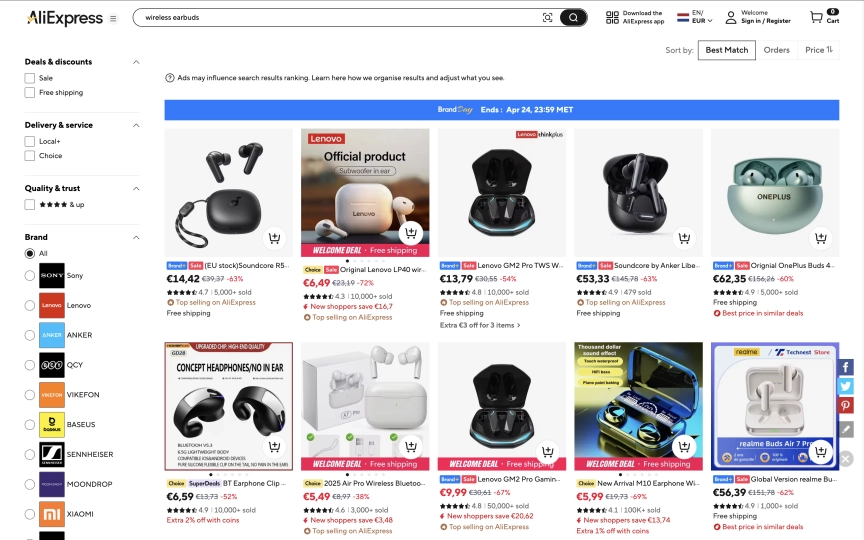
AliExpress returns comparison tables and buying guides inside the page content. Not buried in JavaScript bundles or hidden behind API calls. The search results include sponsored product listings with prices, AI-generated product comparisons with specs and price ranges, step-by-step buying advice, and FAQ sections. All of this comes back from a single observe call because AliExpress renders its search pages server-side.
That makes AliExpress one of the easiest e-commerce sites to scrape. No anti-bot detection. No CAPTCHAs. Datacenter proxies work fine (the cheapest option). You can block images, fonts, media, and stylesheets for maximum speed without losing any data.
This guide covers:
- How to extract sponsored product listings with prices and seller info
- The AI-generated buying guides AliExpress embeds in every search page
- Comparison tables with product specs, ratings, and price ranges
- How to build a multi-keyword product research tool for dropshipping
- Why product detail pages require a different approach
- Search URL filters for sorting, price ranges, and shipping options
- The DIY (BeautifulSoup) comparison and when it makes sense
TL;DR: AliExpress search pages are server-rendered, so observe returns rich markdown with product listings, buying guides, and comparison tables in a single request. Datacenter proxies work. Block all resource types for speed. Product detail pages use a client-rendered SPA that doesn't hydrate in headless mode, so extract product URLs from search results and follow up with targeted requests.
Don't have an API key yet? Create a free Browserbeam account - you get 5,000 credits, no credit card required.
Quick Start: Scrape AliExpress Products
One request. Datacenter proxy. Full product listings with prices, plus a buying guide with comparison tables.
curl -s -X POST https://api.browserbeam.com/v1/sessions \
  -H "Authorization: Bearer YOUR_API_KEY" \
  -H "Content-Type: application/json" \
  -d '{
    "url": "https://www.aliexpress.com/w/wholesale-wireless-earbuds.html",
    "proxy": { "kind": "datacenter", "country": "us" },
    "block_resources": ["image", "font", "media", "stylesheet"],
    "steps": [
      {"observe": {}},
      {"close": {}}
    ]
  }' | jq '.page.markdown.content'
from browserbeam import Browserbeam
client = Browserbeam(api_key="YOUR_API_KEY")
session = client.sessions.create(
url="https://www.aliexpress.com/w/wholesale-wireless-earbuds.html",
proxy={"kind": "datacenter", "country": "us"},
block_resources=["image", "font", "media", "stylesheet"],
steps=[{"observe": {}}, {"close": {}}],
)
print(session.page.markdown.content[:2000])import Browserbeam from "@browserbeam/sdk";
const client = new Browserbeam({ apiKey: "YOUR_API_KEY" });
const session = await client.sessions.create({
url: "https://www.aliexpress.com/w/wholesale-wireless-earbuds.html",
proxy: { kind: "datacenter", country: "us" },
block_resources: ["image", "font", "media", "stylesheet"],
steps: [{ observe: {} }, { close: {} }],
});
console.log(session.page?.markdown?.content?.slice(0, 2000));require "browserbeam"
client = Browserbeam::Client.new(api_key: "YOUR_API_KEY")
session = client.sessions.create(
url: "https://www.aliexpress.com/w/wholesale-wireless-earbuds.html",
proxy: { kind: "datacenter", country: "us" },
block_resources: ["image", "font", "media", "stylesheet"],
steps: [{ observe: {} }, { close: {} }]
)
puts session.page.markdown.content[0..2000]The response includes three types of data in a single markdown output:
1. Sponsored product listings with prices:
Premium sponsored items

NEW 3 Pro A3 Earphones With ANC C-type Cable ...
$19.63 / piece

Headphones digital type-c gaming wired headph...
$26.25 / piece

AI Translation Earbuds BT 5.4 Headphones Tran...
$34.71 / piece
2. AI-generated comparison tables:
| Model | Battery Life | Noise Cancellation | Bluetooth Version | Price (USD) |
| --- | --- | --- | --- | --- |
| Earin Wireless Earbuds | 12 hours | Yes | 5.0 | $25 |
| Wireless In-Ear Earbuds | 10 hours | No  | 4.2 | $18 |
| Wireless Headphone Earbuds | 15 hours | Yes | 5.2 | $30 |
3. Buying guide content with step-by-step advice:
1. Identify your primary use (e.g., commuting, workouts, office work).
2. Check for essential features like battery life, noise cancellation,
   and Bluetooth version.
3. Read user reviews to assess comfort and sound quality.
4. Compare prices and features across different models on AliExpress.
5. Test the fit and comfort if possible, or look for models with
   multiple ear tip sizes.
All of this from one observe call. AliExpress generates this content server-side for SEO, which means it's available in the initial HTML without waiting for JavaScript to render.
What Data Can You Extract from AliExpress?
AliExpress search pages return far more data than a typical product listing page. The SSR content includes buying guides, comparison tables, and FAQ sections alongside the actual product listings.
| Data Type | Source | Available Fields |
|---|---|---|
| Sponsored listings | Top of search results | Product title, price per piece, seller badges |
| Comparison tables | Embedded in buying guide | Model name, specs (battery, BT version, ANC), price range |
| Buying guides | SSR content block | Step-by-step advice, feature definitions, use case scenarios |
| FAQ content | Below buying guide | Questions and answers about product category |
| Product URLs | DOM links | Direct item URLs for follow-up extraction |
Search URL Structure
AliExpress search URLs follow a predictable pattern. The query goes in the path:
# Basic search
https://www.aliexpress.com/w/wholesale-{query}.html

# With sorting (orders, price, newest)
https://www.aliexpress.com/w/wholesale-wireless-earbuds.html?sortType=total_tranpro_desc

# Common sort options
?sortType=total_tranpro_desc   # Most orders
?sortType=price_asc            # Price low to high
?sortType=price_desc           # Price high to low
?sortType=create_desc          # Newest first
Replace spaces in your query with hyphens. "phone case iphone 15" becomes wholesale-phone-case-iphone-15.html.
Scraping Search Results
Observe for Rich Markdown
The observe approach gives you the most data because AliExpress search pages are server-rendered. The markdown output includes everything visible on the page plus the buying guide content that AliExpress generates for SEO.
curl -s -X POST https://api.browserbeam.com/v1/sessions \
  -H "Authorization: Bearer YOUR_API_KEY" \
  -H "Content-Type: application/json" \
  -d '{
    "url": "https://www.aliexpress.com/w/wholesale-phone-case-iphone-15.html",
    "proxy": { "kind": "datacenter", "country": "us" },
    "block_resources": ["image", "font", "media", "stylesheet"],
    "steps": [
      {"observe": {}},
      {"close": {}}
    ]
  }' | jq '.page.markdown.content'
from browserbeam import Browserbeam
client = Browserbeam(api_key="YOUR_API_KEY")
session = client.sessions.create(
url="https://www.aliexpress.com/w/wholesale-phone-case-iphone-15.html",
proxy={"kind": "datacenter", "country": "us"},
block_resources=["image", "font", "media", "stylesheet"],
steps=[{"observe": {}}, {"close": {}}],
)
markdown = session.page.markdown.content
print(f"Content length: {len(markdown)} characters")
print(markdown[:2000])import Browserbeam from "@browserbeam/sdk";
const client = new Browserbeam({ apiKey: "YOUR_API_KEY" });
const session = await client.sessions.create({
url: "https://www.aliexpress.com/w/wholesale-phone-case-iphone-15.html",
proxy: { kind: "datacenter", country: "us" },
block_resources: ["image", "font", "media", "stylesheet"],
steps: [{ observe: {} }, { close: {} }],
});
const markdown = session.page?.markdown?.content ?? "";
console.log(`Content length: ${markdown.length} characters`);
console.log(markdown.slice(0, 2000));require "browserbeam"
client = Browserbeam::Client.new(api_key: "YOUR_API_KEY")
session = client.sessions.create(
url: "https://www.aliexpress.com/w/wholesale-phone-case-iphone-15.html",
proxy: { kind: "datacenter", country: "us" },
block_resources: ["image", "font", "media", "stylesheet"],
steps: [{ observe: {} }, { close: {} }]
)
markdown = session.page.markdown.content
puts "Content length: #{markdown.length} characters"
puts markdown[0..2000]A typical search returns 8,000-11,000 characters of markdown. The content varies by query but always includes the sponsored listings at the top, followed by the buying guide, comparison tables, and FAQ sections.
Extract Product URLs
The search page DOM contains direct links to individual product pages. Use execute_js after observe to collect them:
curl -s -X POST https://api.browserbeam.com/v1/sessions \
  -H "Authorization: Bearer YOUR_API_KEY" \
  -H "Content-Type: application/json" \
  -d '{
    "url": "https://www.aliexpress.com/w/wholesale-wireless-earbuds.html",
    "proxy": { "kind": "datacenter", "country": "us" },
    "block_resources": ["image", "font", "media", "stylesheet"],
    "steps": [
      {"observe": {}},
      {"execute_js": {"code": "const links = document.querySelectorAll(\"a[href*=\\\"/item/\\\"]\"); const seen = new Set(); const urls = []; links.forEach(l => { const match = l.href.match(/\\/item\\/.*?\\/(\\d+)\\.html/); if (match && !seen.has(match[1])) { seen.add(match[1]); const img = l.querySelector(\"img\"); const title = img ? img.alt : l.textContent.trim(); urls.push({id: match[1], url: l.href.split(\"?\")[0], title: title.slice(0, 100)}); } }); return urls;", "result_key": "products"}},
      {"close": {}}
    ]
  }' | jq '.extraction.products[:5]'
from browserbeam import Browserbeam
client = Browserbeam(api_key="YOUR_API_KEY")
session = client.sessions.create(
url="https://www.aliexpress.com/w/wholesale-wireless-earbuds.html",
proxy={"kind": "datacenter", "country": "us"},
block_resources=["image", "font", "media", "stylesheet"],
steps=[
{"observe": {}},
{"execute_js": {
"code": """
const links = document.querySelectorAll('a[href*="/item/"]');
const seen = new Set();
const urls = [];
links.forEach(l => {
const match = l.href.match(/\\/item\\/.*?\\/(\\d+)\\.html/);
if (match && !seen.has(match[1])) {
seen.add(match[1]);
const img = l.querySelector('img');
const title = img ? img.alt : l.textContent.trim();
urls.push({
id: match[1],
url: l.href.split('?')[0],
title: title.slice(0, 100),
});
}
});
return urls;
""",
"result_key": "products",
}},
{"close": {}},
],
)
for p in session.extraction["products"][:5]:
print(f"{p['id']}: {p['title'][:60]}")
print(f" {p['url']}")import Browserbeam from "@browserbeam/sdk";
const client = new Browserbeam({ apiKey: "YOUR_API_KEY" });
const session = await client.sessions.create({
url: "https://www.aliexpress.com/w/wholesale-wireless-earbuds.html",
proxy: { kind: "datacenter", country: "us" },
block_resources: ["image", "font", "media", "stylesheet"],
steps: [
{ observe: {} },
{
execute_js: {
code: `
const links = document.querySelectorAll('a[href*="/item/"]');
const seen = new Set();
const urls = [];
links.forEach(l => {
const match = l.href.match(/\\/item\\/.*?\\/(\\d+)\\.html/);
if (match && !seen.has(match[1])) {
seen.add(match[1]);
const img = l.querySelector('img');
const title = img ? img.alt : l.textContent.trim();
urls.push({
id: match[1],
url: l.href.split('?')[0],
title: title.slice(0, 100),
});
}
});
return urls;`,
result_key: "products",
},
},
{ close: {} },
],
});
const products = session.extraction?.products as any[];
products?.slice(0, 5).forEach((p) => {
console.log(`${p.id}: ${p.title.slice(0, 60)}`);
});require "browserbeam"
client = Browserbeam::Client.new(api_key: "YOUR_API_KEY")
session = client.sessions.create(
url: "https://www.aliexpress.com/w/wholesale-wireless-earbuds.html",
proxy: { kind: "datacenter", country: "us" },
block_resources: ["image", "font", "media", "stylesheet"],
steps: [
{ observe: {} },
{ execute_js: {
code: 'const links = document.querySelectorAll("a[href*=\\\"/item/\\\"]"); const seen = new Set(); const urls = []; links.forEach(l => { const match = l.href.match(/\\/item\\/.*?\\/(\\d+)\\.html/); if (match && !seen.has(match[1])) { seen.add(match[1]); const img = l.querySelector("img"); const title = img ? img.alt : l.textContent.trim(); urls.push({id: match[1], url: l.href.split("?")[0], title: title.slice(0, 100)}); } }); return urls;',
result_key: "products"
} },
{ close: {} }
]
)
session.extraction["products"].first(5).each do |p|
puts "#{p['id']}: #{p['title'][0..60]}"
endOutput:
[
  {
    "id": "1005009531853494",
    "url": "https://www.aliexpress.com/item/Headphones-digital-type-c-gaming-wired-headphones-in-ear-mobile-phone-e-sports-chicken-headphones-with-light-suitable-for-apple/1005009531853494.html",
    "title": "Headphones digital type-c gaming wired headphones in-ear mobile phone..."
  },
  {
    "id": "1005012001273706",
    "url": "https://www.aliexpress.com/item/NEW-3-Pro-A3-Earphones-With-ANC-C-type-Cable-With-ANC-2-Pro-Wireless-Bluetooth-Earbuds-Handfree-Headset-for-iOS-Android/1005012001273706.html",
    "title": "NEW 3 Pro A3 Earphones With ANC C-type Cable..."
  },
  {
    "id": "1005008658663351",
    "url": "https://www.aliexpress.com/item/New-Wireless-Earbuds-HiFi-Stereo-Headphones-BT5.3-with-ENC-Noise-Cancelling-48H-LED-Display-Ear-Buds-IP7-Waterproof-Earphones/1005008658663351.html",
    "title": "New Wireless Earbuds HiFi Stereo Headphones BT5.3..."
  }
]
The observe step is required before execute_js here. It renders the SSR content and populates the DOM with product links. Without it, the page returns only the navigation shell. Product titles come from the img alt attribute on each link (AliExpress renders product cards as image links without text content).
Working with AliExpress's Server-Rendered Content
AliExpress is unusual among e-commerce sites. Most large platforms (Amazon, Shopify, eBay) render product data with client-side JavaScript. AliExpress search pages deliver their content as server-rendered HTML.
What SSR Means for Scraping
| Aspect | SSR (AliExpress search) | CSR (most e-commerce) |
|---|---|---|
| Content in initial HTML | Yes - full buying guide, tables, prices | No - skeleton placeholder |
| JavaScript required | Minimal (DOM is populated on load) | Yes (data fetched after page load) |
| Resource blocking | Block everything safely | May break rendering |
| Observe reliability | Very high (content is stable from first render) | Varies (need to wait for JS) |
| Extraction speed | Fast (no waiting for hydration) | Slower (wait for dynamic content) |
This is why observe alone returns 8,000+ characters of structured content. The buying guides, comparison tables, and product recommendations are all present in the HTML that the server sends. They're generated for Google's crawlers, which means they're also available to any browser that requests the page.
The Buying Guide Content
Every AliExpress search generates a category-specific buying guide. In our testing, we found that these guides follow a consistent structure:
- Introduction with search intent analysis
- Step-by-step buying advice tailored to the product category
- Technical term definitions (e.g., "IPX Rating", "ANC", "TPU")
- Comparison table with 3 product models, specs, and prices
- FAQ section with 3-5 questions and detailed answers
- Related product terms and category cross-references
The content varies by search query. "Wireless earbuds" generates audio-focused comparisons. "Phone case iphone 15" generates material and protection comparisons. Each search query produces unique content, making it valuable for product research and market analysis.
(Pro Tip: The comparison tables in the buying guides aren't pulled from actual AliExpress listings. They're AI-generated summaries based on the product category. Treat them as category-level market intelligence, not as real-time pricing data.)
Building a Dropshipping Product Finder
Dropshipping research means scanning multiple product categories quickly. Here's a multi-keyword scraper that collects buying guides and product URLs across categories:
from browserbeam import Browserbeam
import json
import re
from datetime import date

client = Browserbeam(api_key="YOUR_API_KEY")

categories = [
    "wireless-earbuds",
    "phone-case-iphone-15",
    "led-strip-lights",
    "portable-blender",
    "car-phone-holder",
]

results = {}
for category in categories:
    url = f"https://www.aliexpress.com/w/wholesale-{category}.html"
    session = client.sessions.create(
        url=url,
        proxy={"kind": "datacenter", "country": "us"},
        block_resources=["image", "font", "media", "stylesheet"],
        steps=[
            {"observe": {}},
            {"execute_js": {
                "code": """
const links = document.querySelectorAll('a[href*="/item/"]');
const seen = new Set();
const urls = [];
links.forEach(l => {
  const match = l.href.match(/\\/item\\/.*?\\/(\\d+)\\.html/);
  if (match && !seen.has(match[1])) {
    seen.add(match[1]);
    urls.push({id: match[1], url: l.href.split('?')[0]});
  }
});
return urls;
""",
                "result_key": "products",
            }},
            {"close": {}},
        ],
    )

    markdown = session.page.markdown.content
    tables = re.findall(r"\|.*\|.*\|.*\n\|.*\n(?:\|.*\n)+", markdown)

    results[category] = {
        "markdown_length": len(markdown),
        "product_urls": session.extraction["products"],
        "comparison_tables": len(tables),
        "has_buying_guide": "Results for" in markdown,
    }
    print(f"{category}: {len(session.extraction['products'])} products, "
          f"{len(tables)} tables, {len(markdown)} chars")

with open(f"aliexpress_research_{date.today().isoformat()}.json", "w") as f:
    json.dump(results, f, indent=2)

print(f"\nScraped {len(categories)} categories")
This script collects product URLs and buying guide metadata for five categories. Run it across 20-30 categories to build a full product research dataset. The comparison tables give you a quick view of what's trending in each category, and the product URLs let you follow up with individual product research.
Filtering Results by Sort Order
Different sort orders return different sponsored listings and buying guide content:
from browserbeam import Browserbeam

client = Browserbeam(api_key="YOUR_API_KEY")

sort_options = {
    "best_match": "",
    "most_orders": "?sortType=total_tranpro_desc",
    "price_low": "?sortType=price_asc",
    "price_high": "?sortType=price_desc",
    "newest": "?sortType=create_desc",
}

base = "https://www.aliexpress.com/w/wholesale-wireless-earbuds.html"

for label, params in sort_options.items():
    session = client.sessions.create(
        url=f"{base}{params}",
        proxy={"kind": "datacenter", "country": "us"},
        block_resources=["image", "font", "media", "stylesheet"],
        steps=[{"observe": {}}, {"close": {}}],
    )
    md = session.page.markdown.content
    prices = [line for line in md.split("\n") if "$ " in line or "/ piece" in line]
    print(f"{label}: {len(md)} chars, {len(prices)} price lines")
Product Detail Pages: What Works (and What Doesn't)
AliExpress product detail pages use a client-side rendered SPA framework. Unlike the server-rendered search pages, product pages load a 279KB HTML shell and rely on JavaScript to hydrate the product data. In our testing across datacenter and residential proxies, with and without resource blocking, the product content consistently failed to render in headless mode.
What you get from a product detail page:
# Aliexpress

-   I'm shopping for...

AliExpress

0Cart0
That's the navigation shell without any product data.
Why Product Pages Don't Render
AliExpress product pages use a custom rendering framework that detects headless environments. The HTML is present (279KB of it), but the SPA never hydrates the product section. The DOM contains 70KB of body HTML with category navigation and footer content, but zero product elements.
This is different from sites like IMDb where the React app hydrates after a delay (which observe solves). AliExpress product pages intentionally skip rendering when they detect a non-standard browser environment.
Workaround: Extract Data from Search Results
The sponsored product listings at the top of search results give you titles and prices. For more structured product data, combine multiple search queries to build a complete dataset:
from browserbeam import Browserbeam
import re

client = Browserbeam(api_key="YOUR_API_KEY")

def extract_sponsored_products(markdown):
    lines = markdown.split("\n")
    products = []
    current_title = None
    for line in lines:
        line = line.strip()
        if not line:
            continue
        if current_title is None and line and not line.startswith(("$", "#", "|", "-", "*")):
            current_title = line
        elif current_title and "$" in line and "/ piece" in line:
            price_match = re.search(r"\$([\d.]+)", line)
            if price_match:
                products.append({
                    "title": current_title,
                    "price": float(price_match.group(1)),
                    "currency": "USD",
                })
            current_title = None
        else:
            current_title = line if line and not line.startswith(("$", "#", "|", "-", "*")) else None
    return products

session = client.sessions.create(
    url="https://www.aliexpress.com/w/wholesale-wireless-earbuds.html",
    proxy={"kind": "datacenter", "country": "us"},
    block_resources=["image", "font", "media", "stylesheet"],
    steps=[{"observe": {}}, {"close": {}}],
)

products = extract_sponsored_products(session.page.markdown.content)
for p in products:
    print(f"${p['price']:.2f} - {p['title'][:60]}")
Output:
$19.63 - NEW 3 Pro A3 Earphones With ANC C-type Cable ...
$26.25 - Headphones digital type-c gaming wired headph...
$34.71 - AI Translation Earbuds BT 5.4 Headphones Tran...
$19.40 - Super A3 For New 3 Pro ANC TWS Wireless Bluet...
$8.65 - New Wireless Earbuds HiFi Stereo Headphones B...
Saving and Processing Your Data
Export to JSON
import json

data = {
    "query": "wireless-earbuds",
    "markdown": markdown,
    "product_urls": product_urls,
    "sponsored_products": sponsored_products,
}

with open("aliexpress_wireless_earbuds.json", "w") as f:
    json.dump(data, f, indent=2, ensure_ascii=False)

print(f"Saved {len(markdown)} chars of content")
Export Comparison Tables to CSV
The comparison tables in the buying guide are already structured. Parse them from the markdown:
import csv
import re

def extract_tables(markdown):
    table_pattern = re.compile(
        r"(\|[^\n]+\|\n\|[\s\-:|]+\|\n(?:\|[^\n]+\|\n)+)", re.MULTILINE
    )
    tables = []
    for match in table_pattern.finditer(markdown):
        rows = match.group(0).strip().split("\n")
        headers = [h.strip() for h in rows[0].split("|")[1:-1]]
        data = []
        for row in rows[2:]:
            cells = [c.strip() for c in row.split("|")[1:-1]]
            if len(cells) == len(headers):
                data.append(dict(zip(headers, cells)))
        if data:
            tables.append({"headers": headers, "rows": data})
    return tables

tables = extract_tables(markdown)
for i, table in enumerate(tables):
    filename = f"aliexpress_table_{i + 1}.csv"
    with open(filename, "w", newline="", encoding="utf-8") as f:
        writer = csv.DictWriter(f, fieldnames=table["headers"])
        writer.writeheader()
        writer.writerows(table["rows"])
    print(f"Saved {filename} with {len(table['rows'])} rows")
DIY Scraping vs Browserbeam API
AliExpress search pages are server-rendered, which means traditional scraping tools work better here than on most e-commerce sites. Here's the comparison:
| Aspect | DIY (requests + BeautifulSoup) | Browserbeam API |
|---|---|---|
| Search pages | Works (SSR content in HTML) | Works (observe returns rich markdown) |
| Product detail pages | Same limitation (SPA doesn't render) | Same limitation (SPA doesn't render) |
| Proxy management | Buy and configure yourself | One parameter: proxy: { kind: "datacenter" } |
| Output format | Raw HTML you parse manually | Structured markdown with tables preserved |
| Comparison tables | Extract with BeautifulSoup find_all("table") |
Already formatted as markdown tables |
| Product URLs | Parse <a> tags yourself |
execute_js extracts and deduplicates |
| Setup time | 30 minutes | 2 minutes |
Here's the BeautifulSoup equivalent:
import requests
from bs4 import BeautifulSoup

url = "https://www.aliexpress.com/w/wholesale-wireless-earbuds.html"
headers = {"User-Agent": "Mozilla/5.0 (Windows NT 10.0; Win64; x64) AppleWebKit/537.36"}

response = requests.get(url, headers=headers)
soup = BeautifulSoup(response.text, "html.parser")

tables = soup.find_all("table")
for table in tables:
    rows = table.find_all("tr")
    for row in rows:
        cells = [td.text.strip() for td in row.find_all(["td", "th"])]
        print(" | ".join(cells))

links = soup.find_all("a", href=lambda h: h and "/item/" in h)
for link in links[:5]:
    print(link["href"])
For AliExpress specifically, the DIY approach is more viable than for most sites because the SSR content is available without JavaScript rendering. The Browserbeam API adds value through the markdown formatting (tables are preserved as markdown tables), automatic proxy rotation, and the execute_js capability for DOM-based extraction. If you're already scraping other sites with Browserbeam, using the same API for AliExpress keeps your codebase consistent.
Use Cases
Dropshipping Product Research
Scan trending product categories to find items with high order counts and competitive pricing. The comparison tables in the buying guides provide quick category overviews without needing to visit individual product pages:
from browserbeam import Browserbeam
import re

client = Browserbeam(api_key="YOUR_API_KEY")

trending = [
    "portable-blender", "led-strip-lights", "wireless-earbuds",
    "phone-case-iphone-15", "car-phone-holder", "mini-projector",
]

for product in trending:
    session = client.sessions.create(
        url=f"https://www.aliexpress.com/w/wholesale-{product}.html",
        proxy={"kind": "datacenter", "country": "us"},
        block_resources=["image", "font", "media", "stylesheet"],
        steps=[{"observe": {}}, {"close": {}}],
    )
    md = session.page.markdown.content
    table_count = len(re.findall(r"\|.*\|.*\|.*\n\|.*\n(?:\|.*\n)+", md))
    price_lines = [l for l in md.split("\n") if "/ piece" in l]
    print(f"{product}: {len(price_lines)} sponsored, {table_count} tables")
Cross-Border Price Monitoring
Compare product prices across searches to track pricing trends. Since AliExpress shows prices in USD for US-proxied requests, the data is directly comparable across categories.
Supplier Discovery
Extract product URLs from search results and group them by seller. Build a supplier shortlist based on which sellers appear most frequently across your target categories.
Common Mistakes When Scraping AliExpress
1. Expecting Product Detail Pages to Work
AliExpress product pages use a client-side SPA that doesn't hydrate in headless browsers. The page loads 279KB of HTML but the product section never renders. Stick to search pages for data extraction, and use the sponsored listings and buying guide content as your primary data source.
2. Not Using Observe on Search Pages
The SSR content on AliExpress search pages contains comparison tables, buying guides, and FAQ sections that are only available through observe. If you skip observe and go straight to execute_js, you miss all of this content. The observe step captures the full server-rendered markdown.
3. Using Residential Proxies
AliExpress has no anti-bot protection on search pages. Datacenter proxies work perfectly and cost much less than residential proxies. Save your residential proxy credits for sites that need them, like Redfin or Reddit. See residential vs datacenter proxies for guidance on which type each target site needs.
4. Treating Buying Guide Data as Real-Time Pricing
The comparison tables in the buying guides are AI-generated category summaries. The prices and specs are approximate and may not match actual listings. Use the sponsored product listings at the top of search results for real pricing data, and the buying guide tables for category-level market intelligence.
Frequently Asked Questions
Is it legal to scrape AliExpress?
AliExpress displays product data publicly. Scraping publicly available data is generally permitted under the hiQ v. LinkedIn precedent. AliExpress's Terms of Service restrict automated access, so evaluate your specific use case. For personal product research and price comparison, the legal risk is low.
Does AliExpress block scrapers?
No. AliExpress search pages have no anti-bot protection. Datacenter proxies work without issues. There are no CAPTCHAs, no JavaScript challenges, and no IP-based rate limiting on search pages. Product detail pages don't render in headless mode, but this is a rendering limitation rather than active blocking.
Can I scrape AliExpress product pages?
AliExpress product detail pages use a client-side SPA framework that doesn't hydrate in headless browsers. The page loads but the product content never appears. Search pages work reliably and include sponsored product listings with prices, buying guides with comparison tables, and product URLs that you can use for follow-up research.
How to scrape AliExpress prices?
Two sources: (1) Sponsored product listings at the top of search results show actual prices per piece. Parse these from the observe markdown output. (2) Comparison tables in the buying guide show approximate price ranges for the category. The sponsored listings reflect real-time pricing while the tables are AI-generated summaries.
AliExpress scraper vs Amazon scraper?
AliExpress is simpler to scrape: datacenter proxies work (Amazon needs residential), no CAPTCHA solving needed, and search pages are server-rendered. Amazon has more structured product data on detail pages, while AliExpress product pages don't render. For cross-platform price comparison, scrape AliExpress search pages and Amazon product pages separately, then merge the datasets. See the structured web scraping guide for schema design.
What data does AliExpress return that other sites don't?
The AI-generated buying guides are unique to AliExpress. No other major e-commerce site embeds comparison tables, technical term definitions, and step-by-step buying advice directly in the search results HTML. This content is generated for SEO and gives you category-level market intelligence alongside the product listings.
Start Building Your AliExpress Scraper
AliExpress search pages are server-rendered with rich SSR content: sponsored products with prices, AI-generated buying guides, comparison tables, and FAQ sections. All available from a single observe call with datacenter proxies. Block all resource types for maximum speed.
The main limitation is product detail pages, which use a client-side SPA that doesn't hydrate in headless mode. Work around this by extracting product URLs and sponsored listings from search results, and use the buying guide comparison tables for category-level research.
Try replacing "wireless-earbuds" with any product keyword. The same observe + execute_js pattern works across all AliExpress search pages. For multi-category research, the dropshipping product finder script scales to dozens of categories per run.
For the complete API reference, check the Browserbeam documentation. The data extraction guide covers extraction schemas in depth. If you're scraping other e-commerce sites, the Amazon scraping guide covers anti-bot handling, and the Shopify guide shows the JSON API shortcut for stores.