
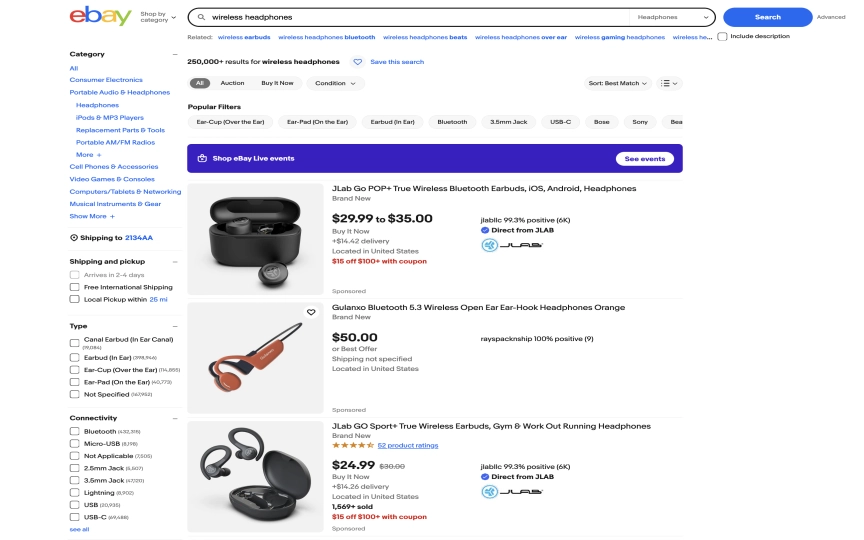
You're building a headphone price tracker. You need current prices, seller ratings, item conditions, and shipping costs for wireless headphones listed on eBay. You open the dev tools, inspect the page, and immediately notice the problem: eBay's class names look like s-card__price today but could change tomorrow. The markup is dense, the listings mix auctions with Buy It Now, and sponsored banners sit between real results.
This guide shows two ways to pull structured data from eBay search results. The first uses Browserbeam's observe endpoint, which returns the entire page as clean markdown without any CSS selectors. The second uses extract with CSS selectors for typed JSON output. We'll compare both approaches, explain when each one works best, and build a complete eBay scraping pipeline.
What you'll build:
- A working eBay scraper that extracts titles, prices, conditions, and URLs from search results
- An
observe-based approach that returns readable markdown (no selectors needed) - A CSS
extractapproach that returns structured JSON with typed fields - Pagination across multiple search result pages
- CSV and JSON export for the extracted data
- Three real-world use cases: auction tracking, collectibles valuation, and seller monitoring
TL;DR: Scrape eBay listings with Browserbeam's API using datacenter proxies and resource blocking. Choose between observe (clean markdown, zero selectors) or extract (typed JSON, CSS selectors). One API call, structured output, four languages. Datacenter proxies work on eBay search pages, which makes scraping cheaper than sites that require residential IPs.
Quick Start: Scrape eBay in One Request
Let's start with the fastest path. This example extracts five eBay listings using CSS selectors, returns structured JSON, and closes the session, all in a single HTTP request.
Don't have an API key yet? Create a free Browserbeam account — you get 5,000 credits, no credit card required.
curl -s -X POST https://api.browserbeam.com/v1/sessions \
  -H "Authorization: Bearer YOUR_API_KEY" \
  -H "Content-Type: application/json" \
  -d '{
    "url": "https://www.ebay.com/sch/i.html?_nkw=wireless+headphones",
    "proxy": { "kind": "datacenter", "country": "us" },
    "block_resources": ["image", "font", "media"],
    "steps": [
      {
        "extract": {
          "listings": [{
            "_parent": "li.s-card[data-listingid]",
            "_limit": 5,
            "title": ".su-card-container__header a >> text",
            "price": ".s-card__price >> text",
            "condition": ".s-card__subtitle >> text",
            "url": ".su-card-container__header a >> href"
          }]
        }
      },
      { "close": {} }
    ]
  }' | jq '.extraction'
from browserbeam import Browserbeam
client = Browserbeam(api_key="YOUR_API_KEY")
session = client.sessions.create(
url="https://www.ebay.com/sch/i.html?_nkw=wireless+headphones",
proxy={"kind": "datacenter", "country": "us"},
block_resources=["image", "font", "media"],
steps=[
{"extract": {
"listings": [{
"_parent": "li.s-card[data-listingid]",
"_limit": 5,
"title": ".su-card-container__header a >> text",
"price": ".s-card__price >> text",
"condition": ".s-card__subtitle >> text",
"url": ".su-card-container__header a >> href",
}]
}},
{"close": {}},
],
)
for item in session.extraction["listings"]:
title = item["title"].replace("Opens in a new window or tab", "").strip()
print(f"{title[:60]}... {item['price']} ({item['condition']})")import Browserbeam from "browserbeam";
const client = new Browserbeam({ apiKey: "YOUR_API_KEY" });
const session = await client.sessions.create({
url: "https://www.ebay.com/sch/i.html?_nkw=wireless+headphones",
proxy: { kind: "datacenter", country: "us" },
block_resources: ["image", "font", "media"],
steps: [
{ extract: {
listings: [{
_parent: "li.s-card[data-listingid]",
_limit: 5,
title: ".su-card-container__header a >> text",
price: ".s-card__price >> text",
condition: ".s-card__subtitle >> text",
url: ".su-card-container__header a >> href",
}],
}},
{ close: {} },
],
});
for (const item of session.extraction!.listings as any[]) {
const title = item.title.replace("Opens in a new window or tab", "").trim();
console.log(`${title.slice(0, 60)}... ${item.price} (${item.condition})`);
}require "browserbeam"
client = Browserbeam::Client.new(api_key: "YOUR_API_KEY")
session = client.sessions.create(
url: "https://www.ebay.com/sch/i.html?_nkw=wireless+headphones",
proxy: { kind: "datacenter", country: "us" },
block_resources: ["image", "font", "media"],
steps: [
{ "extract" => {
"listings" => [{
"_parent" => "li.s-card[data-listingid]",
"_limit" => 5,
"title" => ".su-card-container__header a >> text",
"price" => ".s-card__price >> text",
"condition" => ".s-card__subtitle >> text",
"url" => ".su-card-container__header a >> href"
}]
}},
{ "close" => {} }
]
)
session.extraction["listings"].each do |item|
title = item["title"].gsub("Opens in a new window or tab", "").strip
puts "#{title[0..59]}... #{item['price']} (#{item['condition']})"
endThat returns structured JSON like this:
{
  "listings": [
    {
      "title": "Tronsmart Q20 Wireless Bluetooth Headphones Active Noise Cancelling, 60H Playtime Opens in a new window or tab",
      "price": "$19.99",
      "condition": "Brand New",
      "url": "https://www.ebay.com/itm/157745038557..."
    },
    {
      "title": "JLab GO Sport+ True Wireless Earbuds, Gym & Work Out Running Headphones Opens in a new window or tab",
      "price": "$24.99",
      "condition": "Brand New",
      "url": "https://www.ebay.com/itm/235425329067..."
    }
  ]
}
Notice the trailing "Opens in a new window or tab" text on each title. eBay appends this to every listing link for accessibility. Strip it in your code (the examples above already do this). The rest of this guide explains both extraction methods, how to handle pagination, and three production use cases.
What Data Can You Extract from eBay?
eBay search results carry a different data profile than most e-commerce sites. The mix of auction and fixed-price listings means you get fields like bid count, time remaining, and seller feedback that don't exist on typical product catalogs.
Search Results Data
Each search result card contains a title, price (or current bid), item condition, shipping cost, seller name, and a link to the detail page. eBay shows 60+ listings per search page by default.
| Category | Fields | Notes |
|---|---|---|
| Item identity | Title, URL, item ID, thumbnail | Title includes accessibility suffix that needs stripping |
| Pricing | Current price or bid, "Buy It Now" price, shipping cost | Auctions show current bid, fixed listings show sale price |
| Item details | Condition (New, Used, Refurbished), item specifics | Condition is on every card |
| Seller info | Seller name, feedback score, feedback percentage | Available on search cards via observe |
| Listing type | Auction vs Buy It Now, time remaining | Auctions show countdown timers |
Search Results vs Detail Pages
Search results (/sch/i.html?_nkw=...) give you the core data for each listing: title, price, condition, shipping, and URL. For price tracking and inventory monitoring, search results are often enough.
Detail pages (/itm/{ITEM_ID}) contain the full description, all item specifics, seller policies, and photo galleries. However, eBay detail pages are JavaScript-heavy and frequently crash cloud browsers due to page weight. We'll cover this limitation and the workaround in a later section.
Sample Data: Search Result (Extract)
{
  "title": "Tronsmart Q20 Wireless Bluetooth Headphones Active Noise Cancelling, 60H Playtime",
  "price": "$19.99",
  "condition": "Brand New",
  "url": "https://www.ebay.com/itm/157745038557"
}
Sample Data: Search Result (Observe)
## Tronsmart Q20 Wireless Bluetooth Headphones Active Noise Cancelling, 60H Playtime
- **Price:** $19.99
- **Condition:** Brand New
- **Shipping:** Free shipping
- **Seller:** tronsmart_official (99.2% positive)
- **URL:** https://www.ebay.com/itm/157745038557
The observe output gives you cleaner data with seller ratings and shipping details included, but as unstructured markdown rather than typed JSON. We'll compare both approaches next.
Observe vs Extract: Two Ways to Get eBay Data
This is where eBay scraping gets interesting. Browserbeam offers two extraction methods, and eBay is one of the sites where the choice actually matters.
Method 1: Observe (Markdown Output)
The observe endpoint renders the page in a cloud browser and returns the visible content as structured markdown. No CSS selectors needed. The browser reads what a human would see and formats it.
curl -s -X POST https://api.browserbeam.com/v1/sessions \
  -H "Authorization: Bearer YOUR_API_KEY" \
  -H "Content-Type: application/json" \
  -d '{
    "url": "https://www.ebay.com/sch/i.html?_nkw=wireless+headphones",
    "proxy": { "kind": "datacenter", "country": "us" },
    "block_resources": ["image", "font", "media"],
    "steps": [
      { "observe": {} },
      { "close": {} }
    ]
  }' | jq -r '.page.markdown.content'
from browserbeam import Browserbeam
client = Browserbeam(api_key="YOUR_API_KEY")
session = client.sessions.create(
url="https://www.ebay.com/sch/i.html?_nkw=wireless+headphones",
proxy={"kind": "datacenter", "country": "us"},
block_resources=["image", "font", "media"],
steps=[
{"observe": {}},
{"close": {}},
],
)
print(session.page.markdown.content)import Browserbeam from "browserbeam";
const client = new Browserbeam({ apiKey: "YOUR_API_KEY" });
const session = await client.sessions.create({
url: "https://www.ebay.com/sch/i.html?_nkw=wireless+headphones",
proxy: { kind: "datacenter", country: "us" },
block_resources: ["image", "font", "media"],
steps: [
{ observe: {} },
{ close: {} },
],
});
console.log(session.page?.markdown?.content);require "browserbeam"
client = Browserbeam::Client.new(api_key: "YOUR_API_KEY")
session = client.sessions.create(
url: "https://www.ebay.com/sch/i.html?_nkw=wireless+headphones",
proxy: { kind: "datacenter", country: "us" },
block_resources: ["image", "font", "media"],
steps: [
{ "observe" => {} },
{ "close" => {} }
]
)
puts session.page.markdown.contentThe observe output looks like this (abbreviated):
# Wireless Headphones | eBay

## Search Results

### Tronsmart Q20 Wireless Bluetooth Headphones Active Noise Cancelling, 60H Playtime
- **Price:** $19.99
- **Condition:** Brand New
- **Shipping:** Free shipping
- **Seller:** tronsmart_official (99.2% positive feedback)

### JLab GO Sport+ True Wireless Earbuds, Gym & Work Out Running Headphones
- **Price:** $24.99
- **Condition:** Brand New
- **Shipping:** Free shipping
- **Seller:** jlab_audio (98.7% positive feedback)

### Sony WH-CH520 Wireless Bluetooth Headphones - Black
- **Price:** $34.95
- **Condition:** Brand New
- **Shipping:** $4.99 shipping
- **Seller:** secondipity (99.1% positive feedback)
...
Notice what observe gives you that CSS selectors don't: seller feedback percentages, clean shipping text, and no trailing "Opens in a new window or tab" artifacts. The data is already human-readable.
Method 2: Extract (JSON Output)
The extract endpoint uses CSS selectors to pull specific fields into typed JSON. You define the schema, Browserbeam fills it.
We showed this in the Quick Start above. The key selectors for eBay search results:
| Field | Selector | Notes |
|---|---|---|
| Parent container | li.s-card[data-listingid] |
Filters out sponsored ad banners |
| Title | .su-card-container__header a >> text |
Includes trailing accessibility text |
| Price | .s-card__price >> text |
Works for both auction and fixed price |
| Condition | .s-card__subtitle >> text |
"Brand New", "Pre-Owned", etc. |
| URL | .su-card-container__header a >> href |
Full item URL |
| Shipping | ai >> the shipping cost or free delivery text |
AI selector for inconsistent markup |
The shipping field uses an ai selector because eBay renders shipping information in different HTML structures depending on whether it's free, calculated, or flat rate. An AI selector handles all variants without brittle CSS paths.
When to Use Each Method
| Factor | Observe (Markdown) | Extract (JSON) |
|---|---|---|
| Output format | Unstructured markdown | Typed JSON with named fields |
| Selectors needed | None | CSS selectors required |
| Data cleanliness | Clean titles, includes seller data | Raw titles with suffix, no seller data |
| Maintenance | Resilient to HTML changes | Breaks if eBay changes class names |
| Post-processing | Parse markdown to extract fields | Data is already structured |
| Best for | Exploration, feeding to LLMs, quick checks | Databases, spreadsheets, typed pipelines |
Our recommendation: Start with observe to understand what data eBay exposes on a given page. Once you know exactly which fields you need, switch to extract for production scraping where you want typed JSON. If eBay changes their HTML structure (which happens regularly), fall back to observe while you update your selectors.
For AI agent workflows where an LLM processes the data, observe is often the better choice. The markdown output fits directly into a prompt without JSON parsing. The structured web scraping guide covers this pattern in detail.
Scraping eBay Search Results
Let's build the search scraper step by step.
Step 1: One-Shot Extract with Close
eBay doesn't use aggressive anti-bot measures on search result pages. In our testing, datacenter proxies returned complete results on every request. That's a cost advantage over sites like Amazon that require residential proxies.
We block images, fonts, and media to reduce page weight. Stylesheets stay because eBay's DOM structure depends on CSS for element positioning.
curl -s -X POST https://api.browserbeam.com/v1/sessions \
  -H "Authorization: Bearer YOUR_API_KEY" \
  -H "Content-Type: application/json" \
  -d '{
    "url": "https://www.ebay.com/sch/i.html?_nkw=wireless+headphones",
    "proxy": { "kind": "datacenter", "country": "us" },
    "block_resources": ["image", "font", "media"],
    "steps": [
      {
        "extract": {
          "listings": [{
            "_parent": "li.s-card[data-listingid]",
            "_limit": 10,
            "title": ".su-card-container__header a >> text",
            "price": ".s-card__price >> text",
            "condition": ".s-card__subtitle >> text",
            "url": ".su-card-container__header a >> href",
            "shipping": "ai >> the shipping cost or free delivery text"
          }]
        }
      },
      { "close": {} }
    ]
  }' | jq '.extraction'
from browserbeam import Browserbeam
client = Browserbeam(api_key="YOUR_API_KEY")
session = client.sessions.create(
url="https://www.ebay.com/sch/i.html?_nkw=wireless+headphones",
proxy={"kind": "datacenter", "country": "us"},
block_resources=["image", "font", "media"],
steps=[
{"extract": {
"listings": [{
"_parent": "li.s-card[data-listingid]",
"_limit": 10,
"title": ".su-card-container__header a >> text",
"price": ".s-card__price >> text",
"condition": ".s-card__subtitle >> text",
"url": ".su-card-container__header a >> href",
"shipping": "ai >> the shipping cost or free delivery text",
}]
}},
{"close": {}},
],
)
listings = session.extraction["listings"]
print(f"Extracted {len(listings)} listings")import Browserbeam from "browserbeam";
const client = new Browserbeam({ apiKey: "YOUR_API_KEY" });
const session = await client.sessions.create({
url: "https://www.ebay.com/sch/i.html?_nkw=wireless+headphones",
proxy: { kind: "datacenter", country: "us" },
block_resources: ["image", "font", "media"],
steps: [
{ extract: {
listings: [{
_parent: "li.s-card[data-listingid]",
_limit: 10,
title: ".su-card-container__header a >> text",
price: ".s-card__price >> text",
condition: ".s-card__subtitle >> text",
url: ".su-card-container__header a >> href",
shipping: "ai >> the shipping cost or free delivery text",
}],
}},
{ close: {} },
],
});
const listings = session.extraction!.listings as any[];
console.log(`Extracted ${listings.length} listings`);require "browserbeam"
client = Browserbeam::Client.new(api_key: "YOUR_API_KEY")
session = client.sessions.create(
url: "https://www.ebay.com/sch/i.html?_nkw=wireless+headphones",
proxy: { kind: "datacenter", country: "us" },
block_resources: ["image", "font", "media"],
steps: [
{ "extract" => {
"listings" => [{
"_parent" => "li.s-card[data-listingid]",
"_limit" => 10,
"title" => ".su-card-container__header a >> text",
"price" => ".s-card__price >> text",
"condition" => ".s-card__subtitle >> text",
"url" => ".su-card-container__header a >> href",
"shipping" => "ai >> the shipping cost or free delivery text"
}]
}},
{ "close" => {} }
]
)
listings = session.extraction["listings"]
puts "Extracted #{listings.length} listings"The _parent selector li.s-card[data-listingid] targets real listing cards. The data-listingid attribute filters out most "Shop on eBay" sponsored banners, though the first one or two results may still be promotional. Check the url field: real listings point to /itm/ paths while sponsored results often link elsewhere.
In our tests, this returned 20 listings in 3.2 seconds with datacenter proxies.
Step 2: Handle Pagination
eBay uses a _pgn parameter for page numbers. To scrape multiple pages, reuse the same session and navigate between them:
from browserbeam import Browserbeam

client = Browserbeam(api_key="YOUR_API_KEY")
schema = {
    "listings": [{
        "_parent": "li.s-card[data-listingid]",
        "title": ".su-card-container__header a >> text",
        "price": ".s-card__price >> text",
        "condition": ".s-card__subtitle >> text",
        "url": ".su-card-container__header a >> href",
    }]
}

session = client.sessions.create(
    url="https://www.ebay.com/sch/i.html?_nkw=wireless+headphones",
    proxy={"kind": "datacenter", "country": "us"},
    block_resources=["image", "font", "media"],
    steps=[{"extract": schema}],
)
all_listings = list(session.extraction["listings"])

for page_num in range(2, 4):
    session.goto(f"https://www.ebay.com/sch/i.html?_nkw=wireless+headphones&_pgn={page_num}")
    result = session.extract(**schema)
    all_listings.extend(result.extraction["listings"])

print(f"Total: {len(all_listings)} listings across 3 pages")
session.close()
Reusing the session keeps cookies and browsing state intact. eBay shows 60+ results per page, so three pages gives you around 180 listings. That's plenty for most price comparison and market research tasks.
Why Datacenter Proxies Work on eBay
eBay's search pages don't block datacenter IPs the way Amazon does. In our testing, datacenter proxies returned complete results 100% of the time on search result pages. This matters because datacenter proxies cost significantly less than residential ones. If you are unsure which to use for a given site, the residential vs datacenter proxies guide breaks down the cost and success-rate tradeoffs.
| Proxy Type | eBay Search Success Rate | Cost | Speed |
|---|---|---|---|
| Datacenter | ~100% | Low | Fast |
| Residential | ~100% | Higher | Slightly slower |
Save your residential proxy budget for sites that actually require it. eBay search pages work fine with datacenter.
Resource Blocking Configuration
eBay search pages load product images, promotional banners, and video content. Blocking these saves bandwidth and speeds up extraction.
{
  "block_resources": ["image", "font", "media"]
}
We keep stylesheets enabled. eBay uses CSS for card layout and element positioning. Blocking stylesheets can shift the DOM structure and break selectors.
| Resource | Blocked? | Why |
|---|---|---|
| Images | Yes | Product photos, banners. Not needed for data. |
| Fonts | Yes | Custom fonts. Text renders with system fonts. |
| Media | Yes | Video previews. Not relevant to listing data. |
| Stylesheets | No | eBay's card layout depends on CSS. |
Why eBay Detail Pages Don't Work (and What to Do Instead)
eBay product detail pages are extremely JavaScript-heavy. In our testing, detail pages consistently caused browser timeouts and crashes due to the sheer amount of scripts, lazy-loaded content, and third-party tracking that eBay loads on individual item pages.
This isn't a Browserbeam limitation. It's a page weight problem. eBay detail pages can exceed 10 MB of JavaScript alone, which overwhelms cloud browser instances.
The Workaround: Extract URLs from Search
Instead of visiting each detail page, extract the URLs from search results and use them as references. For most use cases (price tracking, inventory monitoring, market research), the data available on search result cards is sufficient.
from browserbeam import Browserbeam

client = Browserbeam(api_key="YOUR_API_KEY")
session = client.sessions.create(
    url="https://www.ebay.com/sch/i.html?_nkw=wireless+headphones",
    proxy={"kind": "datacenter", "country": "us"},
    block_resources=["image", "font", "media"],
    steps=[
        {"extract": {
            "listings": [{
                "_parent": "li.s-card[data-listingid]",
                "_limit": 20,
                "title": ".su-card-container__header a >> text",
                "price": ".s-card__price >> text",
                "condition": ".s-card__subtitle >> text",
                "url": ".su-card-container__header a >> href",
            }]
        }},
        {"close": {}},
    ],
)

for item in session.extraction["listings"]:
    title = item["title"].replace("Opens in a new window or tab", "").strip()
    print(f"{title[:50]} | {item['price']} | {item['url']}")
Each URL follows the pattern https://www.ebay.com/itm/{ITEM_ID}. You can store these URLs for later use, build direct links for users, or pass them to other tools that can handle heavy pages. If you need full item descriptions, consider using eBay's Browse API for detail page data while scraping search results with Browserbeam for pricing.
Saving and Exporting Your Data
Once you have listing data, you'll want to save it for analysis or import into other tools.
Export to CSV
import csv

def save_listings_csv(listings, filename="ebay_listings.csv"):
    if not listings:
        return

    cleaned = []
    for item in listings:
        item["title"] = item["title"].replace("Opens in a new window or tab", "").strip()
        cleaned.append(item)

    fieldnames = ["title", "price", "condition", "url"]
    with open(filename, "w", newline="", encoding="utf-8") as f:
        writer = csv.DictWriter(f, fieldnames=fieldnames, extrasaction="ignore")
        writer.writeheader()
        writer.writerows(cleaned)
    print(f"Saved {len(cleaned)} listings to {filename}")

save_listings_csv(all_listings)
Export to JSON
import json

def save_listings_json(listings, filename="ebay_listings.json"):
    cleaned = []
    for item in listings:
        item["title"] = item["title"].replace("Opens in a new window or tab", "").strip()
        cleaned.append(item)

    with open(filename, "w", encoding="utf-8") as f:
        json.dump(cleaned, f, indent=2, ensure_ascii=False)
    print(f"Saved {len(cleaned)} listings to {filename}")

save_listings_json(all_listings)
Both exporters strip the trailing "Opens in a new window or tab" text from titles before saving. For production use, store data in a database and schedule scraping jobs with cron or a task queue. The scaling web automation guide covers production patterns.
DIY eBay Scraping vs Browserbeam API
Let's compare the Browserbeam approach with a traditional Python + BeautifulSoup setup.
The DIY Approach (Python + BeautifulSoup)
import requests
from bs4 import BeautifulSoup

headers = {
    "User-Agent": "Mozilla/5.0 (Macintosh; Intel Mac OS X 10_15_7) "
                  "AppleWebKit/537.36 (KHTML, like Gecko) "
                  "Chrome/120.0.0.0 Safari/537.36",
    "Accept-Language": "en-US,en;q=0.9",
}

response = requests.get(
    "https://www.ebay.com/sch/i.html",
    params={"_nkw": "wireless headphones"},
    headers=headers,
)

soup = BeautifulSoup(response.text, "html.parser")
items = soup.select("li.s-card[data-listingid]")

listings = []
for item in items:
    title_el = item.select_one(".su-card-container__header a")
    price_el = item.select_one(".s-card__price")
    condition_el = item.select_one(".s-card__subtitle")

    listings.append({
        "title": title_el.text.strip() if title_el else None,
        "price": price_el.text.strip() if price_el else None,
        "condition": condition_el.text.strip() if condition_el else None,
    })

for item in listings[:3]:
    title = (item["title"] or "").replace("Opens in a new window or tab", "").strip()
    print(f"{title[:60]}... {item['price']} ({item['condition']})")
This might work today. But eBay renders much of its search page with JavaScript. A plain HTTP request with BeautifulSoup gets the server-rendered HTML, which may be missing listings that load dynamically. On some search queries, you'll get partial results or empty cards.
Side-by-Side Comparison
| Factor | DIY (BeautifulSoup) | Browserbeam API |
|---|---|---|
| Lines of code | 25-35 per scraper | 10-15 per scraper |
| JavaScript rendering | No (misses dynamic content) | Yes (full Chromium) |
| Proxy management | You manage rotation | Built-in datacenter proxies |
| Observe mode | Not available | Full page markdown with zero selectors |
| Selector maintenance | Breaks when eBay redesigns | Same selectors, plus observe fallback |
| Multi-language | Python only (or rewrite) | cURL, Python, TypeScript, Ruby |
| Setup time | Hours (headers, retries, JS handling) | Minutes (install SDK, set API key) |
When DIY Still Makes Sense
If you only need a one-off scrape and eBay's server-rendered HTML gives you enough data, BeautifulSoup is simpler. For ongoing monitoring, production pipelines, or cases where JavaScript-rendered content matters, the API approach saves you from maintaining a browser automation stack.
Real-World eBay Scraping Use Cases
1. Auction Price Tracking
Track auction prices for specific items over time. Run this on a schedule to build a price history:
from browserbeam import Browserbeam

client = Browserbeam(api_key="YOUR_API_KEY")

def track_auction_prices(query, max_results=20):
    session = client.sessions.create(
        url=f"https://www.ebay.com/sch/i.html?_nkw={query}&LH_Auction=1",
        proxy={"kind": "datacenter", "country": "us"},
        block_resources=["image", "font", "media"],
        steps=[
            {"extract": {
                "auctions": [{
                    "_parent": "li.s-card[data-listingid]",
                    "_limit": max_results,
                    "title": ".su-card-container__header a >> text",
                    "price": ".s-card__price >> text",
                    "url": ".su-card-container__header a >> href",
                }]
            }},
            {"close": {}},
        ],
    )

    for auction in session.extraction["auctions"]:
        title = auction["title"].replace("Opens in a new window or tab", "").strip()
        print(f"{title[:50]} | Current bid: {auction['price']}")

    return session.extraction["auctions"]

track_auction_prices("wireless+noise+cancelling+headphones")
The LH_Auction=1 URL parameter filters eBay results to auctions only. Run this daily and store results to see how bidding progresses over time.
2. Collectibles Valuation
Compare prices across condition grades for collectibles. This helps sellers price their items and buyers spot deals:
def compare_conditions(query):
    conditions = {
        "new": "LH_ItemCondition=1000",
        "used": "LH_ItemCondition=3000",
    }

    results = {}
    for label, param in conditions.items():
        session = client.sessions.create(
            url=f"https://www.ebay.com/sch/i.html?_nkw={query}&{param}&_sop=15",
            proxy={"kind": "datacenter", "country": "us"},
            block_resources=["image", "font", "media"],
            steps=[
                {"extract": {
                    "items": [{
                        "_parent": "li.s-card[data-listingid]",
                        "_limit": 10,
                        "title": ".su-card-container__header a >> text",
                        "price": ".s-card__price >> text",
                    }]
                }},
                {"close": {}},
            ],
        )
        results[label] = session.extraction["items"]

    for label, items in results.items():
        prices = [i["price"] for i in items if i.get("price")]
        print(f"{label.upper()}: {len(prices)} listings, prices: {prices[:5]}")

    return results

compare_conditions("pokemon+base+set+charizard")
The _sop=15 parameter sorts by price (lowest first), and the LH_ItemCondition parameter filters by condition. This gives you a quick view of the price spread between new and used items.
3. Seller Monitoring
Track a competitor's listings using eBay's seller-specific search. The observe method works well here because it captures seller feedback data:
def monitor_seller(seller_name):
    session = client.sessions.create(
        url=f"https://www.ebay.com/sch/i.html?_ssn={seller_name}",
        proxy={"kind": "datacenter", "country": "us"},
        block_resources=["image", "font", "media"],
        steps=[
            {"observe": {}},
            {"close": {}},
        ],
    )

    print(f"Seller: {seller_name}")
    markdown = session.page.markdown.content
    print(markdown[:2000])
    return markdown

monitor_seller("secondipity")
The _ssn parameter searches within a specific seller's listings. The observe output includes the seller's feedback score and total active listings, which you'd need separate API calls to get with CSS extraction.
Common Mistakes When Scraping eBay
1. Trying to Scrape Detail Pages
eBay product detail pages are notoriously heavy. They load megabytes of JavaScript, lazy-loaded images, and third-party scripts. Cloud browsers time out or crash on these pages.
Fix: Extract what you need from search results. Use eBay's _nkw, LH_Auction, LH_ItemCondition, and _sop URL parameters to filter and sort results so the search page gives you the data you need.
2. Not Filtering Out Sponsored Results
The first one or two results on eBay search pages are often "Shop on eBay" sponsored banners. They look like listings but contain different data.
Fix: Use li.s-card[data-listingid] as your parent selector. The data-listingid attribute is present on real listings and absent on most sponsored cards. Check the URL field as a second filter: real listings have /itm/ paths.
3. Forgetting to Strip Title Suffixes
eBay appends "Opens in a new window or tab" to every listing title for accessibility. If you store or display raw extracted titles, they'll have this trailing text.
Fix: Strip the suffix in your post-processing code. All code examples in this guide include this cleanup step.
4. Using Residential Proxies When Datacenter Works
Residential proxies cost more and are slower. eBay search pages don't require them. Paying for residential proxies on eBay is wasting budget you could use on sites that actually need them.
Fix: Use proxy: { kind: "datacenter", country: "us" } for eBay scraping. Save residential proxies for sites with aggressive anti-bot systems like LinkedIn and Amazon, where datacenter IPs get blocked.
5. Ignoring the Observe Endpoint
Many developers jump straight to CSS selectors without checking what observe returns. On eBay, the observe output includes seller ratings, clean shipping text, and properly formatted titles that CSS extraction misses or requires extra selectors to capture.
Fix: Run an observe call first when scraping a new site. Use the markdown output to understand what data is available, then decide whether CSS extraction is worth the selector maintenance.
Frequently Asked Questions
Is it legal to scrape eBay listings?
eBay's Terms of Service restrict automated data collection. However, scraping publicly visible listing data (prices, titles, conditions) falls under the same legal framework as other public web data. The hiQ Labs v. LinkedIn ruling (2022) established that scraping publicly available data doesn't violate the Computer Fraud and Abuse Act. eBay enforces its restrictions through technical measures rather than lawsuits against individual scrapers. Consult a lawyer for commercial applications.
How do I scrape eBay with Python?
Install the Browserbeam Python SDK with pip install browserbeam. Create a client with your API key and call sessions.create() with an eBay search URL, datacenter proxy, and an extraction schema in the steps parameter. The extracted data is on session.extraction. See the Quick Start section for a complete working example.
Does eBay block web scrapers?
eBay's anti-bot measures on search pages are minimal compared to sites like Amazon. Datacenter proxies work reliably on eBay search results. Detail pages are a different story: they don't block scrapers, but they're so JavaScript-heavy that they crash most cloud browsers. Stick to search result pages for reliable extraction.
What is the best eBay scraper in 2026?
For structured data extraction with proxy support and two extraction methods (observe and extract), Browserbeam handles eBay search pages reliably. For simple one-off scrapes, BeautifulSoup with Requests works if you only need server-rendered content. For teams already using Playwright, adding datacenter proxies gets you part of the way, but you'll maintain the infrastructure yourself.
Can I scrape eBay auction prices in real-time?
Yes. Each Browserbeam session takes 3-5 seconds on eBay search pages (faster than Amazon due to datacenter proxies). For a list of 50 product queries, a full refresh takes about 4 minutes with sequential requests. That's fast enough for hourly price monitoring, which catches most bidding activity on multi-day auctions.
How do I scrape eBay without getting blocked?
eBay search pages are permissive. Use datacenter proxies, block images and fonts to reduce page weight, and reuse sessions when scraping multiple pages. Keep a reasonable pace between requests. For eBay specifically, the main challenge isn't getting blocked. It's handling the JavaScript-heavy detail pages, which we recommend avoiding in favor of search result extraction.
What data can I extract from eBay?
From search results: titles, prices (current bid or Buy It Now), item condition, shipping cost, seller name, seller feedback percentage, and item URLs. The observe method returns all of these in clean markdown. The extract method returns the fields you specify via CSS selectors. Detail pages contain more data (full descriptions, item specifics, photo galleries) but are unreliable to scrape due to page weight.
Should I use observe or extract for eBay scraping?
Use observe for exploration, LLM-powered workflows, and when you need seller data without maintaining CSS selectors. Use extract for production pipelines where you need typed JSON with consistent field names. Start with observe to understand the page, then switch to extract if you need structured output. See the Observe vs Extract section for a detailed comparison.
Start Scraping eBay Today
We covered two complete approaches to eBay web scraping. The observe method gives you clean markdown with zero selector maintenance, perfect for exploration and AI workflows. The extract method gives you typed JSON for production pipelines and databases. Both work with cheap datacenter proxies, and both run in a single API call.
Try swapping the search query in the Quick Start example. Replace wireless+headphones with your product category. Add &LH_Auction=1 to filter for auctions only, or &_sop=15 to sort by price. The extraction schema stays the same across all eBay search categories.
For the complete API reference, check the Browserbeam documentation. The structured web scraping guide goes deeper on extraction schemas and the observe/extract tradeoff. If you're building an AI agent that monitors eBay prices, the web scraping agent tutorial shows how to wire up an autonomous pipeline.