
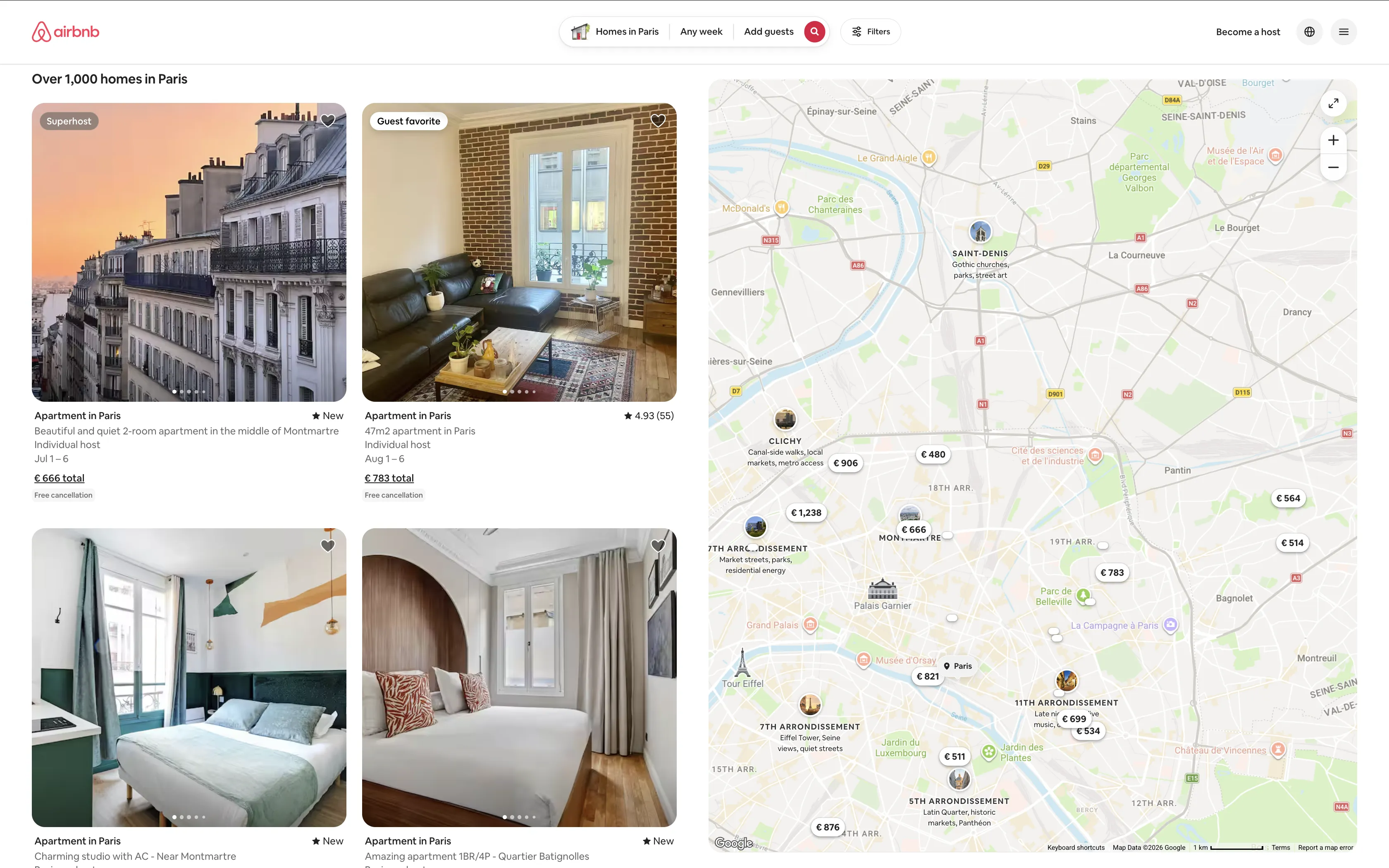
The keyword "airbnb scraper" costs $18.74 per click in Google Ads. That's the highest CPC of any web scraping keyword, and it tells you exactly how much Airbnb listing data is worth. Property managers, real estate investors, and travel platforms all want nightly rates, host ratings, and availability calendars. And unlike Amazon or Reddit, Airbnb doesn't fight back against datacenter proxies, which makes scraping it cheaper than most sites in this series.
This guide walks through building a complete Airbnb scraper with Browserbeam's cloud browser API. We'll extract search result listings, pull detail pages with reviews and amenities, and build a price tracker that monitors nightly rates over time. Every code example runs against real Airbnb URLs and returns real data.
What you'll build:
- A one-call Airbnb scraper that returns listing names, prices, ratings, and URLs as structured JSON
- Search result filtering by date, guests, and location using URL parameters
- Detail page extraction with amenities, host info, reviews, and calendar availability
- An automated price tracker that monitors nightly rates across listings
- CSV and JSON export for the extracted data
- Three real-world use cases: investment analysis, rental market comparison, and travel deal finder
TL;DR: Scrape Airbnb listings with Browserbeam's API and datacenter proxies. One API call returns listing names, prices, ratings, and URLs as structured JSON. No residential IPs needed. Airbnb uses obfuscated CSS class names, but stable attribute selectors like [itemprop=itemListElement] and [itemprop=name] still work. For richer data (descriptions, reviews, amenities), the observe endpoint returns the full page as markdown.
Don't have an API key yet? Create a free Browserbeam account. You get 5,000 credits, no credit card required.
Quick Start: Scrape Airbnb Listings in One Request
Let's start with the fastest path. This example extracts Airbnb listings as structured JSON with names, prices, ratings, and URLs. One HTTP request, real listing data, session closed automatically.
Airbnb obfuscates its CSS class names (cg7l307, dk055fg), but stable attribute selectors still work. The key is [itemprop=itemListElement] for the listing container and [itemprop=name] for the listing name. Both use schema.org microdata that Airbnb maintains for SEO.
curl -s -X POST https://api.browserbeam.com/v1/sessions \
  -H "Authorization: Bearer YOUR_API_KEY" \
  -H "Content-Type: application/json" \
  -d '{
    "url": "https://www.airbnb.com/s/Paris/homes?currency=USD",
    "proxy": { "kind": "datacenter", "country": "us" },
    "locale": "en-US",
    "timezone": "America/New_York",
    "steps": [
      {
        "extract": {
          "listings": [{
            "_parent": "[itemprop=itemListElement]",
            "_limit": 10,
            "name": "[itemprop=name] >> content",
            "title": "[id*=title] >> text",
            "url": "a[target*=listing_] >> href",
            "price": "div[style*=--pricing] button span:first-child >> text",
            "rating": "[data-testid=price-availability-row] + div > span span:nth-of-type(3) >> text"
          }]
        }
      },
      { "close": {} }
    ]
  }' | jq '.extraction'
from browserbeam import Browserbeam
client = Browserbeam(api_key="YOUR_API_KEY")
session = client.sessions.create(
url="https://www.airbnb.com/s/Paris/homes?currency=USD",
proxy={"kind": "datacenter", "country": "us"},
locale="en-US",
timezone="America/New_York",
steps=[
{"extract": {
"listings": [{
"_parent": "[itemprop=itemListElement]",
"_limit": 10,
"name": "[itemprop=name] >> content",
"title": "[id*=title] >> text",
"url": "a[target*=listing_] >> href",
"price": "div[style*=--pricing] button span:first-child >> text",
"rating": "[data-testid=price-availability-row] + div > span span:nth-of-type(3) >> text"
}]
}},
{"close": {}}
]
)
for listing in session.extraction["listings"]:
print(f'{listing["name"]}: {listing["price"]}')import Browserbeam from "@browserbeam/sdk";
const client = new Browserbeam({ apiKey: "YOUR_API_KEY" });
const session = await client.sessions.create({
url: "https://www.airbnb.com/s/Paris/homes?currency=USD",
proxy: { kind: "datacenter", country: "us" },
locale: "en-US",
timezone: "America/New_York",
steps: [
{ extract: {
listings: [{
_parent: "[itemprop=itemListElement]",
_limit: 10,
name: "[itemprop=name] >> content",
title: "[id*=title] >> text",
url: "a[target*=listing_] >> href",
price: "div[style*=--pricing] button span:first-child >> text",
rating: "[data-testid=price-availability-row] + div > span span:nth-of-type(3) >> text"
}]
}},
{ close: {} }
]
});
for (const listing of session.extraction?.listings ?? []) {
console.log(`${listing.name}: ${listing.price}`);
}require "browserbeam"
client = Browserbeam::Client.new(api_key: "YOUR_API_KEY")
session = client.sessions.create(
url: "https://www.airbnb.com/s/Paris/homes?currency=USD",
proxy: { kind: "datacenter", country: "us" },
locale: "en-US",
timezone: "America/New_York",
steps: [
{ extract: {
listings: [{
_parent: "[itemprop=itemListElement]",
_limit: 10,
name: "[itemprop=name] >> content",
title: "[id*=title] >> text",
url: "a[target*=listing_] >> href",
price: "div[style*=--pricing] button span:first-child >> text",
rating: "[data-testid=price-availability-row] + div > span span:nth-of-type(3) >> text"
}]
}},
{ close: {} }
]
)
session.extraction["listings"].each do |listing|
puts "#{listing['name']}: #{listing['price']}"
endHere's the JSON you get back:
{
  "extraction": {
    "listings": [
      {
        "name": "Balcony Eiffel Tower View : Newly Refurbished Apt",
        "title": "Apartment in Paris",
        "url": "https://www.airbnb.com/rooms/1536119775792438782?...",
        "price": "$2,360",
        "rating": "5.0 (32)"
      },
      {
        "name": "Beautiful 2-room apartment in Montmartre",
        "title": "Apartment in Paris",
        "url": "https://www.airbnb.com/rooms/1608845619012980698?...",
        "price": "$680",
        "rating": "New"
      },
      {
        "name": "Amazing apartment 1BR/4P - Louvre Museum",
        "title": "Apartment in Paris",
        "url": "https://www.airbnb.com/rooms/1657225431937186423?...",
        "price": "$2,106",
        "rating": "5.0 (3)"
      }
    ]
  }
}
Each listing has a typed JSON object with the name, property type, full URL (with check-in/checkout params), total price, and rating. The selectors use schema.org attributes (itemprop), data-testid, and CSS custom properties (--pricing), all of which are more stable than Airbnb's obfuscated class names.
Here's how each selector works:
| Selector | Target | Why It's Stable |
|---|---|---|
[itemprop=itemListElement] |
Listing card container | Schema.org microdata for SEO |
[itemprop=name] >> content |
Listing name | Schema.org microdata |
[id*=title] >> text |
Property type ("Apartment in Paris") | Partial ID match |
a[target*=listing_] >> href |
Listing URL | Target attribute for new-tab links |
div[style*=--pricing] button span:first-child >> text |
Price | CSS custom property + button structure |
[data-testid=price-availability-row] sibling |
Rating | QA test attribute |
What Data Can You Extract from Airbnb?
Airbnb exposes different data depending on which page you scrape. Here's what's available on each:
| Data Field | Search Results | Listing Detail |
|---|---|---|
| Listing title | ✓ | ✓ |
| Property type (apartment, house, room) | ✓ | ✓ |
| Nightly/total price | ✓ | ✓ |
| Star rating | ✓ | ✓ |
| Number of reviews | ✓ | ✓ |
| Guest capacity | ✓ | |
| Bedrooms / beds / baths | ✓ | |
| Amenities (WiFi, kitchen, etc.) | ✓ | |
| Host name and Superhost status | ✓ | ✓ |
| Host response rate | ✓ | |
| Cancellation policy | ✓ | ✓ |
| Individual review text | ✓ | |
| Category ratings (cleanliness, location, etc.) | ✓ | |
| Description | ✓ | |
| Calendar availability | ✓ | |
| Check-in instructions | ✓ |
Search results give you enough to compare prices and ratings across listings. Detail pages give you everything you need for deep analysis: full reviews, amenity lists, category ratings, and availability calendars.
Why Datacenter Proxies Work on Airbnb
Airbnb doesn't use aggressive anti-bot detection on search or listing pages. Standard datacenter proxies pass without issues, which makes Airbnb one of the cheapest sites to scrape at scale.
| Factor | Airbnb | Amazon | |
|---|---|---|---|
| Proxy type needed | Datacenter | Residential | Residential |
| Anti-bot detection | Minimal | Aggressive | JS challenge |
| Cost per 1,000 pages | ~$2 | ~$15 | ~$15 |
| Block rate (datacenter) | <1% | ~90% | ~95% |
| Resource blocking safe | No (causes skeleton rendering) | Yes | No |
Amazon and Reddit actively block datacenter IPs. Amazon returns CAPTCHAs, and Reddit triggers a JavaScript challenge that only residential proxies with full browser rendering can handle. Airbnb does neither. It serves the same content to datacenter and residential IPs.
Set proxy.kind to "datacenter" and proxy.country to match your target market. If you're scraping Paris listings and want USD prices, use a US proxy with locale: "en-US" and ?currency=USD in the URL.
For more on proxy types and when each makes sense, see the scraping guide for Amazon (residential) or eBay (datacenter).
Scraping Airbnb Search Results
The Quick Start uses a one-shot pattern with steps. For production scraping, you'll want to keep the session open so you can extract listings, grab detail page URLs, and run follow-up actions.
# Step 1: Create session
SID=$(curl -s -X POST https://api.browserbeam.com/v1/sessions \
  -H "Authorization: Bearer YOUR_API_KEY" \
  -H "Content-Type: application/json" \
  -d '{
    "url": "https://www.airbnb.com/s/Paris/homes?currency=USD",
    "proxy": { "kind": "datacenter", "country": "us" },
    "locale": "en-US",
    "timezone": "America/New_York"
  }' | jq -r '.session_id')

# Step 2: Extract listings as JSON
curl -s -X POST "https://api.browserbeam.com/v1/sessions/$SID/act" \
  -H "Authorization: Bearer YOUR_API_KEY" \
  -H "Content-Type: application/json" \
  -d '{"steps": [{"extract": {"listings": [{"_parent": "[itemprop=itemListElement]", "_limit": 20, "name": "[itemprop=name] >> content", "title": "[id*=title] >> text", "url": "a[target*=listing_] >> href", "price": "div[style*=--pricing] button span:first-child >> text", "rating": "[data-testid=price-availability-row] + div > span span:nth-of-type(3) >> text"}]}}]}' | jq '.extraction'

# Step 3: Close session
curl -s -X POST "https://api.browserbeam.com/v1/sessions/$SID/act" \
  -H "Authorization: Bearer YOUR_API_KEY" \
  -H "Content-Type: application/json" \
  -d '{"steps": [{"close": {}}]}'
from browserbeam import Browserbeam
client = Browserbeam(api_key="YOUR_API_KEY")
session = client.sessions.create(
url="https://www.airbnb.com/s/Paris/homes?currency=USD",
proxy={"kind": "datacenter", "country": "us"},
locale="en-US",
timezone="America/New_York"
)
result = session.extract(
listings=[{
"_parent": "[itemprop=itemListElement]",
"_limit": 20,
"name": "[itemprop=name] >> content",
"title": "[id*=title] >> text",
"url": "a[target*=listing_] >> href",
"price": "div[style*=--pricing] button span:first-child >> text",
"rating": "[data-testid=price-availability-row] + div > span span:nth-of-type(3) >> text"
}]
)
for listing in result.extraction["listings"]:
print(f'{listing["name"]}: {listing["price"]}')
session.close()import Browserbeam from "@browserbeam/sdk";
const client = new Browserbeam({ apiKey: "YOUR_API_KEY" });
const session = await client.sessions.create({
url: "https://www.airbnb.com/s/Paris/homes?currency=USD",
proxy: { kind: "datacenter", country: "us" },
locale: "en-US",
timezone: "America/New_York"
});
const result = await session.extract({
listings: [{
_parent: "[itemprop=itemListElement]",
_limit: 20,
name: "[itemprop=name] >> content",
title: "[id*=title] >> text",
url: "a[target*=listing_] >> href",
price: "div[style*=--pricing] button span:first-child >> text",
rating: "[data-testid=price-availability-row] + div > span span:nth-of-type(3) >> text"
}]
});
for (const listing of result.extraction?.listings ?? []) {
console.log(`${listing.name}: ${listing.price}`);
}
await session.close();require "browserbeam"
client = Browserbeam::Client.new(api_key: "YOUR_API_KEY")
session = client.sessions.create(
url: "https://www.airbnb.com/s/Paris/homes?currency=USD",
proxy: { kind: "datacenter", country: "us" },
locale: "en-US",
timezone: "America/New_York"
)
result = session.extract(
listings: [{
_parent: "[itemprop=itemListElement]",
_limit: 20,
name: "[itemprop=name] >> content",
title: "[id*=title] >> text",
url: "a[target*=listing_] >> href",
price: "div[style*=--pricing] button span:first-child >> text",
rating: "[data-testid=price-availability-row] + div > span span:nth-of-type(3) >> text"
}]
)
result.extraction["listings"].each do |listing|
puts "#{listing['name']}: #{listing['price']}"
end
session.closeThe interactive pattern (create, extract, close separately) gives you a live session where you can chain multiple actions: extract listings, navigate to detail pages, and observe each one.
Using Observe for Richer Listing Data
The extract schema gives you structured JSON with specific fields. But if you want the full picture (descriptions, dates, cancellation policies, bed counts), the observe endpoint returns everything visible on the page as markdown. Use observe when you need more data than the CSS selectors can target, or when feeding results to an LLM.
session = client.sessions.create(
    url="https://www.airbnb.com/s/Paris/homes?currency=USD",
    proxy={"kind": "datacenter", "country": "us"},
    locale="en-US",
    timezone="America/New_York",
    steps=[{"observe": {}}, {"close": {}}]
)
print(session.page.markdown)
Filtering by Date, Guests, and Location
Airbnb encodes all search filters in the URL. Append query parameters to control what listings appear:
| Parameter | Example | Effect |
|---|---|---|
checkin / checkout |
checkin=2026-07-01&checkout=2026-07-06 |
Show availability and total price for dates |
adults |
adults=2 |
Filter by guest count |
children |
children=1 |
Include child guests |
infants |
infants=1 |
Include infant guests |
pets |
pets=1 |
Pet-friendly listings only |
price_min / price_max |
price_min=50&price_max=200 |
Nightly price range in local currency |
min_bedrooms |
min_bedrooms=2 |
Minimum bedroom count |
room_types[] |
room_types[]=Entire%20home/apt |
Filter by room type |
currency |
currency=USD |
Force price currency |
Combine parameters to build targeted search URLs:
base = "https://www.airbnb.com/s/Paris/homes"
params = "?currency=USD&checkin=2026-07-01&checkout=2026-07-06&adults=2&price_max=200"

session = client.sessions.create(
    url=f"{base}{params}",
    proxy={"kind": "datacenter", "country": "us"},
    locale="en-US",
    timezone="America/New_York"
)

result = session.extract(
    listings=[{
        "_parent": "[itemprop=itemListElement]",
        "_limit": 20,
        "name": "[itemprop=name] >> content",
        "price": "div[style*=--pricing] button span:first-child >> text",
        "url": "a[target*=listing_] >> href"
    }]
)
for listing in result.extraction["listings"]:
    print(f'{listing["name"]}: {listing["price"]}')

session.close()
With checkin and checkout set, Airbnb shows total prices for the stay instead of nightly rates. This is critical for price comparison workflows where you need the all-in cost.
Extracting Listing URLs from Search Results
The extract schema already returns full URLs in the url field. But if you only need the room paths (e.g., for building detail page URLs later), use the same extract with a simpler schema:
session = client.sessions.create(
    url="https://www.airbnb.com/s/Paris/homes?currency=USD",
    proxy={"kind": "datacenter", "country": "us"},
    locale="en-US",
    timezone="America/New_York"
)

result = session.extract(
    listings=[{
        "_parent": "[itemprop=itemListElement]",
        "_limit": 20,
        "name": "[itemprop=name] >> content",
        "url": "a[target*=listing_] >> href"
    }]
)
for listing in result.extraction["listings"]:
    print(f'{listing["name"]}: {listing["url"]}')

session.close()
Each URL looks like https://www.airbnb.com/rooms/928380169835462176?.... You can open a fresh session on each URL to scrape the full detail page.
Working with Airbnb's Dynamic Pricing and Availability
Airbnb prices aren't static. The same listing can show different nightly rates depending on four factors:
- Check-in and checkout dates. Hosts set custom pricing per night, with seasonal peaks and weekend premiums. A listing that costs $120/night in February might charge $280/night in July.
- Proxy location. Airbnb may adjust display currency and pricing based on where the request originates. Always set
locale,timezone, andcurrencyexplicitly to get consistent results. - Guest count. Some hosts charge extra per guest beyond a base number. Adding
adults=4to the URL can change the total price. - Stay length. Weekly and monthly discounts are common. A 7-night stay might cost less per night than a 3-night stay at the same listing.
For price tracking, always include checkin, checkout, and currency in every request. Without dates, Airbnb shows "Add dates for prices" instead of actual rates on detail pages.
import json
from datetime import date, timedelta

checkin = date(2026, 8, 1)
checkout = checkin + timedelta(days=5)

session = client.sessions.create(
    url=(
        f"https://www.airbnb.com/s/Paris/homes"
        f"?currency=USD&checkin={checkin}&checkout={checkout}"
        f"&adults=2&price_max=300"
    ),
    proxy={"kind": "datacenter", "country": "us"},
    locale="en-US",
    timezone="America/New_York"
)

result = session.extract(
    listings=[{
        "_parent": "[itemprop=itemListElement]",
        "_limit": 20,
        "name": "[itemprop=name] >> content",
        "price": "div[style*=--pricing] button span:first-child >> text",
        "rating": "[data-testid=price-availability-row] + div > span span:nth-of-type(3) >> text",
        "url": "a[target*=listing_] >> href"
    }]
)
session.close()

for listing in result.extraction["listings"]:
    print(f'{listing["name"]}: {listing["price"]} ({listing["rating"]})')
Run this weekly with different date ranges to track how prices shift across seasons. With dates set, the price field contains the total stay price rather than nightly rates.
Scraping Listing Detail Pages
Detail pages contain the richest data on Airbnb: full descriptions, amenity lists, host profiles, review breakdowns, and calendar availability. Open a fresh session directly on the listing URL for the most reliable results.
For structured JSON, use extract with h1, h2, and picture img:
curl -s -X POST https://api.browserbeam.com/v1/sessions \
  -H "Authorization: Bearer YOUR_API_KEY" \
  -H "Content-Type: application/json" \
  -d '{
    "url": "https://www.airbnb.com/rooms/928380169835462176?currency=USD",
    "proxy": { "kind": "datacenter", "country": "us" },
    "locale": "en-US",
    "timezone": "America/New_York",
    "steps": [
      {
        "extract": {
          "title": "h1 >> text",
          "type": "h2 >> text",
          "images": ["picture img >> src"]
        }
      },
      { "close": {} }
    ]
  }' | jq '.extraction'
from browserbeam import Browserbeam
client = Browserbeam(api_key="YOUR_API_KEY")
session = client.sessions.create(
url="https://www.airbnb.com/rooms/928380169835462176?currency=USD",
proxy={"kind": "datacenter", "country": "us"},
locale="en-US",
timezone="America/New_York",
steps=[
{"extract": {
"title": "h1 >> text",
"type": "h2 >> text",
"images": ["picture img >> src"]
}},
{"close": {}}
]
)
print(f"Title: {session.extraction['title']}")
print(f"Type: {session.extraction['type']}")
print(f"Images: {len(session.extraction['images'])}")import Browserbeam from "@browserbeam/sdk";
const client = new Browserbeam({ apiKey: "YOUR_API_KEY" });
const session = await client.sessions.create({
url: "https://www.airbnb.com/rooms/928380169835462176?currency=USD",
proxy: { kind: "datacenter", country: "us" },
locale: "en-US",
timezone: "America/New_York",
steps: [
{ extract: {
title: "h1 >> text",
type: "h2 >> text",
images: ["picture img >> src"]
}},
{ close: {} }
]
});
console.log(`Title: ${session.extraction?.title}`);
console.log(`Type: ${session.extraction?.type}`);
console.log(`Images: ${session.extraction?.images?.length}`);require "browserbeam"
client = Browserbeam::Client.new(api_key: "YOUR_API_KEY")
session = client.sessions.create(
url: "https://www.airbnb.com/rooms/928380169835462176?currency=USD",
proxy: { kind: "datacenter", country: "us" },
locale: "en-US",
timezone: "America/New_York",
steps: [
{ extract: {
title: "h1 >> text",
type: "h2 >> text",
images: ["picture img >> src"]
}},
{ close: {} }
]
)
puts "Title: #{session.extraction['title']}"
puts "Type: #{session.extraction['type']}"
puts "Images: #{session.extraction['images'].length}"Here's the JSON you get back:
{
  "extraction": {
    "title": "Elegant & Bright | 2P | Montmartre & Sacré-Cœur",
    "type": "Entire rental unit in Paris, France",
    "images": [
      "https://a0.muscache.com/im/pictures/miso/Hosting-928380169835462176/original/62f0b38a-2b0f-4f4a-8ece-73228030c43b.jpeg?im_w=720",
      "https://a0.muscache.com/im/pictures/miso/Hosting-928380169835462176/original/6c569a25-2c8a-4ad6-9506-94446a6080d2.jpeg?im_w=720",
      "https://a0.muscache.com/im/pictures/miso/Hosting-928380169835462176/original/49cfe706-6298-40ce-9123-d6ad25023682.jpeg?im_w=720"
    ]
  }
}
Getting More Detail Page Fields with execute_js
The extract schema handles title, type, and images cleanly with CSS selectors. For deeper fields like amenities, guest capacity, and rating breakdowns, use execute_js to pull specific data from the rendered page:
session = client.sessions.create(
    url="https://www.airbnb.com/rooms/928380169835462176?currency=USD",
    proxy={"kind": "datacenter", "country": "us"},
    locale="en-US",
    timezone="America/New_York"
)

result = session.execute_js("""
return {
  title: document.querySelector('h1')?.textContent?.trim(),
  type: document.querySelector('h2')?.textContent?.trim(),
  rating: document.querySelector('[data-testid="pdp-reviews-highlight-banner-host-rating"] span')?.textContent,
  amenities: [...document.querySelectorAll('[data-testid="amenity-row"] div')].map(d => d.textContent?.trim()).filter(Boolean).slice(0, 15),
  images: [...document.querySelectorAll('picture img')].map(i => i.src).filter(s => s.includes('muscache')).slice(0, 10)
}
""", result_key="listing")

listing = result.extraction["listing"]
print(f"Title: {listing['title']}")
print(f"Rating: {listing['rating']}")
print(f"Amenities: {', '.join(listing.get('amenities', []))}")
session.close()
Using Observe for Full Page Data
For the richest data (full descriptions, all reviews, calendar availability), the observe endpoint returns everything visible on the page as markdown. This is ideal when feeding data to an LLM or when you need fields that are hard to target with CSS.
session = client.sessions.create(
    url="https://www.airbnb.com/rooms/928380169835462176?currency=USD",
    proxy={"kind": "datacenter", "country": "us"},
    locale="en-US",
    timezone="America/New_York",
    steps=[{"observe": {}}, {"close": {}}]
)
print(session.page.markdown)
One observe call returns the listing title, property type, guest capacity, room count, host profile, Superhost status, amenities, category ratings, individual reviews, and location. Use extract when you need structured JSON for a pipeline, observe when you need the full picture.
Building an Airbnb Price Tracker
Let's build a simple price tracker that monitors listings over time and flags price changes. This combines search scraping with detail page extraction.
import csv
import json
import os
from datetime import date, timedelta
from browserbeam import Browserbeam

client = Browserbeam(api_key="YOUR_API_KEY")
HISTORY_FILE = "airbnb_prices.json"

def load_history():
    if os.path.exists(HISTORY_FILE):
        with open(HISTORY_FILE) as f:
            return json.load(f)
    return {}

def save_history(history):
    with open(HISTORY_FILE, "w") as f:
        json.dump(history, f, indent=2)

def scrape_search(city, checkin, checkout, max_price=300):
    url = (
        f"https://www.airbnb.com/s/{city}/homes"
        f"?currency=USD&checkin={checkin}&checkout={checkout}"
        f"&adults=2&price_max={max_price}"
    )
    session = client.sessions.create(
        url=url,
        proxy={"kind": "datacenter", "country": "us"},
        locale="en-US",
        timezone="America/New_York"
    )

    result = session.execute_js(
        'return [...document.querySelectorAll("a[href*=\'/rooms/\']")]'
        '.map(a => ({ path: a.pathname, text: a.textContent.trim() }))'
        '.filter((v, i, a) => a.findIndex(x => x.path === v.path) === i)'
        '.slice(0, 10)',
        result_key="listings"
    )
    urls = result.extraction["listings"]
    session.close()
    return urls

def scrape_detail(path):
    url = f"https://www.airbnb.com{path}?currency=USD"
    session = client.sessions.create(
        url=url,
        proxy={"kind": "datacenter", "country": "us"},
        locale="en-US",
        timezone="America/New_York",
        steps=[
            {"observe": {}},
            {"close": {}}
        ]
    )
    return session.page.markdown

def track_prices(city="Paris"):
    checkin = date.today() + timedelta(days=30)
    checkout = checkin + timedelta(days=5)
    history = load_history()
    today = str(date.today())

    print(f"Searching {city} for {checkin} to {checkout}...")
    listings = scrape_search(city, checkin, checkout)
    print(f"Found {len(listings)} listings")

    for listing in listings[:5]:
        path = listing["path"]
        print(f"\nScraping {path}...")
        markdown = scrape_detail(path)

        if path not in history:
            history[path] = []
        history[path].append({
            "date": today,
            "checkin": str(checkin),
            "checkout": str(checkout),
            "markdown_preview": markdown[:500]
        })

        if len(history[path]) > 1:
            prev = history[path][-2]
            print(f"  Previous scrape: {prev['date']}")
            print(f"  Compare markdown to detect price changes")

    save_history(history)
    print(f"\nSaved {len(listings)} listings to {HISTORY_FILE}")

track_prices("Paris")
The tracker creates a session per search query and per detail page. Each run appends a timestamped snapshot to the history file. Compare the markdown between runs to detect price changes, new reviews, or availability shifts.
(Pro Tip: Run this as a daily cron job with different cities. Store results in a database instead of JSON for production use.)
Saving and Exporting Your Data
CSV Export
import csv

def save_listings_csv(listings, filename="airbnb_listings.csv"):
    if not listings:
        return
    with open(filename, "w", newline="") as f:
        writer = csv.DictWriter(f, fieldnames=listings[0].keys())
        writer.writeheader()
        writer.writerows(listings)
    print(f"Saved {len(listings)} listings to {filename}")

listings = [
    {"url": "/rooms/123", "title": "Cozy Studio", "price": "$95/night"},
    {"url": "/rooms/456", "title": "Montmartre Apt", "price": "$142/night"},
]
save_listings_csv(listings)
JSON Export
import json

def save_listings_json(listings, filename="airbnb_listings.json"):
    with open(filename, "w") as f:
        json.dump(listings, f, indent=2)
    print(f"Saved {len(listings)} listings to {filename}")

save_listings_json(listings)
For larger datasets, consider writing directly to a database or a data warehouse. The markdown output from observe can be stored as-is and parsed later, or you can extract structured fields with execute_js before saving.
Airbnb Scraper vs Airbnb API
Airbnb does not offer a public API for listing data. They retired their affiliate API years ago, and the internal API requires authentication and is undocumented. This makes web scraping the only reliable way to get Airbnb data programmatically.
| Approach | Airbnb Public API | Third-Party "API" Services | Browserbeam Scraper |
|---|---|---|---|
| Official support | No public API exists | Not affiliated with Airbnb | You control the scraper |
| Data freshness | N/A | Varies (often cached) | Real-time, every request |
| Pricing | N/A | $50-500/mo for limited calls | Pay per session |
| Data coverage | N/A | Partial (varies by provider) | Full page content |
| Customization | N/A | Fixed endpoints | Any URL, any data |
| Reliability | N/A | Depends on their scraper | You own the infrastructure |
Third-party services that sell "Airbnb API" access are running scrapers themselves and reselling the data. You're paying a markup for someone else's scraper with no control over freshness, coverage, or reliability.
Building your own scraper with Browserbeam gives you direct access to any Airbnb page, real-time data, and full control over what you extract. The observe endpoint handles Airbnb's obfuscated markup, and datacenter proxies keep costs low.
Real-World Use Cases
Investment Property Analysis
Compare short-term rental yields across neighborhoods by scraping listings in target areas and analyzing nightly rates, occupancy signals (calendar availability), and review scores.
neighborhoods = ["Marais", "Montmartre", "Saint-Germain", "Bastille"]
results = {}

for hood in neighborhoods:
    session = client.sessions.create(
        url=f"https://www.airbnb.com/s/Paris--{hood}/homes?currency=USD&adults=2",
        proxy={"kind": "datacenter", "country": "us"},
        locale="en-US",
        timezone="America/New_York",
        steps=[{"observe": {}}, {"close": {}}]
    )
    results[hood] = session.page.markdown
    print(f"{hood}: {len(session.page.markdown)} chars of listing data")

for hood, data in results.items():
    print(f"\n--- {hood} ---")
    print(data[:500])
Run this monthly across multiple cities to build a dataset for rental yield models. Pair with local property prices from real estate listing sites to calculate ROI.
Rental Market Comparison
Compare Airbnb pricing across competing markets for the same travel dates. Useful for travel companies setting dynamic pricing or hosts benchmarking their rates.
from datetime import date

cities = ["Barcelona", "Lisbon", "Rome", "Prague"]
checkin = date(2026, 9, 1)
checkout = date(2026, 9, 6)

for city in cities:
    session = client.sessions.create(
        url=(
            f"https://www.airbnb.com/s/{city}/homes"
            f"?currency=USD&checkin={checkin}&checkout={checkout}&adults=2"
        ),
        proxy={"kind": "datacenter", "country": "us"},
        locale="en-US",
        timezone="America/New_York",
        steps=[{"observe": {}}, {"close": {}}]
    )
    lines = session.page.markdown.split("\n")
    price_lines = [l for l in lines if "$" in l]
    print(f"{city}: {len(price_lines)} price entries found")
    for p in price_lines[:3]:
        print(f"  {p.strip()}")
Travel Deal Finder
Build a deal alert system that watches specific destinations and notifies you when prices drop below a threshold.
import re

PRICE_THRESHOLD = 600

session = client.sessions.create(
    url=(
        "https://www.airbnb.com/s/Tokyo/homes"
        "?currency=USD&checkin=2026-10-01&checkout=2026-10-06&adults=2"
    ),
    proxy={"kind": "datacenter", "country": "us"},
    locale="en-US",
    timezone="America/New_York",
    steps=[{"observe": {}}, {"close": {}}]
)

markdown = session.page.markdown
prices = re.findall(r'\$(\d[\d,]*)\s*total', markdown)

deals = [int(p.replace(",", "")) for p in prices if int(p.replace(",", "")) < PRICE_THRESHOLD]
print(f"Found {len(deals)} listings under ${PRICE_THRESHOLD} total")
for deal in deals:
    print(f"  ${deal} total for 5 nights")
Schedule this daily and pipe the output to a Slack webhook or email alert. The observe output includes enough context (listing name, dates, total price) to build useful notifications without scraping detail pages.
Common Mistakes When Scraping Airbnb
1. Blocking Resources That Airbnb Needs to Render
Adding block_resources: ["image", "font", "media"] speeds up page loads on most sites. On Airbnb, it can trigger skeleton loading states where listing cards never populate with real data. The page renders placeholder boxes instead of actual titles and prices.
Fix: Omit block_resources entirely when scraping Airbnb. The extra load time is worth getting complete data. If speed is critical, test with block_resources: ["media"] only (blocking images and fonts causes the issue).
2. Ignoring Locale and Currency Settings
Without explicit locale and timezone settings, Airbnb picks them from the proxy's IP location. A datacenter proxy in the US might exit through a node in Thailand, showing prices in Thai Baht instead of USD.
Fix: Always set three things: locale: "en-US" on the session, timezone: "America/New_York" (or your target), and ?currency=USD in the URL. This guarantees consistent pricing regardless of which proxy node handles the request.
3. Navigating to Detail Pages Within the Same Session
Airbnb is a single-page application. Using session.goto() to navigate from search results to a listing detail page within the same session can result in skeleton loading states where the detail page never fully renders.
Fix: Open a fresh session for each detail page URL. This triggers a clean page load instead of an SPA transition, and the observe output returns complete listing data every time.
4. Using Obfuscated Class Names as Selectors
Airbnb obfuscates its CSS class names (e.g., cg7l307, t1jojoys). These change between deploys and across A/B test variants. Any extract schema using these class names will break unpredictably.
Fix: Use attribute-based selectors instead: [itemprop=itemListElement] (schema.org microdata), [data-testid=...] (QA attributes), div[style*=--pricing] (CSS custom properties), and a[target*=listing_] (target attributes). These are stable because Airbnb maintains them for SEO, testing, and functionality. See the selector table in the Quick Start for the full list.
5. Scraping Without Dates in the URL
Airbnb detail pages show "Add dates for prices" instead of actual nightly rates when no check-in/checkout dates are provided. Search result pages may show estimated ranges instead of totals.
Fix: Always include checkin and checkout query parameters. For price tracking, use consistent date windows (e.g., always 30 days out, 5-night stay) so your data is comparable across scraping runs.
Frequently Asked Questions
How do I scrape Airbnb with Python?
Install the Browserbeam Python SDK with pip install browserbeam. Create a client with your API key, then call client.sessions.create() with the Airbnb URL and a datacenter proxy. Use session.extract() with the schema from the Quick Start to get structured JSON, or session.observe() for the full page as markdown. See the Python SDK guide for setup details.
Is it legal to scrape Airbnb?
Web scraping public data is generally legal in the US under the hiQ Labs v. LinkedIn ruling, but Airbnb's terms of service prohibit automated access. Scrape responsibly: respect rate limits, don't overload their servers, and use the data for legitimate business purposes like market research or price monitoring. This guide is for educational purposes.
Does Airbnb have a public API?
No. Airbnb retired their affiliate API and does not offer a public API for listing data. The internal API requires authentication and is not documented for external use. Web scraping is the only way to programmatically access Airbnb listing data. See the comparison section for alternatives.
Do I need residential proxies for Airbnb?
No. Datacenter proxies work on Airbnb search and listing pages without issues. This makes Airbnb one of the cheapest sites to scrape. Compare this to Amazon or Reddit, which both require more expensive residential proxies.
How do I get Airbnb prices in USD?
Set three things: locale: "en-US" on the session, timezone: "America/New_York", and append ?currency=USD to the URL. Without these, prices may display in the currency associated with your proxy's exit IP.
Can I scrape Airbnb reviews?
Yes. Detail pages include individual review text, reviewer names, dates, and star ratings. Use observe on a listing URL to get all visible reviews. Airbnb shows a subset by default, so the observe output returns what a normal user would see on the first page of reviews.
How many listings can I scrape from Airbnb?
Each search results page shows 18-20 listings. Use URL parameters to filter and paginate. Each listing detail page requires a separate session for reliable results. With Browserbeam's free tier (5,000 credits), you can scrape several hundred search pages or detail pages.
What's the best airbnb scraper in 2026?
For most use cases, a cloud browser API like Browserbeam gives you the best balance of reliability, speed, and cost. It handles JavaScript rendering, proxy rotation, and cookie management. For small-scale one-off scraping, Playwright with a datacenter proxy works but requires you to manage the browser infrastructure yourself.
Start Scraping Airbnb Today
We covered the full workflow for Airbnb web scraping: search results with extract for structured JSON, observe for rich markdown on detail pages, URL extraction with execute_js, and a price tracker that monitors listings over time. Datacenter proxies keep costs low, and attribute-based selectors ([itemprop], [data-testid], div[style*=--pricing]) give you stable CSS extraction even on Airbnb's obfuscated markup.
Try swapping Paris in the Quick Start example with your target city. Add checkin and checkout parameters to see real pricing. Point the price tracker at a handful of listings you're watching and run it weekly.
For the complete API reference, check the Browserbeam documentation. The structured web scraping guide goes deeper on extraction schemas and the observe/extract tradeoff. If you're building an AI agent that monitors Airbnb data, the web scraping agent tutorial shows how to wire up an autonomous pipeline.