

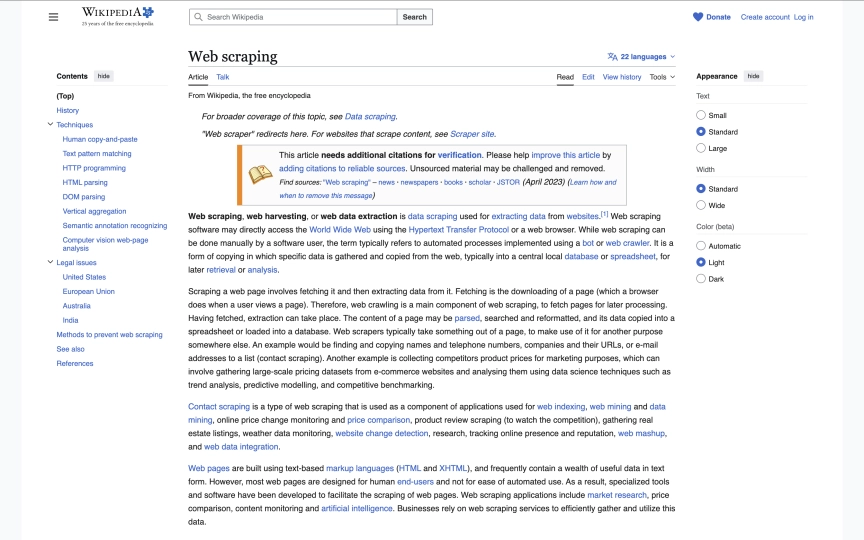
Extract structured data from any Wikipedia article with five lines of code. Title, summary, sections, references, infobox. No anti-bot detection. No residential proxies. No CAPTCHA solving. Wikipedia is the cleanest scraping target on the web, and the only site in this series where you can block every resource type, including stylesheets, without breaking the page.
This guide covers everything you need to pull data from Wikipedia at scale:
- A one-request Wikipedia scraper that returns article titles, summaries, and section headings as structured JSON
- Infobox extraction that turns sidebar data into key-value pairs
- Search result scraping with pagination across Wikipedia's 6.8 million English articles
- The only resource blocking configuration that blocks stylesheets safely
- A complete Wikipedia research agent that searches, extracts, and builds a knowledge base
- CSV and JSON export for your extracted data
- Six common mistakes and how to avoid them
TL;DR: Wikipedia has zero anti-bot protection, Creative Commons licensed data, and clean semantic HTML. Use Browserbeam's extract endpoint with CSS selectors like #firstHeading >> text and #mw-content-text .mw-parser-output > p:first-of-type >> text. Block all resources (images, fonts, media, and stylesheets) for maximum speed. Datacenter proxies work every time.
Don't have an API key yet? Create a free Browserbeam account - you get 5,000 credits, no credit card required.
Quick Start: Extract a Wikipedia Article in One Request
This example pulls the title, first paragraph, and section headings from any Wikipedia article. One HTTP request. Structured JSON output. Session auto-closes.
curl -s -X POST https://api.browserbeam.com/v1/sessions \
  -H "Authorization: Bearer YOUR_API_KEY" \
  -H "Content-Type: application/json" \
  -d '{
    "url": "https://en.wikipedia.org/wiki/Web_scraping",
    "proxy": { "kind": "datacenter", "country": "us" },
    "block_resources": ["image", "font", "media", "stylesheet"],
    "steps": [
      {
        "extract": {
          "title": "#firstHeading >> text",
          "summary": "#mw-content-text .mw-parser-output > p:first-of-type >> text",
          "sections": [{
            "_parent": "#mw-content-text .mw-heading2",
            "_limit": 10,
            "heading": "h2 >> text"
          }]
        }
      },
      { "close": {} }
    ]
  }' | jq '.extraction'
from browserbeam import Browserbeam
client = Browserbeam(api_key="YOUR_API_KEY")
session = client.sessions.create(
url="https://en.wikipedia.org/wiki/Web_scraping",
proxy={"kind": "datacenter", "country": "us"},
block_resources=["image", "font", "media", "stylesheet"],
steps=[
{"extract": {
"title": "#firstHeading >> text",
"summary": "#mw-content-text .mw-parser-output > p:first-of-type >> text",
"sections": [{
"_parent": "#mw-content-text .mw-heading2",
"_limit": 10,
"heading": "h2 >> text",
}],
}},
{"close": {}},
],
)
print(f"Title: {session.extraction['title']}")
print(f"Summary: {session.extraction['summary'][:100]}...")
for s in session.extraction["sections"]:
print(f" - {s['heading']}")import Browserbeam from "browserbeam";
const client = new Browserbeam({ apiKey: "YOUR_API_KEY" });
const session = await client.sessions.create({
url: "https://en.wikipedia.org/wiki/Web_scraping",
proxy: { kind: "datacenter", country: "us" },
block_resources: ["image", "font", "media", "stylesheet"],
steps: [
{ extract: {
title: "#firstHeading >> text",
summary: "#mw-content-text .mw-parser-output > p:first-of-type >> text",
sections: [{
_parent: "#mw-content-text .mw-heading2",
_limit: 10,
heading: "h2 >> text",
}],
}},
{ close: {} },
],
});
console.log(`Title: ${session.extraction!.title}`);
console.log(`Summary: ${(session.extraction!.summary as string).slice(0, 100)}...`);
for (const s of session.extraction!.sections as any[]) {
console.log(` - ${s.heading}`);
}require "browserbeam"
client = Browserbeam::Client.new(api_key: "YOUR_API_KEY")
session = client.sessions.create(
url: "https://en.wikipedia.org/wiki/Web_scraping",
proxy: { kind: "datacenter", country: "us" },
block_resources: ["image", "font", "media", "stylesheet"],
steps: [
{ "extract" => {
"title" => "#firstHeading >> text",
"summary" => "#mw-content-text .mw-parser-output > p:first-of-type >> text",
"sections" => [{
"_parent" => "#mw-content-text .mw-heading2",
"_limit" => 10,
"heading" => "h2 >> text"
}]
}},
{ "close" => {} }
]
)
puts "Title: #{session.extraction['title']}"
puts "Summary: #{session.extraction['summary'][0..99]}..."
session.extraction["sections"].each { |s| puts " - #{s['heading']}" }That returns structured JSON like this:
{
  "title": "Web scraping",
  "summary": "Web scraping, web harvesting, or web data extraction is data scraping used for extracting data from websites.[1] Web scraping software may directly access the World Wide Web using the Hypertext Transfer Protocol or a web browser...",
  "sections": [
    { "heading": "History" },
    { "heading": "Techniques" },
    { "heading": "Legal issues" },
    { "heading": "Methods to prevent web scraping" },
    { "heading": "See also" },
    { "heading": "References" }
  ]
}
The selectors are stable. Wikipedia has used the same #firstHeading, .mw-parser-output, and .mw-heading2 structure for years. Unlike sites where class names change with every deploy, Wikipedia's semantic HTML is designed for longevity.
If you just want the code, you're done. The rest of this guide explains infobox extraction, search result scraping, a research agent pipeline, and six common mistakes.
What Data Can You Extract from Wikipedia?
Wikipedia articles follow a consistent template. Every article has the same HTML structure regardless of topic, which means one extraction schema works across all 6.8 million English articles.
Article Pages vs Search Pages
| Page Type | URL Pattern | Available Data |
|---|---|---|
| Article | /wiki/Article_Name |
Title, summary, full text, sections, infobox, references, categories, external links |
| Search | /w/index.php?search=query&fulltext=1 |
Result titles, snippets, article URLs, result count |
| Category | /wiki/Category:Category_Name |
Article list, subcategories, category tree |
Data Fields by Type
| Field | Selector | Page Type | Notes |
|---|---|---|---|
| Title | #firstHeading >> text |
Article | Always present |
| Summary | #mw-content-text .mw-parser-output > p:first-of-type >> text |
Article | First paragraph, may contain citation markers like [1] |
| Section headings | #mw-content-text .mw-heading2 h2 >> text |
Article | Major sections only (H2 level) |
| Infobox | .infobox tr (via execute_js) |
Article | Key-value sidebar data, not on every article |
| References | #mw-content-text .reference >> text |
Article | Inline citation markers |
| Categories | #mw-normal-catlinks li a >> text |
Article | Bottom of page |
| Search result title | .mw-search-result-heading a >> text |
Search | Linked article name |
| Search snippet | .searchresult >> text |
Search | Text excerpt with query terms |
| Search result URL | .mw-search-result-heading a >> href |
Search | Path to article |
Sample Article Extraction Output
{
  "title": "Python (programming language)",
  "summary": "Python is a high-level, general-purpose programming language...",
  "sections": [
    { "heading": "History" },
    { "heading": "Design philosophy and features" },
    { "heading": "Syntax and semantics" },
    { "heading": "Programming examples" },
    { "heading": "Implementations" }
  ]
}
Sample Infobox Extraction Output
{
  "Paradigm": "Multi-paradigm: object-oriented, procedural (imperative), functional, structured, reflective",
  "Designed by": "Guido van Rossum",
  "Developer": "Python Software Foundation",
  "First appeared": "20 February 1991",
  "Stable release": "3.14.4 / 7 April 2026",
  "Typing discipline": "Duck, dynamic, strong; optional type annotations",
  "License": "Python Software Foundation License",
  "Website": "python.org"
}
Maximum Optimization: Block Everything
Wikipedia is the only site in this guide series where you can safely block stylesheets. On every other site we've covered (Amazon, eBay, Reddit, Airbnb), blocking CSS breaks the page layout or causes skeleton loading. Wikipedia is different because its content structure lives entirely in semantic HTML, not in CSS-dependent layouts.
Why Blocking Stylesheets Works on Wikipedia
Wikipedia uses #firstHeading, #mw-content-text, .mw-parser-output, and .infobox as structural selectors. These IDs and classes exist in the raw HTML regardless of whether CSS loads. The content is plain text inside <p>, <h2>, <table>, and <ul> elements. CSS only controls visual styling (fonts, colors, spacing), not the data structure.
On eBay, by contrast, CSS controls card layout and element positioning. Blocking stylesheets on eBay shifts the DOM structure and breaks selectors. On Airbnb, it causes skeleton loading. Wikipedia's DOM is stable with or without CSS.
Resource Blocking Configuration
{
  "block_resources": ["image", "font", "media", "stylesheet"]
}
Performance Comparison
| Configuration | Resources Blocked | Page Load | Data Returned |
|---|---|---|---|
| No blocking | None | Baseline | Complete |
| Standard blocking | image, font, media | Faster | Complete |
| Maximum blocking | image, font, media, stylesheet | Fastest | Complete |
In our testing, blocking all four resource types returned identical extraction results while reducing page load time. Wikipedia's article text, section headings, infobox data, and references all render correctly without stylesheets.
| Resource | Blocked? | Why |
|---|---|---|
| Images | Yes | Article images, logos, icons. Not needed for text data. |
| Fonts | Yes | Custom fonts. Text renders with system fonts. |
| Media | Yes | Audio/video players on some articles. |
| Stylesheets | Yes | Visual styling only. Wikipedia's content structure is in semantic HTML. |
(Pro Tip: If you're scraping thousands of Wikipedia articles, the bandwidth savings from blocking all resources adds up fast. Every blocked stylesheet is one fewer HTTP request per page.)
Scraping Wikipedia Articles (Show Pages)
The Quick Start showed a one-shot extraction with auto-close. For more complex workflows, like extracting the article and then pulling infobox data, keep the session open.
Interactive Pattern: Extract, Then Dig Deeper
from browserbeam import Browserbeam

client = Browserbeam(api_key="YOUR_API_KEY")
session = client.sessions.create(
    url="https://en.wikipedia.org/wiki/Python_(programming_language)",
    proxy={"kind": "datacenter", "country": "us"},
    block_resources=["image", "font", "media", "stylesheet"],
)

result = session.extract(
    title="#firstHeading >> text",
    summary="#mw-content-text .mw-parser-output > p:first-of-type >> text",
    sections=[{
        "_parent": "#mw-content-text .mw-heading2",
        "_limit": 15,
        "heading": "h2 >> text",
    }],
)

print(f"Title: {result.extraction['title']}")
print(f"Sections: {len(result.extraction['sections'])}")

session.close()
The session.extract(**schema) call takes keyword arguments for the schema. The return value is a SessionEnvelope with an .extraction attribute containing the JSON data.
Extracting Infobox Data
Wikipedia infoboxes contain structured key-value data in the sidebar (programming language details, country stats, chemical properties). The .infobox table has a consistent structure across articles, but the fields vary by topic. The best approach is execute_js to iterate over table rows and build a clean object.
curl -s -X POST https://api.browserbeam.com/v1/sessions \
  -H "Authorization: Bearer YOUR_API_KEY" \
  -H "Content-Type: application/json" \
  -d '{
    "url": "https://en.wikipedia.org/wiki/Python_(programming_language)",
    "proxy": { "kind": "datacenter", "country": "us" },
    "block_resources": ["image", "font", "media", "stylesheet"],
    "steps": [
      {
        "execute_js": {
          "code": "const rows = document.querySelectorAll(\".infobox tr\"); const data = {}; rows.forEach(r => { const th = r.querySelector(\"th.infobox-label\"); const td = r.querySelector(\"td.infobox-data\"); if (th && td) data[th.textContent.trim()] = td.textContent.trim(); }); return data;",
          "result_key": "infobox"
        }
      },
      { "close": {} }
    ]
  }' | jq '.extraction.infobox'
from browserbeam import Browserbeam
client = Browserbeam(api_key="YOUR_API_KEY")
session = client.sessions.create(
url="https://en.wikipedia.org/wiki/Python_(programming_language)",
proxy={"kind": "datacenter", "country": "us"},
block_resources=["image", "font", "media", "stylesheet"],
steps=[
{"execute_js": {
"code": """
const rows = document.querySelectorAll('.infobox tr');
const data = {};
rows.forEach(r => {
const th = r.querySelector('th.infobox-label');
const td = r.querySelector('td.infobox-data');
if (th && td) data[th.textContent.trim()] = td.textContent.trim();
});
return data;
""",
"result_key": "infobox",
}},
{"close": {}},
],
)
for key, value in session.extraction["infobox"].items():
print(f"{key}: {value}")import Browserbeam from "browserbeam";
const client = new Browserbeam({ apiKey: "YOUR_API_KEY" });
const session = await client.sessions.create({
url: "https://en.wikipedia.org/wiki/Python_(programming_language)",
proxy: { kind: "datacenter", country: "us" },
block_resources: ["image", "font", "media", "stylesheet"],
steps: [
{ execute_js: {
code: `
const rows = document.querySelectorAll('.infobox tr');
const data = {};
rows.forEach(r => {
const th = r.querySelector('th.infobox-label');
const td = r.querySelector('td.infobox-data');
if (th && td) data[th.textContent.trim()] = td.textContent.trim();
});
return data;
`,
result_key: "infobox",
}},
{ close: {} },
],
});
const infobox = session.extraction!.infobox as Record;
for (const [key, value] of Object.entries(infobox)) {
console.log(`${key}: ${value}`);
} require "browserbeam"
client = Browserbeam::Client.new(api_key: "YOUR_API_KEY")
session = client.sessions.create(
url: "https://en.wikipedia.org/wiki/Python_(programming_language)",
proxy: { kind: "datacenter", country: "us" },
block_resources: ["image", "font", "media", "stylesheet"],
steps: [
{ "execute_js" => {
"code" => 'const rows = document.querySelectorAll(".infobox tr"); const data = {}; rows.forEach(r => { const th = r.querySelector("th.infobox-label"); const td = r.querySelector("td.infobox-data"); if (th && td) data[th.textContent.trim()] = td.textContent.trim(); }); return data;',
"result_key" => "infobox"
}},
{ "close" => {} }
]
)
session.extraction["infobox"].each { |k, v| puts "#{k}: #{v}" }Not every Wikipedia article has an infobox. Check if the result is empty before processing. Articles about people, countries, programming languages, chemical elements, and species almost always have infoboxes. Abstract concept articles usually don't.
Full Article Content via Observe
For cases where you need the entire article as readable text (feeding content to an LLM, building a training dataset, or doing full-text search), the observe endpoint returns everything as structured markdown.
from browserbeam import Browserbeam

client = Browserbeam(api_key="YOUR_API_KEY")
session = client.sessions.create(
    url="https://en.wikipedia.org/wiki/Web_scraping",
    proxy={"kind": "datacenter", "country": "us"},
    block_resources=["image", "font", "media", "stylesheet"],
    steps=[
        {"observe": {}},
        {"close": {}},
    ],
)

print(session.page.markdown.content[:500])
The observe output includes headings, paragraphs, lists, tables, and references in clean markdown format. It's the best option when you need the full article rather than specific fields.
Scraping Wikipedia Search Results (Index Pages)
Wikipedia's search uses a simple URL structure. The key parameter is fulltext=1, which forces a search results page instead of auto-redirecting to an exact match.
Search URL Structure
https://en.wikipedia.org/w/index.php?search=YOUR_QUERY&title=Special:Search&fulltext=1Without fulltext=1, searching for "machine learning" redirects you straight to the Machine Learning article. With it, you get the search results page with 20 results per page.
Extract Search Results
curl -s -X POST https://api.browserbeam.com/v1/sessions \
  -H "Authorization: Bearer YOUR_API_KEY" \
  -H "Content-Type: application/json" \
  -d '{
    "url": "https://en.wikipedia.org/w/index.php?search=web+scraping+tools&title=Special:Search&fulltext=1",
    "proxy": { "kind": "datacenter", "country": "us" },
    "block_resources": ["image", "font", "media", "stylesheet"],
    "steps": [
      {
        "extract": {
          "results": [{
            "_parent": ".mw-search-result",
            "_limit": 10,
            "title": ".mw-search-result-heading a >> text",
            "snippet": ".searchresult >> text",
            "url": ".mw-search-result-heading a >> href"
          }]
        }
      },
      { "close": {} }
    ]
  }' | jq '.extraction'
from browserbeam import Browserbeam
client = Browserbeam(api_key="YOUR_API_KEY")
session = client.sessions.create(
url="https://en.wikipedia.org/w/index.php?search=web+scraping+tools&title=Special:Search&fulltext=1",
proxy={"kind": "datacenter", "country": "us"},
block_resources=["image", "font", "media", "stylesheet"],
steps=[
{"extract": {
"results": [{
"_parent": ".mw-search-result",
"_limit": 10,
"title": ".mw-search-result-heading a >> text",
"snippet": ".searchresult >> text",
"url": ".mw-search-result-heading a >> href",
}]
}},
{"close": {}},
],
)
for r in session.extraction["results"]:
print(f"{r['title']}: {r['snippet'][:80]}...")import Browserbeam from "browserbeam";
const client = new Browserbeam({ apiKey: "YOUR_API_KEY" });
const session = await client.sessions.create({
url: "https://en.wikipedia.org/w/index.php?search=web+scraping+tools&title=Special:Search&fulltext=1",
proxy: { kind: "datacenter", country: "us" },
block_resources: ["image", "font", "media", "stylesheet"],
steps: [
{ extract: {
results: [{
_parent: ".mw-search-result",
_limit: 10,
title: ".mw-search-result-heading a >> text",
snippet: ".searchresult >> text",
url: ".mw-search-result-heading a >> href",
}],
}},
{ close: {} },
],
});
for (const r of session.extraction!.results as any[]) {
console.log(`${r.title}: ${r.snippet.slice(0, 80)}...`);
}require "browserbeam"
client = Browserbeam::Client.new(api_key: "YOUR_API_KEY")
session = client.sessions.create(
url: "https://en.wikipedia.org/w/index.php?search=web+scraping+tools&title=Special:Search&fulltext=1",
proxy: { kind: "datacenter", country: "us" },
block_resources: ["image", "font", "media", "stylesheet"],
steps: [
{ "extract" => {
"results" => [{
"_parent" => ".mw-search-result",
"_limit" => 10,
"title" => ".mw-search-result-heading a >> text",
"snippet" => ".searchresult >> text",
"url" => ".mw-search-result-heading a >> href"
}]
}},
{ "close" => {} }
]
)
session.extraction["results"].each do |r|
puts "#{r['title']}: #{r['snippet'][0..79]}..."
endPagination
Wikipedia search uses an offset parameter for pagination. Each page shows 20 results by default.
from browserbeam import Browserbeam

client = Browserbeam(api_key="YOUR_API_KEY")
base_url = "https://en.wikipedia.org/w/index.php?search=web+scraping&title=Special:Search&fulltext=1"
schema = {
    "results": [{
        "_parent": ".mw-search-result",
        "title": ".mw-search-result-heading a >> text",
        "snippet": ".searchresult >> text",
        "url": ".mw-search-result-heading a >> href",
    }]
}

session = client.sessions.create(
    url=base_url,
    proxy={"kind": "datacenter", "country": "us"},
    block_resources=["image", "font", "media", "stylesheet"],
    steps=[{"extract": schema}],
)
all_results = list(session.extraction["results"])

for offset in [20, 40]:
    session.goto(f"{base_url}&offset={offset}")
    result = session.extract(**schema)
    all_results.extend(result.extraction["results"])

print(f"Total: {len(all_results)} results across 3 pages")
session.close()
Each page returns up to 20 results. Three pages gives you 60 results, which covers most research queries.
Building a Wikipedia Research Agent
Here's the structural payoff: a Python script that takes a topic, searches Wikipedia, extracts the top articles, and builds a JSON knowledge base. This combines search and article extraction into a single pipeline.
import json
from browserbeam import Browserbeam

client = Browserbeam(api_key="YOUR_API_KEY")

def search_wikipedia(query, max_results=5):
    """Search Wikipedia and return article URLs."""
    session = client.sessions.create(
        url=f"https://en.wikipedia.org/w/index.php?search={query}&title=Special:Search&fulltext=1",
        proxy={"kind": "datacenter", "country": "us"},
        block_resources=["image", "font", "media", "stylesheet"],
        steps=[
            {"extract": {
                "results": [{
                    "_parent": ".mw-search-result",
                    "_limit": max_results,
                    "title": ".mw-search-result-heading a >> text",
                    "url": ".mw-search-result-heading a >> href",
                }]
            }},
            {"close": {}},
        ],
    )
    return session.extraction["results"]


def extract_article(url):
    """Extract structured data from a Wikipedia article."""
    full_url = f"https://en.wikipedia.org{url}" if url.startswith("/") else url
    session = client.sessions.create(
        url=full_url,
        proxy={"kind": "datacenter", "country": "us"},
        block_resources=["image", "font", "media", "stylesheet"],
        steps=[
            {"extract": {
                "title": "#firstHeading >> text",
                "summary": "#mw-content-text .mw-parser-output > p:first-of-type >> text",
                "sections": [{
                    "_parent": "#mw-content-text .mw-heading2",
                    "_limit": 15,
                    "heading": "h2 >> text",
                }],
            }},
        ],
    )

    infobox_result = session.execute_js(
        """
        const rows = document.querySelectorAll('.infobox tr');
        const data = {};
        rows.forEach(r => {
          const th = r.querySelector('th.infobox-label');
          const td = r.querySelector('td.infobox-data');
          if (th && td) data[th.textContent.trim()] = td.textContent.trim();
        });
        return data;
        """,
        result_key="infobox",
    )
    session.close()

    return {
        "url": full_url,
        "title": session.extraction["title"],
        "summary": session.extraction["summary"],
        "sections": [s["heading"] for s in session.extraction["sections"]],
        "infobox": infobox_result.extraction.get("infobox", {}),
    }


def build_knowledge_base(topic, max_articles=5):
    """Search a topic and extract all matching articles."""
    print(f"Searching Wikipedia for: {topic}")
    results = search_wikipedia(topic, max_results=max_articles)
    print(f"Found {len(results)} articles")

    knowledge_base = []
    for r in results:
        print(f"  Extracting: {r['title']}")
        article = extract_article(r["url"])
        knowledge_base.append(article)

    return knowledge_base


topic = "web scraping techniques"
kb = build_knowledge_base(topic, max_articles=3)

with open("wikipedia_kb.json", "w") as f:
    json.dump(kb, f, indent=2, ensure_ascii=False)
print(f"\nSaved {len(kb)} articles to wikipedia_kb.json")
This script costs roughly 4 API calls per article (1 search + 1 extract + 1 execute_js + 1 close per article). For 5 articles, that's about 20 calls total. The output is a structured JSON file with titles, summaries, section headings, and infobox data for each article.
You can extend this to feed the knowledge base into an LLM for RAG (Retrieval-Augmented Generation), build a graph database of linked concepts, or create a research dataset for NLP experiments.
Saving and Processing Your Data
Export to CSV
import csv

def save_articles_csv(articles, filename="wikipedia_articles.csv"):
    if not articles:
        return
    fieldnames = ["title", "summary", "url", "section_count"]
    with open(filename, "w", newline="", encoding="utf-8") as f:
        writer = csv.DictWriter(f, fieldnames=fieldnames)
        writer.writeheader()
        for a in articles:
            writer.writerow({
                "title": a["title"],
                "summary": a["summary"][:200],
                "url": a["url"],
                "section_count": len(a.get("sections", [])),
            })
    print(f"Saved {len(articles)} articles to {filename}")
Export to JSON
import json

def save_articles_json(articles, filename="wikipedia_articles.json"):
    with open(filename, "w", encoding="utf-8") as f:
        json.dump(articles, f, indent=2, ensure_ascii=False)
    print(f"Saved {len(articles)} articles to {filename}")
For production workloads, store articles in a database with the Wikipedia URL as a natural key. Schedule extraction jobs with cron or a task queue. The structured web scraping guide covers production patterns in more detail.
DIY Scraping vs Browserbeam API
Wikipedia is simple enough that a DIY approach actually works well. Let's compare.
The DIY Approach (Python + BeautifulSoup)
import requests
from bs4 import BeautifulSoup

response = requests.get(
    "https://en.wikipedia.org/wiki/Web_scraping",
    headers={"User-Agent": "MyBot/1.0 (myemail@example.com)"},
)

soup = BeautifulSoup(response.text, "html.parser")
title = soup.find("span", class_="mw-page-title-main")
summary = soup.select_one("#mw-content-text .mw-parser-output > p:first-of-type")
sections = soup.select("#mw-content-text .mw-heading2 h2")

print(f"Title: {title.text if title else 'N/A'}")
print(f"Summary: {summary.text[:100] if summary else 'N/A'}...")
for s in sections:
    print(f"  - {s.text}")
This works. Wikipedia serves full HTML to every request, no JavaScript rendering needed. No anti-bot protection. A simple requests.get() returns the complete page.
Side-by-Side Comparison
| Factor | DIY (BeautifulSoup) | Browserbeam API |
|---|---|---|
| Lines of code | 10-15 per scraper | 10-15 per scraper |
| JavaScript rendering | Not needed for Wikipedia | Full Chromium (overkill for Wikipedia) |
| Proxy management | You manage User-Agent, rate limiting | Built-in datacenter proxies |
| Infobox extraction | Manual HTML parsing | execute_js with clean JavaScript |
| Multi-language | Python only (or rewrite) | cURL, Python, TypeScript, Ruby |
| Cost | Free (your server + bandwidth) | API credits per request |
| Setup time | Minutes | Minutes |
When DIY Makes Sense for Wikipedia
Wikipedia is the one site in this series where DIY scraping is a genuinely good option. The HTML is server-rendered, there's no anti-bot detection, and BeautifulSoup handles the parsing fine. If you're only scraping Wikipedia articles and you're comfortable managing your own rate limiting and error handling, the DIY approach saves API credits.
Where Browserbeam adds value on Wikipedia:
- Multi-language support: One schema works in Python, TypeScript, Ruby, and cURL. No rewriting parsers.
- Stability detection: Browserbeam waits until the page is fully loaded before extracting. On Wikipedia this matters less, but if you add other sites to your pipeline, the same code works everywhere.
- Resource blocking: The
block_resourcesparameter is a single config option. With DIY, you'd need to strip resources manually or accept full page weight. - Observe endpoint: Getting the entire article as clean markdown with one call is faster than parsing HTML with BeautifulSoup and reassembling the text.
Use Cases
Knowledge Graph Building
Extract entities and relationships from Wikipedia articles to build a structured knowledge graph. Pull article titles, infobox data, and category links, then connect them by shared categories or internal links.
def extract_categories(url):
    session = client.sessions.create(
        url=url,
        proxy={"kind": "datacenter", "country": "us"},
        block_resources=["image", "font", "media", "stylesheet"],
        steps=[
            {"extract": {
                "title": "#firstHeading >> text",
                "categories": [{
                    "_parent": "#mw-normal-catlinks li",
                    "name": "a >> text",
                }],
            }},
            {"close": {}},
        ],
    )
    return {
        "title": session.extraction["title"],
        "categories": [c["name"] for c in session.extraction["categories"]],
    }

article = extract_categories("https://en.wikipedia.org/wiki/Python_(programming_language)")
print(f"{article['title']} belongs to: {', '.join(article['categories'][:5])}")
Research Dataset Creation
Build a dataset of Wikipedia articles for NLP or machine learning projects. Extract summaries, section text, and metadata across a topic area.
topics = ["natural language processing", "computer vision", "reinforcement learning"]
dataset = []
for topic in topics:
    results = search_wikipedia(topic, max_results=3)
    for r in results:
        article = extract_article(r["url"])
        dataset.append(article)

print(f"Dataset: {len(dataset)} articles across {len(topics)} topics")
Fact Extraction for RAG Pipelines
Feed Wikipedia data to an LLM as context for question answering. The observe endpoint returns clean markdown that fits directly into a prompt without additional parsing.
session = client.sessions.create(
    url="https://en.wikipedia.org/wiki/Large_language_model",
    proxy={"kind": "datacenter", "country": "us"},
    block_resources=["image", "font", "media", "stylesheet"],
    steps=[{"observe": {}}, {"close": {}}],
)

context = session.page.markdown.content[:4000]
prompt = f"Based on this Wikipedia article:\n\n{context}\n\nWhat are the main limitations of large language models?"
print(f"Context length: {len(context)} chars")
The observe output is already in markdown, which most LLMs handle well. No HTML parsing or cleanup needed. Trim to your token budget and pass it straight into the prompt.
Common Mistakes When Scraping Wikipedia
1. Not Blocking Resources
Wikipedia articles load images, stylesheets, and fonts that you don't need for text extraction. Every unblocked resource adds latency and bandwidth cost.
Fix: Always use block_resources: ["image", "font", "media", "stylesheet"] for Wikipedia. It's the most aggressive blocking configuration that works safely.
2. Scraping Mobile vs Desktop Pages
Wikipedia has a mobile site (en.m.wikipedia.org) with different HTML structure. Mobile pages use different selectors and may omit infoboxes entirely.
Fix: Always use the desktop URL (en.wikipedia.org/wiki/...). The selectors in this guide are all for the desktop version. If you accidentally hit a mobile URL, the #firstHeading, .mw-heading2, and .infobox selectors may not match.
3. Missing Infobox Data
Not every Wikipedia article has an infobox. Running execute_js on an article without one returns an empty object, which is fine. But if you assume every article has infobox data and try to access specific keys, your code crashes.
Fix: Check if the infobox is empty before processing. Use if infobox_data: or equivalent null checks.
4. Ignoring Redirects
Searching for "Python" might redirect to "Python (programming language)" or "Python (genus)" depending on Wikipedia's disambiguation logic. Your extraction schema still works, but the article might not be the one you expected.
Fix: Check the final URL after extraction. Compare session.page.url against the URL you requested. If Wikipedia redirected, log the redirect so you know which article you actually scraped.
5. Not Handling Disambiguation Pages
Some search terms land on disambiguation pages, which list multiple articles with the same name. These pages have a different structure than regular articles.
Fix: Check if the page title contains "(disambiguation)" or if the page has a .disambig-box element. If so, extract the list of linked articles and pick the most relevant one. Alternatively, use the search API with fulltext=1 to get search results instead of relying on direct URL navigation.
Frequently Asked Questions
Is it legal to scrape Wikipedia?
Yes. Wikipedia content is published under the Creative Commons Attribution-ShareAlike 4.0 license, which allows copying, sharing, and adapting the content for any purpose, including commercial use. You must provide attribution and share derivative works under the same license. Wikipedia explicitly expects automated access and provides an official API for it.
Does Wikipedia block scrapers?
Wikipedia does not use anti-bot detection systems like CAPTCHA, PerimeterX, or Cloudflare. There are no JavaScript challenges or browser fingerprinting. Wikipedia does rate-limit aggressive crawlers and may block IPs that send hundreds of requests per second. Browserbeam's proxy layer handles this. For polite scraping, keep your request rate reasonable (a few requests per second is fine).
Wikipedia API vs scraping: which should I use?
Wikipedia's MediaWiki API returns article content in wikitext or parsed HTML format. It's free, well-documented, and doesn't require a browser. Use the API when you need raw article text and don't mind parsing wikitext markup. Use browser-based scraping when you need the rendered page as it appears to users (with infoboxes, tables, and formatted sections) or when you want clean JSON output with CSS selectors.
How do I scrape Wikipedia infoboxes?
Infoboxes use the .infobox table class. Each row has a th.infobox-label and td.infobox-data cell. The best approach is execute_js to iterate over rows and build a key-value object. See the Extracting Infobox Data section for complete code examples.
How do I handle Wikipedia redirects?
Add fulltext=1 to your search URL to prevent auto-redirects. When navigating directly to an article URL, Wikipedia may redirect (e.g., "Python" to "Python (programming language)"). Check the final page title after extraction to confirm you got the right article. The session.page.url or session.page.title fields tell you where you actually ended up.
Can I scrape Wikipedia in bulk?
Yes, but be respectful. Wikipedia handles millions of page views per day, and moderate scraping rates (1-5 requests per second) won't cause issues. For very large datasets (100,000+ articles), consider using Wikipedia database dumps instead. The dumps are free, complete, and don't require any scraping at all. They're updated regularly and contain the full text of every article.
How do I scrape Wikipedia in other languages?
Replace the language code in the URL. For example, fr.wikipedia.org for French, de.wikipedia.org for German, ja.wikipedia.org for Japanese. The CSS selectors (#firstHeading, .mw-parser-output, .mw-heading2) are the same across all Wikipedia languages because they all use the same MediaWiki software.
Start Extracting Wikipedia Data
We covered three approaches to Wikipedia scraping: CSS extract for structured JSON, execute_js for infobox key-value pairs, and observe for full article markdown. All three work with datacenter proxies and full resource blocking, making Wikipedia the cheapest and fastest site to scrape in this entire series.
Try changing the article URL in the Quick Start example. Replace Web_scraping with any topic. The same extraction schema returns structured data from any Wikipedia article. For search queries, add &fulltext=1 to avoid auto-redirects and get a proper results page.
For the complete API reference, check the Browserbeam documentation. The data extraction guide goes deeper on extraction schemas. If you're building a research pipeline that combines Wikipedia data with other sources, the web scraping agent tutorial shows how to chain multiple sites into a single workflow.