

By the end of this guide, you'll have Claude Code browsing the web, extracting structured data, and filling out forms through a single MCP server config. No Playwright scripts. No Puppeteer boilerplate. No raw HTML parsing. Just structured, token-efficient browser access that works inside your terminal.
Claude Code is already good at writing and debugging code. What it can't do out of the box is see live web pages, interact with them, or pull structured data from them. The Browserbeam MCP server fixes that. It gives Claude Code 19 browser tools that return clean markdown with element refs instead of a wall of HTML. Your coding agent spends tokens on reasoning, not on parsing <div class="sc-1a2b3c4d">.
In this guide, you'll learn:
- How to set up the Browserbeam MCP server for Claude Code in under two minutes
- How to navigate to a page, extract data, and interact with forms using MCP tool calls
- What structured output looks like versus raw HTML, and why the token difference matters
- How DOM diffs reduce token usage by 60-80% on multi-step workflows
- How Browserbeam MCP compares to Steel CLI and Firecrawl's Claude Code plugin
- Real-world patterns for competitive intelligence, data extraction, and QA tasks
- Common mistakes that waste credits and how to avoid them
TL;DR: The Browserbeam MCP server (@browserbeam/mcp-server) gives Claude Code structured browser access through 19 tools. You get markdown page content, element refs for precise interactions, DOM diff tracking for multi-step efficiency, and declarative data extraction without LLM parsing. Set it up with one JSON config and a free API key.
What Claude Code Gets from a Browser MCP Server
Claude Code runs in your terminal. It can read files, run commands, and write code. But it has no browser. Ask it to check a competitor's pricing page, fill out a signup form, or scrape product data, and it hits a wall.
An MCP server for browser automation removes that wall. It exposes browser tools (navigate, click, fill, extract) as callable functions that Claude Code can invoke directly. The MCP protocol handles authentication, request formatting, and response parsing. Claude Code just calls browserbeam_create_session and gets back a structured page state.
Why Structured Output Matters for Coding Agents
Not all browser MCP servers return the same thing. Some give Claude Code raw HTML. Others return screenshots. Browserbeam returns structured markdown with element refs, interactive element lists, forms, and a page map.
The difference is practical. When Claude Code gets raw HTML from a page like Hacker News, it receives 15,000-25,000 tokens of nested <div> elements, inline styles, and JavaScript artifacts. The actual content, the headlines and links, is maybe 500 tokens buried inside. Claude Code burns the rest of its context window on noise.
With Browserbeam, Claude Code gets this instead:
# Hacker News

[e1] Show HN: A new way to build browser agents (example.com)
  342 points | posted by alice | 4 hours ago | 127 comments

[e2] PostgreSQL 18 released with native JSON support
  891 points | posted by bob | 6 hours ago | 304 comments

[e3] Why we switched from Kubernetes to plain Docker
  567 points | posted by carol | 2 hours ago | 198 comments
Each [e1], [e2], [e3] is an element ref. Claude Code can say "click e2" to open the PostgreSQL article. No CSS selectors. No XPath. No coordinate guessing from a screenshot.
The MCP Architecture
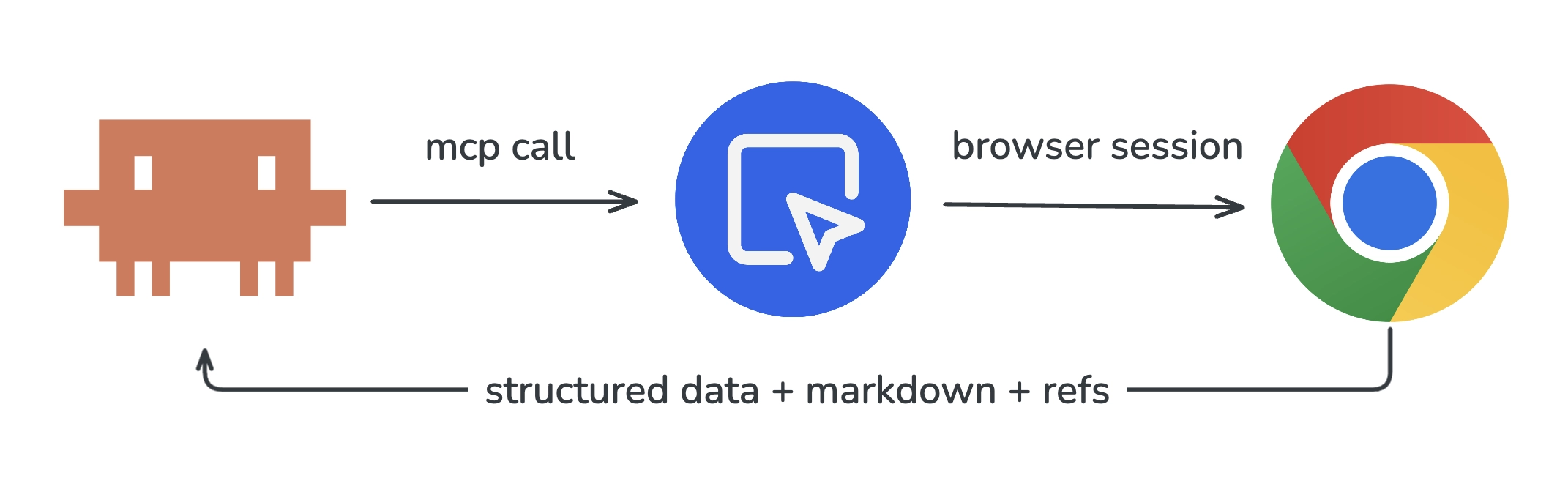
The flow is simple:
- Claude Code decides it needs to browse a web page
- It calls an MCP tool (e.g.,
browserbeam_create_session) - The MCP server translates that into a Browserbeam API call
- A real Chromium browser runs in the cloud, navigates to the page
- Browserbeam processes the page into structured markdown + element refs
- The response flows back through MCP to Claude Code
Claude Code never manages browser processes, installs Chrome, or handles crashes. The MCP server and Browserbeam handle all of that.
Setup: Installing the Browserbeam MCP Server
The setup takes under two minutes. You need Node.js (for npx) and a Browserbeam API key.
Step 1: Get a Free API Key
Sign up at browserbeam.com/users/sign_up. The free trial includes 5,000 credits with no credit card required. That's enough to run roughly 80 minutes of browser sessions, plenty for this tutorial.
Step 2: Add the MCP Server Config
The config goes in a different file depending on your tool. Here are the three main setups:
For Claude Code (Claude Desktop):
Add to ~/Library/Application Support/Claude/claude_desktop_config.json (macOS) or %APPDATA%\Claude\claude_desktop_config.json (Windows):
{
  "mcpServers": {
    "browserbeam": {
      "command": "npx",
      "args": ["-y", "@browserbeam/mcp-server"],
      "env": {
        "BROWSERBEAM_API_KEY": "sk_live_your_key_here"
      }
    }
  }
}
For Cursor:
Add to ~/.cursor/mcp.json:
{
  "mcpServers": {
    "browserbeam": {
      "command": "npx",
      "args": ["-y", "@browserbeam/mcp-server"],
      "env": {
        "BROWSERBEAM_API_KEY": "sk_live_your_key_here"
      }
    }
  }
}
For Windsurf:
Add to ~/.codeium/windsurf/mcp_config.json:
{
  "mcpServers": {
    "browserbeam": {
      "command": "npx",
      "args": ["-y", "@browserbeam/mcp-server"],
      "env": {
        "BROWSERBEAM_API_KEY": "sk_live_your_key_here"
      }
    }
  }
}
Replace sk_live_your_key_here with your actual API key from the Browserbeam dashboard.
Step 3: Verify the Connection
Restart your IDE or Claude Desktop. Then ask Claude Code something that requires browsing:
"Go to https://books.toscrape.com and tell me the title and price of the first 3 books."
If the MCP server is working, Claude Code will call browserbeam_create_session, navigate to the page, and return structured results. If it fails, check that npx is in your PATH and that the API key is valid.
For a deeper walkthrough of MCP setup and all 19 available tools, see the MCP integration guide.
Your First Browser Task: Navigate and Extract
Let's walk through what happens when Claude Code uses the Browserbeam MCP to scrape book data. This is what the tool calls look like behind the scenes.
Creating a Session
Claude Code calls browserbeam_create_session with a target URL:
{
  "tool": "browserbeam_create_session",
  "params": {
    "url": "https://books.toscrape.com"
  }
}
The response includes the session ID, page title, stability signal, and the full page content as structured markdown. The page.stable field tells Claude Code whether the page has finished loading, with no need for arbitrary sleep() calls.
Extracting Structured Data
Now Claude Code wants the book titles and prices. Instead of parsing HTML with regex or asking an LLM to read raw DOM, it calls browserbeam_extract with a declarative schema:
{
  "tool": "browserbeam_extract",
  "params": {
    "session_id": "ses_abc123",
    "schema": {
      "books": [
        {
          "_parent": "article.product_pod",
          "_limit": 5,
          "title": "h3 a >> title",
          "price": ".price_color >> text",
          "availability": ".instock.availability >> text"
        }
      ]
    }
  }
}
The response comes back as typed JSON:
{
  "extraction": {
    "books": [
      { "title": "A Light in the Attic", "price": "£51.77", "availability": "In stock" },
      { "title": "Tipping the Velvet", "price": "£53.74", "availability": "In stock" },
      { "title": "Soumission", "price": "£50.10", "availability": "In stock" },
      { "title": "Sharp Objects", "price": "£47.82", "availability": "In stock" },
      { "title": "Sapiens: A Brief History of Humankind", "price": "£54.23", "availability": "In stock" }
    ]
  }
}
No LLM parsing. No token cost for extraction. The CSS selectors do the work, and the output is deterministic. Same page, same selectors, same result every time.
Closing the Session
When Claude Code is done, it calls browserbeam_close to release the browser and stop the credit timer:
{
  "tool": "browserbeam_close",
  "params": {
    "session_id": "ses_abc123"
  }
}
This three-step pattern (create, extract, close) covers most scraping tasks. For interactive workflows, we add clicks and form fills in between.
Structured Output vs Raw HTML: What Claude Code Actually Sees
This is where the gap between browser tools becomes obvious. Let's compare what Claude Code receives from three different approaches for the same page.
Token Count Comparison
We tested a product listing page with 20 items. Here's what each approach sends to Claude Code's context window:
| Approach | Tokens Returned | Contains Element Refs | Contains Page Map | Extraction Cost |
|---|---|---|---|---|
| Raw Playwright HTML | ~22,000 | No | No | LLM parsing needed |
| Steel CLI markdown | ~3,500 | No | No | LLM parsing needed |
| Firecrawl /scrape | ~2,800 | No | No | +4 credits for LLM extraction |
| Browserbeam structured | ~1,800 | Yes | Yes | $0 (CSS schema) |
Browserbeam returns the least tokens because it strips boilerplate and returns only the content and interactive elements. But the real win is the element refs. Claude Code can say "click e5" instead of constructing a CSS selector or describing a button's position on screen.
What Raw HTML Looks Like to Claude Code
When Claude Code gets raw HTML from a Playwright-based tool, it sees something like this (truncated):
<div class="page_inner">
  <ul class="breadcrumb">
    <li><a href="/">Home</a></li>
    <li class="active">All products</li>
  </ul>
  <div class="row">
    <div class="col-sm-8 col-md-9">
      <section>
        <div class="alert alert-warning">
          <strong>Warning!</strong> This is a demo website...
        </div>
        <div>
          <ol class="row">
            <li class="col-xs-6 col-sm-4 col-md-3 col-lg-3">
              <article class="product_pod">
                <div class="image_container">
                  <a href="catalogue/a-light-in-the-attic_1000/index.html">
                    <img src="media/cache/2c/da/2cdad67c44b002e7c0..."
                         alt="A Light in the Attic" class="thumbnail">
                  </a>
                </div>
                <!-- 40 more lines per product... -->
Claude Code has to parse this, figure out the structure, identify which elements are clickable, and extract data by writing JavaScript or regex. That's hundreds of tokens spent on plumbing for every page.
What Browserbeam Structured Output Looks Like
The same page through Browserbeam:
# All products | Books to Scrape

**1000 results, showing 1-20. Page 1 of 50.**

| # | Title | Price | Rating | Stock |
|---|-------|-------|--------|-------|
| 1 | [e4] A Light in the Attic | £51.77 | ★★★ | In stock |
| 2 | [e5] Tipping the Velvet | £53.74 | ★ | In stock |
| 3 | [e6] Soumission | £50.10 | ★ | In stock |

**Interactive elements:**
- [e1] "Home" link
- [e2] "Books" link
- [e3] "next" button (pagination)
- [e4] "A Light in the Attic" link
- [e5] "Tipping the Velvet" link
...
Claude Code immediately knows the page structure, sees every clickable element with a ref ID, and can extract or interact without any parsing step. The token difference compounds fast across multi-step workflows.
For a deeper comparison of raw HTML versus structured output with token benchmarks, see the structured output guide.
Interactive Workflows: Forms, Buttons, and Multi-Step Navigation
Scraping is the simple case. The real power shows up when Claude Code needs to interact with a page: fill a form, click through pagination, or navigate a multi-step workflow.
Clicking Elements by Ref
After observing a page, Claude Code can click any element using its ref ID:
{
  "tool": "browserbeam_click",
  "params": {
    "session_id": "ses_abc123",
    "ref": "e3"
  }
}
The response includes the updated page state and a changes field showing what changed after the click. Claude Code doesn't re-read the entire page. It reads only the diff.
Filling Forms
For form interactions, Claude Code uses browserbeam_fill to set values and browserbeam_click to submit:
{
  "tool": "browserbeam_fill",
  "params": {
    "session_id": "ses_abc123",
    "ref": "e7",
    "value": "browser automation"
  }
}
Or fill an entire form at once with browserbeam_fill using field mapping:
{
  "tool": "browserbeam_fill",
  "params": {
    "session_id": "ses_abc123",
    "fields": {
      "username": "testuser",
      "email": "user@example.com",
      "message": "Testing form submission via MCP"
    },
    "submit": true
  }
}
Multi-Step Navigation Example
Here's a practical sequence. Claude Code needs to find a specific book on books.toscrape.com, navigate to its detail page, and extract the full description:
- Create session at
https://books.toscrape.com - Click
e4(the "A Light in the Attic" link) to open the detail page - Extract the product description, price, and availability from the detail page
- Close the session
Each step returns only the changes from the previous state. By step 3, Claude Code has spent fewer tokens than a single raw HTML page load would cost with another tool.
Element Refs vs CSS Selectors
With Playwright-based tools, Claude Code needs to construct CSS selectors to interact with elements: document.querySelector('article.product_pod:nth-child(1) h3 a'). These selectors break when the page layout changes. They require DOM knowledge. And they cost tokens for the model to generate.
Element refs skip all of that. e4 is e4. The Browserbeam API assigns stable refs when it observes the page. Claude Code picks from a list instead of reverse-engineering the DOM.
DOM Diffs: Why Claude Code Processes Less Data Per Step
In a multi-step workflow, Claude Code performs an action and then needs to know what changed. Without diff tracking, it re-reads the entire page after every click, every form fill, every navigation. That's 1,800+ tokens per observation, multiplied by every step.
Browserbeam's diff tracking changes the math. After each action, the response includes a changes field that contains only what's different from the previous page state. If Claude Code clicks a pagination button and 20 new products load, the diff contains those 20 products plus any updated navigation elements. Not the header. Not the sidebar. Not the footer. Just what changed.
Token Savings in Practice
| Workflow | Steps | Full Re-read (tokens) | With Diffs (tokens) | Savings |
|---|---|---|---|---|
| Browse 5 product pages | 5 | ~9,000 | ~3,200 | 64% |
| Fill a 4-field form + submit | 5 | ~9,000 | ~2,100 | 77% |
| Paginate through 10 pages | 10 | ~18,000 | ~5,400 | 70% |
| Multi-step checkout flow | 8 | ~14,400 | ~3,600 | 75% |
The savings compound. A 10-step workflow that would cost ~18,000 tokens with full re-reads costs ~5,400 tokens with diffs. That's the difference between a workflow that fits in Claude Code's context window and one that doesn't.
How to Use Diffs
You don't need to do anything special. Every action response from the MCP server automatically includes the page changes. Claude Code sees the changes field and reasons about what happened. If it needs the full page state again, it calls browserbeam_observe to get a fresh snapshot.
Comparison: Browserbeam MCP vs Steel CLI vs Firecrawl Plugin
Three tools compete for giving Claude Code browser access. Each makes different tradeoffs.
| Feature | Browserbeam MCP | Steel CLI | Firecrawl Plugin |
|---|---|---|---|
| Connection type | MCP server (19 tools) | CLI binary (steel-browser skill) |
Claude Code plugin |
| Output format | Structured markdown + element refs | Markdown, screenshots, PDFs | Markdown, question, highlights |
| Element refs | Yes (click by ref ID) | No | No |
| DOM diff tracking | Yes (60-80% savings) | No | No |
| Page map | Yes (auto on first observe) | No | No |
| Stability detection | Yes (built-in) | No | No |
| Declarative extraction | CSS schema, no LLM cost | No | LLM-based (+4 credits) |
| Form interaction | fill, type, select, check | Via Playwright commands | Limited (/interact is single-turn) |
| Session persistence | Yes (multi-step) | Yes | No (per-page scraping) |
| Self-hosting | No | Yes (open source) | Yes (MIT license) |
| Proxy support | Built-in (datacenter + residential) | Built-in | No |
| CAPTCHA solving | Built-in (75 credits/solve) | Built-in | No |
| Entry price | $29/mo (500K credits) | $29/mo (290 browser hrs) | $16/mo (5K credits) |
When to Use Each Tool
Browserbeam MCP fits best when Claude Code needs to interact with pages across multiple steps: navigate, click, fill forms, extract data, and repeat. The structured output with element refs makes each step cheaper and more reliable than constructing CSS selectors or parsing raw HTML.
Steel CLI fits when you want open-source flexibility and your workflow is mostly "go to a page, get the markdown." The CLI integrates directly as a coding agent skill, and the open-source steel-browser means no vendor lock-in. But you lose element refs, diffs, and declarative extraction.
Firecrawl Plugin fits when your primary need is turning URLs into LLM-ready markdown for knowledge bases or RAG pipelines. The /agent endpoint handles autonomous multi-step research. But interactive sessions (persistent state, form filling, multi-step navigation) are not its strength.
For a full comparison of all five cloud browser APIs, see the platform comparison guide.
Real-World Example: Competitive Intelligence Workflow
Let's build something practical. Claude Code needs to visit Hacker News, find the top 5 stories, and extract their titles, ranks, and URLs.
The Prompt
You tell Claude Code:
"Go to Hacker News, extract the top 5 stories with their ranks, titles, and URLs. Format the results as a markdown table."
What Claude Code Does
Behind the scenes, Claude Code calls these MCP tools in sequence:
1. Create a session:
{
  "tool": "browserbeam_create_session",
  "params": {
    "url": "https://news.ycombinator.com"
  }
}
2. Extract the data:
{
  "tool": "browserbeam_extract",
  "params": {
    "session_id": "ses_def456",
    "schema": {
      "stories": [
        {
          "_parent": ".athing",
          "_limit": 5,
          "rank": ".rank >> text",
          "title": ".titleline > a >> text",
          "url": ".titleline > a >> href"
        }
      ]
    }
  }
}
3. Close the session:
{
  "tool": "browserbeam_close",
  "params": {
    "session_id": "ses_def456"
  }
}
Claude Code then formats the extraction result into a markdown table and presents it. Three tool calls, no HTML parsing, no LLM extraction cost, and the session is cleaned up.
Expanding the Workflow
From here, Claude Code can build on this pattern. Want to monitor daily? Ask it to write a script that calls the Browserbeam Python SDK on a cron job. Need to go deeper? It can click into each story, extract the article content, and summarize it. The element refs from the first extraction give it the links to click.
For more agent workflow patterns, see the intelligent web agents guide.
Common Mistakes When Using Claude Code with Browser MCP
1. Forgetting to Close Sessions
Every open session consumes credits at 1 credit per second. If Claude Code opens a session, gets the data it needs, and moves on without calling browserbeam_close, the session stays open until it times out (5 minutes to 1 hour depending on your settings). That's wasted credits.
Fix: Always close sessions when done. If you're writing a script, use a try/finally block. When chatting with Claude Code, remind it: "close the browser session when you're finished."
2. Using Full Mode When You Don't Need It
browserbeam_observe with mode: "full" returns content from every page section: nav, sidebar, footer, main content. That's useful when you need navigation links or footer data. But for most tasks, the default mode (main content only) is 3-5x more token-efficient.
Fix: Use default mode first. Check the page map (auto-included on first observe) to see if the information you need is in the main content area. Switch to mode: "full" only when you specifically need sidebar, nav, or footer content.
3. Re-observing Instead of Reading Diffs
After Claude Code clicks a button, the response already includes changes showing what's different on the page. Calling browserbeam_observe again right after an action wastes a round trip and tokens.
Fix: Read the action response first. It contains the page changes. Only call browserbeam_observe if you need a fresh, full snapshot of the page.
4. Not Using Declarative Extraction
Some users have Claude Code read the structured markdown and then ask the LLM to "extract the product names and prices from the above." That works, but it costs LLM tokens for something the browserbeam_extract tool does for free.
Fix: Use browserbeam_extract with a CSS selector schema. The extraction is deterministic, fast, and doesn't consume LLM tokens. Reserve LLM-based interpretation for genuinely ambiguous content.
5. Ignoring the Page Map
The first browserbeam_observe or browserbeam_create_session response includes a page map: a structural outline of every section (nav, header, main, aside, footer) with CSS selectors and content hints. Skipping this means Claude Code might use mode: "full" unnecessarily or miss content that's in a sidebar.
Fix: Check the page map before deciding what to observe. It tells you where different types of content live on the page, at a fraction of the token cost of loading everything.
Tips for Production Claude Code + Browser Workflows
Session Management
- One session per task. Don't reuse sessions across unrelated tasks. Each session maintains cookies, local storage, and page state. Mixing tasks in one session leads to confusing state.
- Set appropriate timeouts. Pass
timeoutwhen creating sessions if your page loads slowly. The default works for most sites, but heavy SPAs might need more time. - Monitor active sessions. Use
browserbeam_list_sessionswithstatus: "active"to check for sessions that should have been closed.
Proxy Configuration
If your target site blocks datacenter IPs, use residential proxies:
{
  "tool": "browserbeam_create_session",
  "params": {
    "url": "https://books.toscrape.com",
    "proxy_kind": "residential",
    "proxy_country": "us"
  }
}
Residential proxies cost 350 credits per MB versus 35 for datacenter. Use them only when needed.
Handling Long Pages
Default page content is capped at 12,000 characters. For long pages, use browserbeam_scroll_collect which scrolls the entire page, loads lazy content, and returns up to 100,000 characters:
{
  "tool": "browserbeam_scroll_collect",
  "params": {
    "session_id": "ses_abc123",
    "max_scrolls": 10,
    "max_text_length": 50000
  }
}
Error Handling
When a tool call fails, Claude Code gets an error response with a code and message. Common errors:
| Error | Cause | Fix |
|---|---|---|
session_not_found |
Session was closed or timed out | Create a new session |
session_timeout |
Page took too long to load | Increase timeout or check the URL |
rate_limited |
Too many requests per minute | Slow down or upgrade your plan |
credits_exhausted |
No credits remaining | Add credits or upgrade your plan |
Frequently Asked Questions
Do I need Playwright or Puppeteer to use Browserbeam MCP with Claude Code?
No. The Browserbeam MCP server handles all browser management in the cloud. Claude Code calls MCP tools, and the server translates those into browser actions. You don't install, configure, or manage any browser binaries locally. If you're looking for a Playwright alternative that works with coding agents, this is it.
How do I set up a Claude Code MCP server for browser automation?
Add the Browserbeam MCP server config to your Claude Desktop config file (macOS: ~/Library/Application Support/Claude/claude_desktop_config.json). The config is three lines: the command (npx), the package (@browserbeam/mcp-server), and your API key. Restart Claude Desktop and the tools appear automatically.
Can I use Browserbeam MCP with Cursor and Windsurf too?
Yes. The same MCP server works with Cursor (~/.cursor/mcp.json), Windsurf (~/.codeium/windsurf/mcp_config.json), and any MCP-compatible client. The config format is identical across all three. See the MCP setup guide for the exact config for each IDE.
How much does it cost to use Browserbeam with Claude Code?
The free trial includes 5,000 credits (no credit card required). Runtime costs 1 credit per second. A typical browsing task (navigate, extract, close) takes 10-30 seconds and costs 10-30 credits. The Starter plan at $29/month includes 500,000 credits, enough for thousands of browser tasks. See the billing docs for the full rate sheet.
What's the difference between Browserbeam MCP and using Claude Code with Steel?
Steel's CLI gives Claude Code a browser skill that returns markdown, screenshots, or PDFs. Browserbeam's MCP server returns structured markdown with element refs, DOM diff tracking, page maps, and declarative extraction. The key difference: element refs let Claude Code interact with specific page elements by ID instead of constructing CSS selectors, and diffs reduce token usage by 60-80% on multi-step workflows.
Does the Browserbeam MCP server support web scraping with Claude Code?
Yes. Use browserbeam_create_session to navigate to a page and browserbeam_extract with a CSS selector schema to pull structured JSON data. The extraction is deterministic (no LLM cost) and handles pagination, repeating elements, and nested data. For scraping guides, see the Python SDK tutorial.
Can Claude Code fill forms and click buttons through the MCP server?
Yes. The MCP server exposes browserbeam_click, browserbeam_fill, browserbeam_type, browserbeam_select, and browserbeam_check tools. Claude Code uses element refs from the page observation to target specific fields and buttons. Form fills, multi-step checkouts, and signup flows all work.
What happens if my Claude Code MCP browser session crashes?
Browserbeam handles browser crashes automatically. If a session fails, the session status changes to failed with an error code and message. Claude Code can create a new session and retry. Use browserbeam_get_session to check a session's status if something seems wrong.
Conclusion: Give Claude Code Structured Eyes on the Web
You've got the full setup: a Browserbeam MCP server connected to Claude Code, returning structured markdown with element refs, DOM diffs, and declarative extraction. Three tool calls handle most tasks. The token savings compound across multi-step workflows.
Try it on your own workflows. Point Claude Code at a competitor's pricing page and ask it to extract a comparison table. Have it fill out a staging environment's signup form and verify the confirmation. Send it to Hacker News every morning to summarize the top stories.
The API docs cover every tool and parameter. The Python SDK guide shows how to build the same patterns into standalone scripts. And if you want to understand the full MCP protocol, the MCP deep-dive has the architecture details.
Sign up for a free trial and give Claude Code a browser. The 5,000 credits are enough to run this entire tutorial and then some.